NexSms官方博客
The most error-prone part of integrating an SMS verification API is timeout handling. Many people treat it as a single problem and end up writing a loop: if no code arrives, place a new order; if still no code, place another—burning through number pools, concurrency quotas, and balance, while the logs don't show which step actually failed.
First, the key insight: "timeout" in an SMS verification API refers to two different things, and they must be handled with two separate logics.
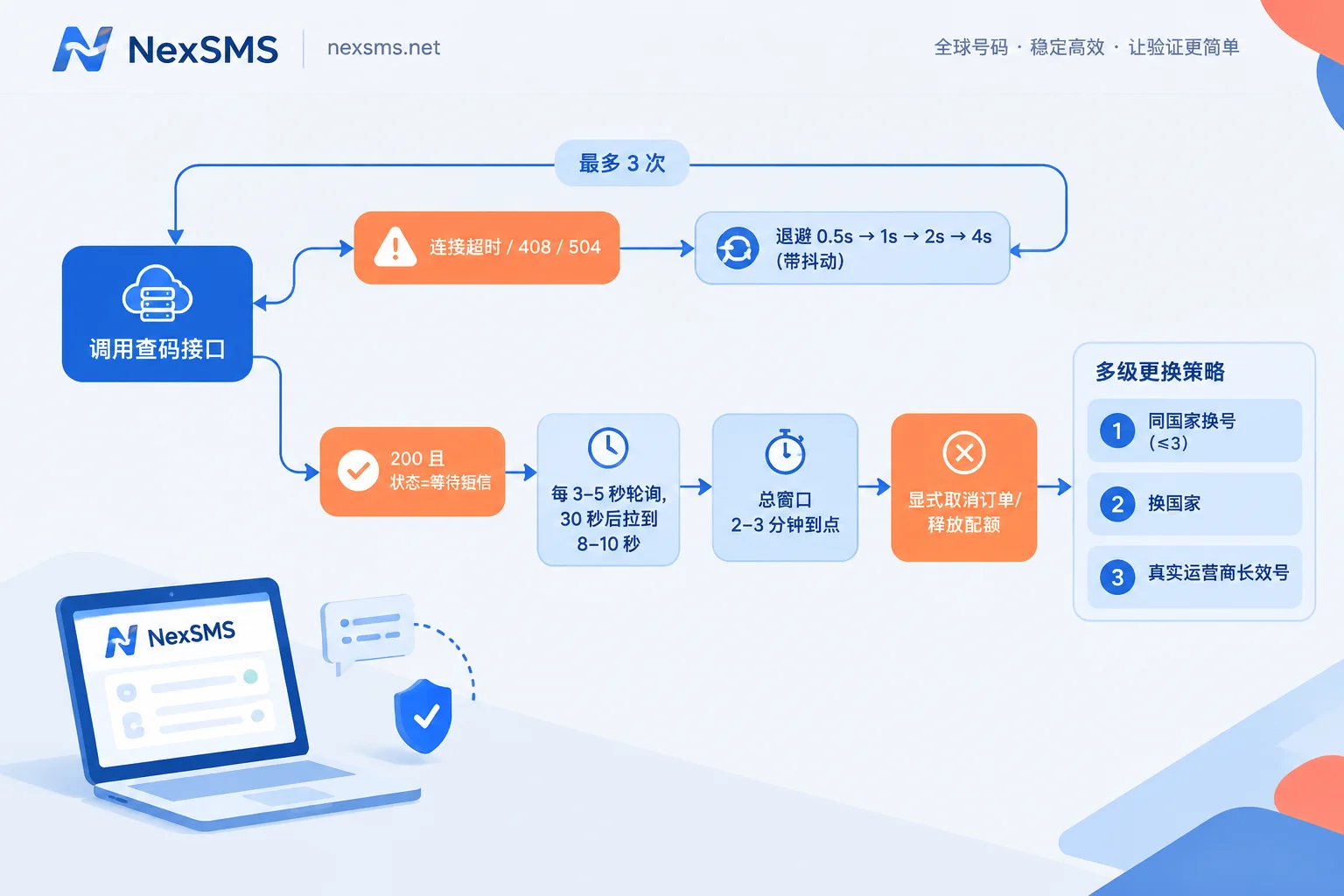
- API communication timeout: connection timeout, read timeout, 408, 502/503/504. The request itself didn't go through or the gateway hiccuped—nothing to do with SMS. What needs retrying is the same request.
- SMS reception timeout: the API returns 200 normally, but the status stays at "waiting for SMS" (called differently across platforms, commonly something like WAIT_CODE). This means communication is fine; the SMS just hasn't arrived. In this case, what needs retrying is not the request, but switching the number, country, or number type.
Mistaking the second for the first leads to the endless loop described above. Let's break them down.
API Communication Timeout: Backoff, Jitter, Idempotency
Only retry errors that are safe to retry. Connection/read timeouts, 408, 429, 502, 503, 504 are retryable; explicit 4xx business errors like insufficient balance, invalid parameters, no available numbers, or authentication failure are not—retrying them only wastes rate limit quota.
Backoff must include jitter. 0.5s → 1s → 2s → 4s, each with a random offset (e.g., ±30%), capped at 3–4 attempts. Without jitter, multiple concurrent tasks will retry at the same millisecond, hammering the just-recovered API.
Retrying write requests requires solving idempotency first. Getting a number (placing an order) actually occupies a number and incurs charges. A request timeout does not mean the operation didn't execute—it's very likely the server succeeded but the response was lost. So before retrying, you need a way to confirm the previous result:
- If the platform supports idempotency keys, include a unique key you generate;
- If not, query the "active orders/in-progress orders" list before retrying to confirm no order was just created, then decide whether to resend.
Skipping this step typically results in: one business operation gets two numbers, charges twice, but the program only recognizes one—the other sits there occupying quota until it expires.
For the complete call sequence of getting a number, checking for SMS, and finalizing the order, see How to Integrate an SMS Verification API: The Complete Call Chain for Getting a Number, Receiving SMS, and Finalizing. This article only covers the exception branches.
SMS Reception: Polling Cadence and Total Wait Window
Don't write a tight loop with no interval. High-frequency empty polling most commonly hits the API gateway's 429, rate-limiting yourself and actually slowing down code retrieval.
A ready-to-use starting point:
- First 30 seconds: poll every 3–5 seconds. Most verification codes arrive in this window.
- After 30 seconds: stretch the interval to 8–10 seconds. If it hasn't arrived after the first 30 seconds, it's probably not "almost there"—increasing frequency yields no benefit.
- Total wait window: 2–3 minutes.
Why 2–3 minutes instead of longer? Because it must align with the verification code's validity period on the target platform. Some platforms' codes expire in 5–10 minutes, others allow you to click resend after 60 seconds and invalidate the old code. A window longer than the code's validity is pointless: even if it arrives, it may already be invalid, and you're still occupying a number and concurrency. Conversely, if the target platform you're integrating is known for slow routing, extending the window to 4 minutes is reasonable—adjust per platform, don't use a global constant.
If your platform offers webhooks or long polling, prefer them over active polling—they eliminate both rate limiting and latency issues. For specific support and configuration, refer to that platform's developer documentation.
First Action After Timeout: Explicit Finalization
When the wait window is reached and no code has arrived, do not just abandon the order and move to the next one. Explicitly call the cancel/release endpoint to move the order to a terminal state.
Three reasons:
- Cost. For orders that produce no verification code, most SMS platforms don't charge or refund the quota—but this usually requires you to actively finalize. Abandoned orders often wait for natural expiration, and funds are locked until then.
- Quota. Unfinalized orders continue to occupy your concurrency/active order limit. After dozens of rounds in a batch task, new number requests will fail with "concurrency limit reached," looking like a platform failure.
- Attribution. With a clear terminal state, logs become analyzable: how long this number waited and in what state it ended is the only basis for deciding whether to switch country or number type later.
The exact endpoint path and field names for cancellation vary by platform (whether the order identifier is called order_id or id, what status is returned after cancellation)—follow the documentation of the platform you actually integrate with; don't copy example code from others.
Not Receiving SMS Usually Isn't the SMS Platform's Fault
This is the premise for tiered retries. When the same number receives nothing within the window, the most common cause is silent rejection by the target platform: it determines the line type before sending, simply doesn't send, and the frontend only shows "sent." The second cause is carrier routing delay or cross-border link drops.
So retries should proceed in tiers, each tier changing a different variable:
Tier 1: Get a new number in the same country, limit 2–3 attempts. Eliminate the possibility that "this particular number just happens to be bad." If two or three numbers in a row are silent, luck is basically ruled out.
Tier 2: Switch to an alternative country. Some target platforms tighten restrictions on specific country number ranges; switching to a node in another country often works immediately.
Tier 3: Change number type, upgrade to a real carrier local number. If the target platform rejects virtual landline ranges, the first two tiers will never work because the variable hasn't changed. This tier changes the number's line attributes, not the number itself. For the difference, see What's the Difference Between a Real Carrier Local Number and a Virtual Landline; if your target site is a platform like ChatGPT that checks line type before sending, the logic in Why Can't VoIP Virtual Numbers Register for ChatGPT is the direct cause of your retry failures.
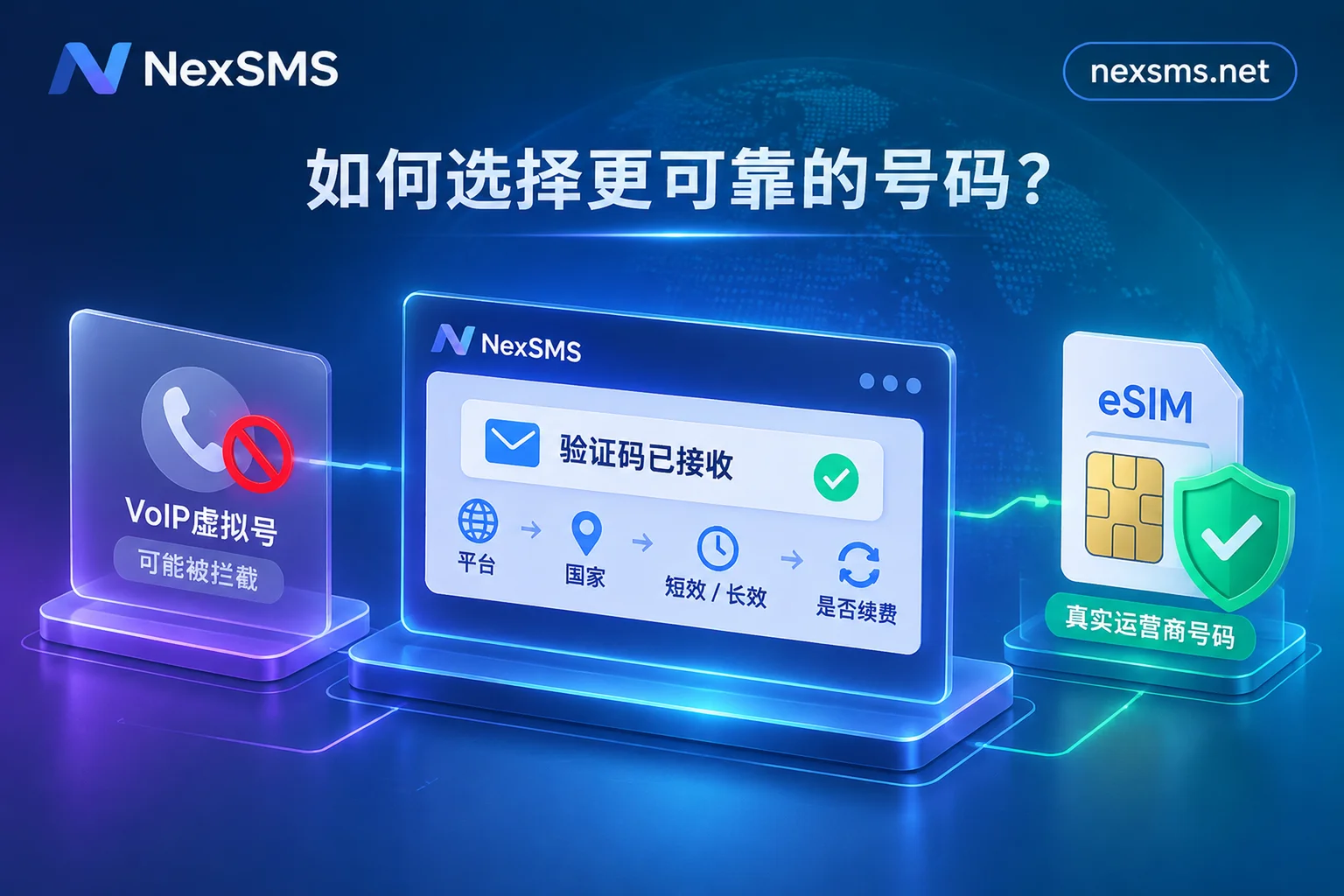
When it comes to selecting numbers: NexSMS short-term regular numbers are pay-per-use, have a very short validity period, and are single-use for one verification—suitable for Tier 1 and Tier 2 low-cost probing; long-term premium numbers are real carrier local numbers (physical SIM and eSIM), renewable, with unlimited SMS reception during the validity period—suitable as the fallback for Tier 3, and also for accounts that need to receive codes again later (rebinding, two-factor authentication, password recovery all require the same number). If your retry logic is forced to repeatedly get numbers because "I'll need to receive another code next time," the problem isn't in the retry code—it's the wrong number type. You can review How to Choose Between Short-Term Numbers and Long-Term Premium Numbers. Note: whether a number can pass a given platform's verification depends on that platform's rules at the time; long-term numbers also require renewal before expiration to keep them.
There's another situation that switching numbers can't solve: repeatedly submitting from the same exit IP and browser environment triggers the target platform's environment risk control, which will silently reject you continuously—switching ten numbers won't help. This falls under exit and environment (NexIP, NexBrowser), not something the SMS reception segment can fix. Simple test: switching numbers is ineffective, but switching environment immediately works.
Circuit Breaker: Put Limits on Retries
Automated tasks must have hard limits; otherwise, on the day the target site tightens risk control overall, the program will quietly burn a full day's balance.
- Max numbers per task: 3. Beyond that, mark as failed and exit, leaving it to manual judgment.
- Spending limits. Set per-task and per-hour caps.
- Failure rate circuit breaker. If N consecutive tasks (e.g., 10) for the same target platform all time out, pause the entire queue instead of continuing to queue. This usually means their rules changed, not that your retries aren't trying hard enough.
- Log attribution fields. At minimum record: target platform, country, number type, actual wait duration, terminal reason. With these four, you can distinguish "this country is bad," "virtual number ranges are bad," or "this platform is bad overall today," giving you a basis to change the right variable next time.
Three Easily Overlooked Details
Backfilling must also be idempotent. Retries solve getting the code, but the same business action can only be submitted once. The step of writing the code back to the business side must also be deduplicated, otherwise the retry chain will produce duplicate submissions.
Validate the code before using it. Check against expected length and character set (mostly 4–8 digits) before backfilling, to avoid submitting digits from marketing or welcome SMS that arrived simultaneously as the verification code, wasting the target platform's attempt count.
Don't frantically click "resend" on the target platform. Platform-side resend endpoints are generally throttled; multiple requests in a short time will be silently dropped, and new codes may invalidate old ones—you'll receive even fewer. For the specific decision sequence when to stop and wait, see No SMS After Submitting Number: Troubleshoot with a Four-Layer Funnel and What to Do About Verification Code Delays. The same applies to automated tasks: leave at least the platform's own cooldown time between two resend requests.
One-Sentence Version
API timeout → jittered backoff retry the same request, ensure idempotency for write requests first; SMS reception timeout → poll starting at 3–5 seconds, cap at 2–3 minutes, finalize explicitly at deadline, then change variables in order "same-country number change → country change → switch to real carrier long-term number," all within circuit breaker limits on number count and spending.
If you're deciding which number type and country to use for retries, first find the corresponding target platform in SMS Verification Instructions by Application, then return to number type and renewal terms to make your choice.