NexSms官方博客
To integrate an SMS verification API, there are really only four actions to write: authenticate and fetch a usable config once → request a number → wait for the verification code → complete or cancel. The rest of the work is almost entirely spent on the exception branches of the last two steps—how fast to poll, how long to wait, how to refund when no code arrives, and how to switch numbers without stalling the entire pipeline.
Let's walk through this chain. Field names vary across platforms (getNumber / getStatus / setStatus are a fairly common set), but the stage division and the states you need to handle are universal. For specific endpoints, authentication header formats, and JSON fields, refer to the documentation in your platform's developer console—don't copy parameter names from another platform.
Step 1: Beyond Authentication, First Confirm That This Country and This Application Currently Have Numbers
Passing an API Key for validation is the bare minimum, but it's not enough. Before launch and before each batch task starts, you should also fetch the available configuration: account balance, supported country list, and supported target service list.
The reason is practical—countries and inventory change. The country code hardcoded in your code might happen to have no numbers available today. Treating this configuration as runtime data cached for a few minutes is more reliable than hardcoding it.
Step 2: What You Really Need to Store When Getting a Number Is the Order ID, Not the Phone Number
The number request endpoint typically takes two key parameters: the country code and the target application identifier (which platform you want to receive codes on). The response gives you a phone number and an order ID (commonly called activation_id).
The most common mistake here is using the phone number as the primary key. Subsequent status checks, completion confirmation, and cancellation refunds all identify the order by the order ID—the phone number is just a display value filled into the target platform's form. The first thing to do after successfully getting a number is persist it: order ID, number, country, target application, request timestamp, and current status.
One more thing: successfully getting a number doesn't mean the number will work. You only find out whether the target platform accepts it after submitting it—some platforms immediately indicate the number is unsupported. That's a failure of your business logic, not the SMS verification platform's, so log them separately.
Step 3: Receiving the Code—Poll Every 3 to 5 Seconds, Set Timeouts Based on the Target Platform's Code Validity
There are two ways to get the code.
Polling: Periodically call getStatus with the order ID, with a recommended interval of 3–5 seconds. Polling too frequently easily hits the platform's rate limit and gets your Key temporarily blocked, especially with dozens of concurrent orders—rate limits are usually calculated per account total, not per order. Polling too sparsely prolongs the time each order occupies, causing congestion as concurrency increases.
Webhook: The platform pushes the SMS text and parsed verification code to you, eliminating polling overhead, but you must handle duplicate pushes and out-of-order messages yourself, using the order ID for idempotency when persisting.
Don't guess at timeout values. Reference the target platform's own verification code validity, commonly 3–5 minutes; a code you wait 10 minutes for is likely expired by the time you fill it in. When the timeout hits, go to the cancellation branch—don't let one order hold up the entire queue.
Also, after receiving the SMS text, parse the verification code yourself again—don't rely entirely on the platform-provided code field. If the target platform changes its SMS template, the parsed result could be empty, but as long as you have the original text, you can still recover.
Step 4: Closing the Order—Confirm When Received, Actively Cancel When Not
If you receive the code and it passes business-side verification, call an endpoint like setStatus to mark it complete and close the order.
If no code arrives, actively call the cancellation endpoint to release the number—most platforms will refund the quota. The cost of not cancelling isn't just losing that refund; the order may stay open indefinitely, and your retry logic will keep thinking it's still waiting.
Some platforms also have states like waiting for resend (STATUS_WAIT_RESEND), meaning you should go to the target platform and click resend once—the order remains valid. Don't immediately cancel and reopen when you encounter this—switching numbers and starting over costs far more than a single resend.
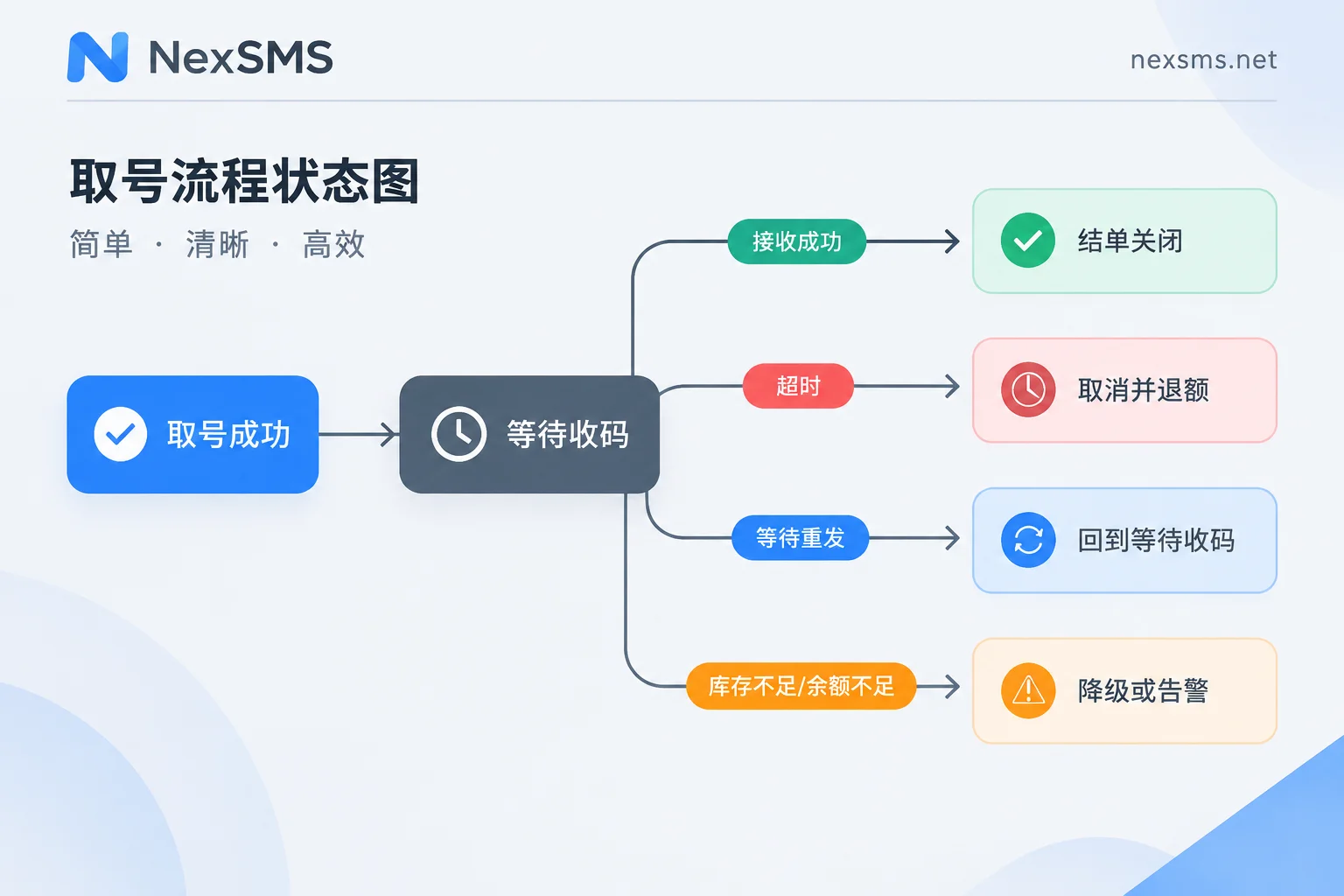
The State Machine Should Cover at Least These Return Types
- Waiting for code (STATUS_WAIT_CODE): Continue polling until timeout.
- Received successfully (STATUS_OK, with code text): Proceed to close the order.
- Cancelled and refunded (STATUS_CANCEL): Order terminated; decide based on business whether to switch numbers and retry.
- Waiting for resend (STATUS_WAIT_RESEND): Prompt or trigger a resend on the target platform—don't abandon the order immediately.
- Out of stock (NO_NUMBERS): Switch country or back off a few seconds and retry—this is the most common silent degradation scenario.
- Insufficient balance (NO_BALANCE): Must alert—don't silently retry; retrying ten thousand times won't produce a number.
The principle is: if the number is unavailable, switch numbers; if the account is unavailable, stop and call for help. Mixing these two into the same retry logic will result in spinning idle for hours in the middle of the night.
Should This Code Be Written for Short-Lived or Long-Lived Numbers? Decide Before You Start
This is the only decision that changes your code structure.
Short-lived pay-per-use numbers: Use and discard, very short validity, order automatically closes after code confirmation. The API side is a standard one-time lifecycle—get number, receive code, close order—the number isn't yours and can't be retrieved afterward. Suitable for one-time registrations and verifications that are unrelated to each other.
Long-lived numbers: If your business later needs number changes, secondary login verification, or multiple code receptions within a few days, a short-lived number that's been released can't be recovered, meaning the account loses its recovery channel. In this case, design for a renewable long-lived number from the start, and maintain holding status and expiration time in your own system—renew before expiration to keep holding it. The corresponding code isn't number-request logic but a number asset table plus an expiration reminder.
NexSMS offers both types: short-lived numbers are pay-per-use and expire after use; long-lived premium numbers are real carrier local numbers (physical SIM and eSIM, not virtual landline numbers), with unlimited code receptions during validity and renewable; the web interface shows codes in real time and also provides a developer API. The billing criteria and renewal conditions for both types are on the features and number types page—check them against whether your business is "one-time" or "needs repeated receptions." If you want to manually run through the process before writing code, the free public number page requires no registration and lets you see what SMS arrival looks like—but public numbers are visible to everyone, so they're only suitable for practice, not for receiving codes for real accounts.
For guidance on choosing a number, refer to how to choose between short-lived numbers and long-lived premium numbers; for the renewal rhythm of long-lived numbers, see how to renew long-lived numbers before expiration without losing the number.
Switching Numbers and Countries: Write Fault Tolerance in the Business Layer, Don't Expect the API to Guarantee It
Whether a number can pass a given platform's verification is determined by that platform's risk control rules at the time—the SMS verification API can't guarantee it. So leave two openings in your automation flow:
Upper limit on number-switching retries. Stop after 2–3 consecutive failures on the same target platform. Continuing to switch numbers often means the same type of number is being blocked by the same rule, purely burning quota.
Degradation path for country switching. Allow configuring a country priority list, degrading in order when inventory is insufficient or consecutive failures occur.
The reasons for failure must be logged separately: the SMS platform didn't provide a number, a number was provided but the target platform didn't accept it, or the number was fine but the code didn't arrive. These three categories require completely different handling—merging them into a single vague failure rate means you can't debug anything. For troubleshooting the third category, refer to no SMS received after submitting the number.
Run Through These Before Launch
- Is the order ID persisted? Can you rebuild the status of all in-flight orders using only it?
- Is the polling interval globally throttled, or does each thread poll on its own?
- Do the timeout values match the target platform's code validity?
- Do timeouts, exceptions, and process restarts all route to the cancellation branch?
- Are balance alerts and inventory degradation two independent pieces of logic?
- Is the original SMS text stored? If you only store the parsed code, you're blind when the template changes.
The most easily overlooked is process restarts. When a batch machine restarts once, those in-flight orders in memory are left unattended—numbers occupied, quota not refunded, status stuck at waiting forever. So order status must be in the database, not just in memory.