 NexSms官方博客
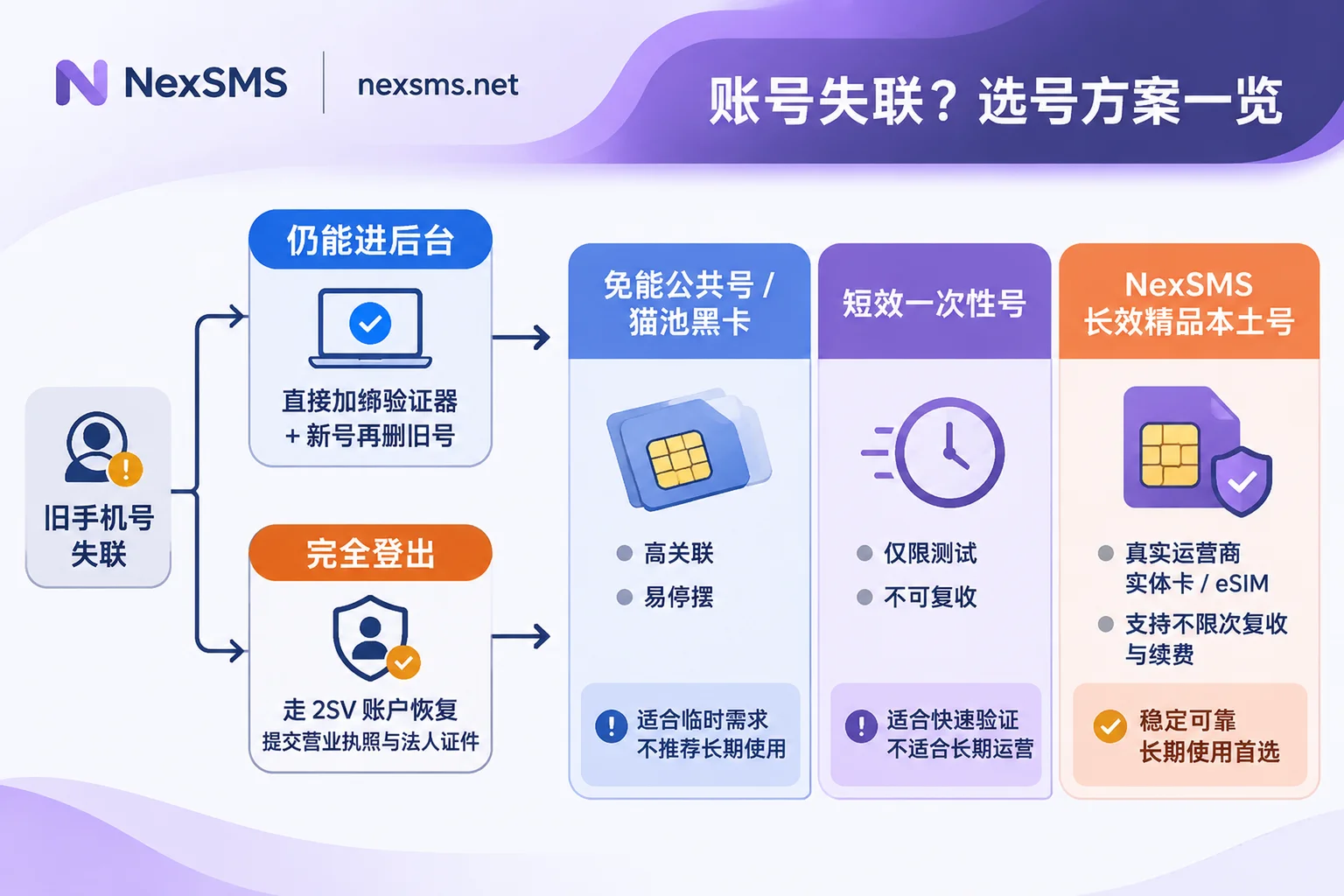
When the old phone number has been deregistered or deactivated and you completely cannot receive verification codes, rebinding has two paths: If you are still logged in on another site (such as switching between the Europe/North America site) or on a trusted device, immediately go to the backend security settings and first bind an authenticator app or a new phone number. After completing verification, delete the old number. If all terminals have been logged out and the page is stuck at the step of "sending an SMS verification code to the old number," do not repeatedly click resend and trigger risk-control account locking. Instead, use the reserved recovery codes (Backup Codes), a backup email, or directly click "Cannot receive verification code / Two-Step Verification Account Recovery" and submit your business license, legal representative ID documents, and store information to go through the official manual unbinding channel.
Rebinding only rescues the account. What really determines whether the store will "lose contact" again later is whether the new number you bind next can withstand platform risk control and long-term re-verification.
I. Why Are So Many Sellers Suddenly Stuck on "Old Number Lost Contact" in 2026?
In the past, many sellers were used to casually using a personal secondary SIM, an agent-issued card, or finding a cheap online SMS-receiving platform to receive a verification code once when setting up a store. But from late 2025 to 2026, the SMS-receiving industry and e-commerce risk control both underwent dramatic shakeouts at the same time, directly exposing a large batch of "hidden-risk numbers":
- Wave of shutdowns among established SMS-receiving platforms, with historical numbers completely lost
On December 29, 2025, the well-known SMS-receiving platform SMS-Activate, which had operated for ten years, suddenly announced it was ceasing operations. Although it guided users to migrate to HeroSMS and set high withdrawal thresholds, it still triggered widespread disputes over user balances and the takeover of historical numbers. Soon after, in the first half of 2026, the industry shakeout continued to accelerate, and many SMS-receiving sites at home and abroad that relied on low-price wholesale (such as DaisySMS and Yezi SMS) successively reported closures or inaccessibility. Sellers who had once used these platforms to temporarily bind stores or payment accounts could not find the original numbers to receive another code once re-verification was triggered. - Multiple regions crack down hard on 'SIM banks' and black-card SMS receiving, causing large-scale failure of low-quality pools
In April 2026, the People's Procuratorate of Pudong New Area, Shanghai, prosecuted a case involving 56 "SIM bank" devices, luring people into opening cards, and connecting tens of thousands of real-name phone cards to overseas SMS-receiving platforms. In September 2026, Shaanxi police also busted an illegal card dealer den involving more than 200,000 phone cards. As gray-market card pools continue to be cleared out, SMS-receiving resources cobbled together from "black cards + SIM banks" have gone offline on a large scale. Not only do verification codes fail to arrive, but entire number ranges have been blacklisted by major overseas platforms' risk control systems. - Annual review and mandatory tightening of 2FA by e-commerce and payment platforms
In 2026, Amazon continued to advance annual certification under the INFORM Consumers Act. Once triggered, sellers effectively have only a 10-calendar-day processing window. TikTok Shop, Temu, and PayPal also further tightened SMS secondary verification requirements for logins from different locations and card binding/withdrawals.
"Old numbers suddenly ceasing service" colliding with "platforms' 10-day verification deadlines" is precisely the core reason cross-border sellers have recently been seeking help with rebinding in concentrated numbers.
II. After the Old Phone Number Is Deregistered, How Do You Unbind and Change It on Major Cross-Border Platforms?
Before filing an appeal or making changes, confirm one thing first: the newly prepared phone number absolutely must not have been used in other stores on the same platform, otherwise it can easily trigger multi-store association the moment you rebind.
1. Amazon Seller Account
- Scenario A: You can still access the backend from a device or another site
Do not directly open a regular Case and ask random questions. Follow this path:设置 → 账户信息 → 账户管理下的登录设置 → 高级安全设置(两步验证)→ 编辑. Amazon allows you to set a "preferred method" and a "backup method." First add an authenticator app or a brand-new independent phone number. After the new number receives the code and is activated, remove the deregistered old number. - Scenario B: Completely logged out and required to enter the old number's verification code
After entering your account password and reaching the SMS verification page, do not repeatedly click resend frantically. Look directly for the "Didn't receive the code?" or "Two-Step Verification Account Recovery (2SV Recovery)" entry at the bottom of the page, and upload your business license, front and back of the legal representative's ID, and other materials as required for identity verification. After approval, Amazon will temporarily disable the old two-step verification so you can log in again and bind a new number.
2. PayPal and Cross-Border Payment Accounts
PayPal has extremely low tolerance for phone number changes. Many sellers of US-region or old accounts find after changing their phone number that customer service often recognizes only one path by phone: "receive an SMS on the archived old number." The recommended handling order is:
- When logging in, first check whether "Try another way" appears, and try logging in with a backup email or a bound authenticator;
- If the only channel is an SMS to the old number, prepare your registration identity documents, the last four digits of the bound bank card/credit card, recent transaction statements, and registered address, then contact PayPal's official manual customer service or official social media support channels (such as the official customer service channels on X/Twitter and Facebook) to apply for manual identity verification and reset the security phone.
3. TikTok Shop, Temu, Lazada, and Other Platforms
- Can log in but the old number is no longer valid: Go to the merchant backend's
账户设置 → 账户安全 → 两步验证, bind an authenticator app (TOTP, such as Google/Microsoft Authenticator) first, and then submit the phone number change. Separating daily login verification from the SMS channel can avoid cross-border SMS delays. - Already logged out of the account: When logging in to Temu merchant, you can click "Cannot receive verification code" to enter the reset process; platforms such as Lazada usually prioritize sending a reset link to the registered email. If both email and phone are blocked, you need to submit enterprise qualifications and go through a manual ticket.
III. How Should You Choose a New Number for Rebinding So the Account Doesn't Turn Into a Brick Again?
Many sellers go through great trouble to unbind the old number, only to casually bind a cheap virtual network number (VoIP) or one-time SMS-receiving number, effectively planting the next landmine.
Based on the detection mechanisms of mainstream risk-control engines today, before sending a verification code, the platform first checks the number's carrier type (Mobile or VoIP), whether the location matches the store site, and the number's historical reuse contamination level. Measured data shows that the pass rate for free shared numbers and ordinary virtual numbers often hovers between 20% and 75%, while real physical SIM card ranges are more likely to establish initial trust. More importantly, what stores and payment accounts care about is not 'whether the first code can be received today,' but 'whether the same number can still be used to receive codes during withdrawal and annual verification six months later.'
When doing cross-border e-commerce account verification, rather than taking the risk of using 'SIM bank numbers' of unknown origin or miscellaneous small sites that may shut down at any time, a more reliable approach is to choose an SMS-receiving platform with clear number sources and a clear distinction between lifecycles. Taking NexSMS (nexsms.net) as an example, a clear 'number tiering' configuration can resolve most sellers' worries after rebinding:
1. Store Core Numbers and Payment Numbers: Use Only 'Long-Term Premium Numbers'
For accounts involving funds and long-term assets, such as the main Amazon store, PayPal, and the TikTok Shop merchant backend, never use short-term one-time numbers. In NexSMS's feature introduction page, long-term premium numbers provide real carrier local numbers (local physical SIM cards and eSIMs, not virtual landing numbers):
- Unlimited code reception within the validity period: After rebinding is complete, subsequent different-location login confirmations, password changes, and annual certification re-verification can all continue to use the same number to receive codes;
- Supports renewal before expiration to keep the number: As long as you renew in time before expiration, you can hold it long term, completely ending the vicious cycle of 'the number being reclaimed and the store being locked.' Operations teams can refer to How to renew long-term numbers before expiration without losing the number: 3–5 days in advance, don't operate right on the expiration date to set up renewal reminders;
- Precise number allocation by site: In NexSMS's country number selection page (for example, for US-site business you can view the US SMS-receiving page), you can directly view area codes, current inventory, and prices by target country and target application, and try to match the site location with the number's area code (for specific strategies, you can further read Which country's number should Amazon sellers use for two-step verification? First see whether it can receive codes again, then look at location).
Compliance note: No legitimate SMS-receiving platform can promise '100% guaranteed verification.' Whether it ultimately passes still depends on the e-commerce or payment platform's risk-control rules, network, and device environment at the time. Before business peaks or large-scale rebinding, it is recommended to first confirm the starting price and number of available numbers for the target application on the pricing page, and place a small test order to measure the pass rate before proceeding.
2. Temporary Testing and High-Risk Isolation: Use 'Short-Term Ordinary Numbers,' Don't Touch Free Public Numbers
If it is for testing a new site's registration process or verifying non-core auxiliary tools, you only need NexSMS's pay-per-use short-term ordinary numbers—use them and they are done, with controllable cost (note: short-term ordinary numbers cannot be renewed, nor can the same number be used to receive a second code).
As for the free public numbers provided on the official website (currently you need to log in to view verification codes), because everyone can see the SMS content received, the official website also explicitly warns not to use them for any important account. Cross-border stores and payment wallets must avoid them.
3. Team Collaboration Without Tying Up Funds: Real-Time Web Code Viewing + On-Demand Top-Up
After rebinding, small and medium sellers often encounter the collaboration problem that 'the boss registers, finance withdraws, and operations logs in, all needing verification codes.' By logging in to the NexSMS console (https://user.nexsms.net), received verification codes are displayed in real time on the web page, with no need to pass cards back and forth in the office like with traditional physical phones. Combined with the ledger rules in How cross-border teams collaboratively manage multiple business phone numbers: number tiering, centralized code viewing, ledger renewal, this can prevent incidents where departing staff take numbers with them.
For technical large sellers with multi-store matrices that need to integrate number acquisition and code reception into internal automation systems, NexSMS also supports a developer API (in parallel with web code reception). For integration, you can directly contact Telegram 7×24 customer service.
In addition, after the shutdown turmoil of established SMS-receiving platforms, sellers should also be more cautious about fund control—do not deposit too much balance at once on any third-party platform. NexSMS supports USDT/BTC cryptocurrency as well as Alipay and WeChat top-ups. Account balances do not expire (non-transferable), so you can top up as much as you use.
IV. Three Anti-Loss-of-Contact Closing Checklist Items After Rebinding Is Complete
- Enable dual fallback with 'Authenticator App + Backup Recovery Codes': As long as the platform backend provides an Authenticator App (TOTP) option, prioritize setting it as the preferred verification method, and print and store the system-generated one-time recovery codes in an offline secure location; use the long-term SMS-receiving number as an SMS backup and account recovery line of defense.
- One card per store; strictly prohibit cross-store mixing: Establish a simple phone number asset ledger, clearly recording the long-term number bound to each store, the platform it belongs to, the purchasing platform, and the expiration time. Absolutely do not use a number already bound to Store A to rescue Store B.
- Regularly review platform availability: For selection logic, you can self-check against How to choose an SMS-receiving platform: a 2026 selection checklist from the shutdown of established platforms and risk-control upgrades. Check the renewal status of long-term numbers 3–5 days in advance, and eliminate the risk of 'cannot receive verification codes' before peak season and verification periods arrive.