 NexSms官方博客
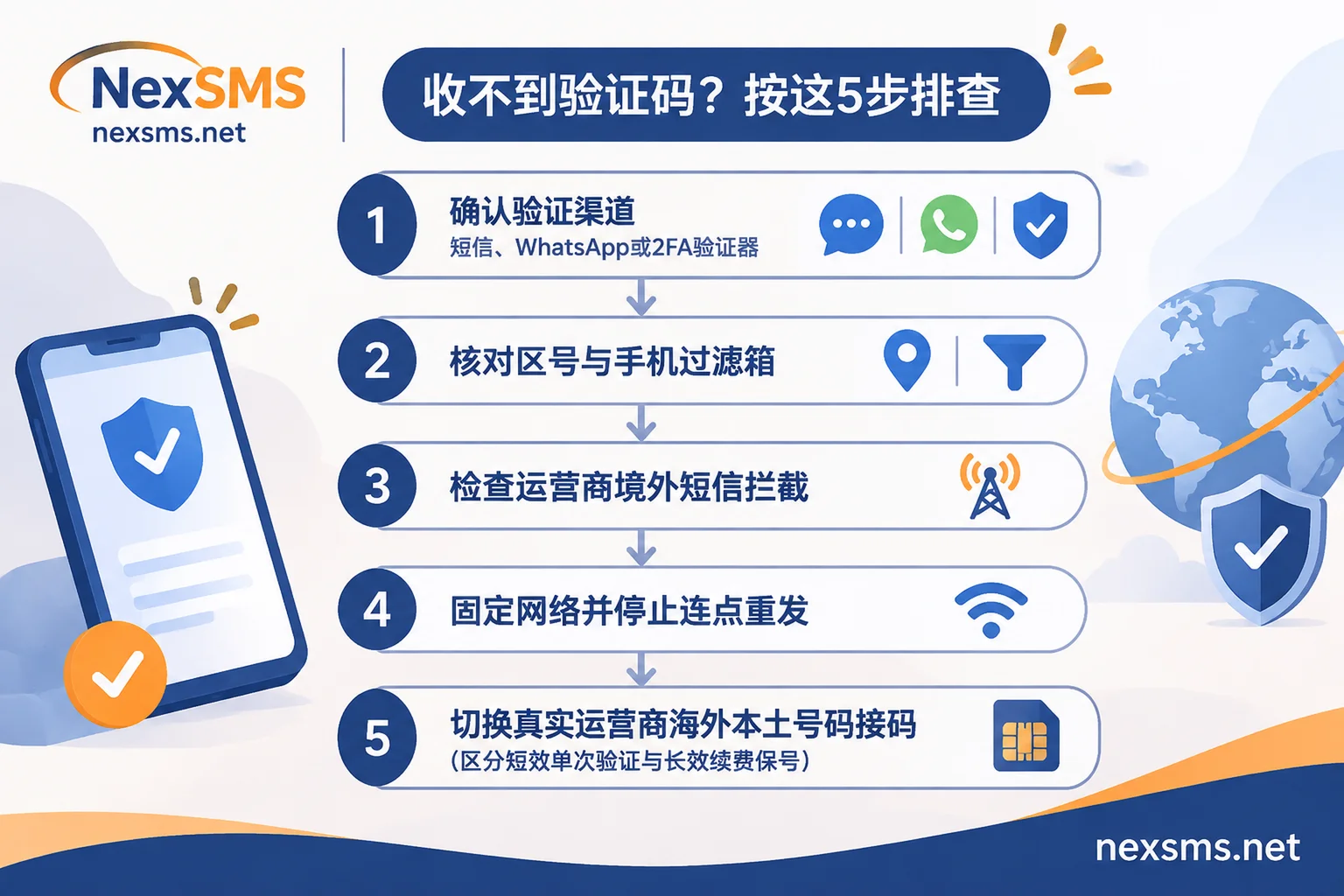
If Instagram doesn't send a verification code, don't keep clicking "Resend" first. First, check whether the page says the code will be sent via SMS, WhatsApp, email, or a 2FA authenticator app; after confirming it's via SMS, troubleshoot in this order: "check international area code → check phone's filtered messages → investigate carrier international SMS blocking → keep device and network stable and wait for cooldown"; if the domestic +86 number channel still can't receive it or triggers risk control, then switch to a real carrier local overseas number to receive the verification code.
Since 2026, the Meta ecosystem has significantly tightened filtering for abnormal logins, cross-region switching, and spam SMS channels. Many users encounter situations where the interface says "verification code sent" but the phone never receives the SMS when registering a new Instagram (IG) account, logging into an old account on a new phone, or triggering account security re-verification. Below, we clarify the most easily overlooked pitfalls and the practical troubleshooting order.
Step 1: First determine whether the page actually requires an "SMS verification code"
Many users get stuck on "not receiving SMS" because Instagram never sent an SMS to the phone in the first place:
- 2FA authenticator code: If the page says "Enter the 6-digit code generated by your authentication app," it means the account previously enabled two-factor authentication. You need to open an authenticator app like Google Authenticator or find previously saved backup codes; waiting for an SMS is useless.
- WhatsApp or email verification: Under the Meta account system, the system sometimes defaults to pushing the verification code to WhatsApp linked to the same number or the bound email first. Check whether there is a "Try another way" option below the login interface and check the email's spam folder.
- The interface didn't send a code at all: If a red error prompt appears immediately after entering the phone number, or the send button is greyed out, it means the request was blocked by number segment risk control before sending the code. In this case, don't wait for the SMS; skip to the number change solution later in this article.
Step 2: Follow these 5 steps to troubleshoot "SMS really not received"
If the page clearly shows that the verification code has been sent via SMS, troubleshoot layer by layer in the following order; usually the first few steps will identify the problem (for a general SMS delivery funnel, you can also refer to Troubleshooting methods when no SMS is received after submitting a number):
- Check the international area code and number format: Instagram is very sensitive to area code format. For mainland China, select
+86; for Hong Kong, select+852; for Taiwan, select+886. Make sure the area code is not entered twice in the number field, there is no extra0at the beginning, and no spaces or hyphens. - Check the phone system's "filtered messages" and blocking apps: On iPhone, after enabling SMS filtering, verification codes from international short codes or unknown numbers are easily categorized as "Unknown Senders" or "Transactions"; on Android, they are often blocked directly into spam by the built-in harassment filter or third-party security manager. It is recommended to temporarily disable "block international/unknown SMS" and try again.
- Check the domestic carrier's "international SMS do-not-disturb" switch: Since 2026, China's four major carriers—China Mobile, China Unicom, China Telecom, and China Broadnet—have provided free nationwide "international calls/SMS do-not-disturb" blocking services. Some provinces or old number segments may also have international SMS reception disabled by default. If you have previously sent a blocking command (e.g., China Mobile
QXGJDX, China UnicomGBGJDX, China TelecomDGDXLJ, China BroadnetKTGDLJ) or have done mobile number portability, contact your carrier's customer service to confirm that "receiving international and Hong Kong/Macau/Taiwan SMS" permission is restored. - Stop repeatedly clicking "Resend"; keep device and network session stable: Clicking "Resend" continuously in a short period will trigger Instagram's rate limit and may even invalidate the previous verification code that was delayed on the way. Also, during verification, don't switch between the mobile app and the computer web page, and don't frequently switch proxy node regions. Keep the same device and a stable network, wait for the cooldown, and try again.
- Compare with other international SMS on the same SIM card: If you can't receive IG verification codes and also can't receive any other international SMS, the problem lies with the current SIM card or carrier channel; if other platforms can receive SMS but only IG cannot, it's likely that the number segment or the current account has triggered the platform's channel rate limiting (similar to sibling platforms; for comparison, see Meta Account Center and re-verification mechanism analysis).
Step 3: When the +86 channel is unstable or triggers risk control, how to correctly verify with an overseas number?
The delivery rate of cross-border A2P SMS channels themselves is not 100% stable, and some users are unwilling to expose their primary personal phone number directly on overseas social platforms, so using an overseas number to complete verification has become a common alternative. However, when choosing a number, be sure to avoid two pitfalls:
- Don't use free public receiving numbers: Free numbers publicly available online are used by thousands of people every day to register IG, and almost all are on Meta's blacklist. Not only is it likely that you won't receive the code, but the verification code is visible to the entire internet, and others can reset or take over your account via that number at any time (see Why free public numbers are insecure for details).
- Avoid ordinary VoIP virtual numbers: VoIP numbers generated based on internet calls are easily identified as high-risk number segments and may be directly rejected during registration or secondary verification, or trigger subsequent blocking.
When you need to stably complete overseas app SMS verification, it is recommended to use NexSMS to choose the corresponding real number source according to your actual usage period. You can view received verification codes in real time on the web page, and it supports USDT/BTC, Alipay, and WeChat recharge (account balance does not expire):
- For single registration or temporary testing only → choose "short-term ordinary number": Billed per use, short validity period, a number receives only one verification code and cannot be renewed. Suitable for temporary verification not involving long-term asset accumulation, but never use it for important accounts that may repeatedly require verification with the original number later.
- For main accounts, brand/cross-border matrix accounts → choose "long-term premium number": Uses real carrier local numbers (local physical SIM cards and eSIM, not virtual landing numbers). Within the validity period, the same number can receive verification codes unlimited times, and renewal is supported before expiration to retain it. When facing Instagram remote login, device change re-verification, or password recovery, you can continuously receive codes with the original number, avoiding "account loss due to number change" (for specific selection differences, refer to How to choose between short-term numbers and long-term premium numbers).
Operation is also straightforward: you can first visit the NexSMS Application Solutions Center to view common verification scenarios and step-by-step instructions for Instagram, then go to the Global Country SMS Receiving Page to filter available number segments by target country, check real-time prices, inventory, and applicable services before placing an order in the user backend; if you also operate a multi-platform social media matrix, you can also refer to Cross-border social media SMS receiving and number keeping guide. If your team needs to integrate number acquisition and code receiving processes into internal systems, NexSMS also supports developer API integration via Telegram customer service.
Objective reminder: Whether the SMS verification code can ultimately be delivered and pass verification depends on Instagram's real-time risk control rules at the time (including login IP purity, device history environment, and operation frequency, etc.). No SMS receiving platform can guarantee 100% verification success; meanwhile, network proxies and independent browser environments need to be configured and maintained by users themselves. Only by combining "stable network environment + real local number" will the pass rate be more reliable.
Summary
When Instagram doesn't send a verification code, don't repeatedly click resend or blindly uninstall and reinstall the app. First confirm whether the verification channel is really SMS, then eliminate area code format, phone filtering, carrier international SMS blocking, and network fluctuations one by one; when the domestic number truly cannot receive or you need to isolate your primary number's privacy, choose a short-term ordinary number or a renewable long-term premium number on NexSMS according to the account's importance, and you can efficiently complete the verification process.