 NexSms官方博客
Direct answer first: SMS verification code receiving is a tool that allocates temporary or long-term phone numbers through an online platform and receives SMS verification codes on a web page. Personal use to protect your primary number's privacy, register overseas tools for your own use, or test software during development is normal tool usage; however, batch registration for others, bypassing real-name requirements, or use for telecom fraud and black-market account farming is clearly illegal. To succeed on the first try without wasting money, the key is to first confirm whether the account will need "secondary verification" in the future, check the country code and real-time inventory before ordering, and distinguish between "number rejected" and "SMS not received" charge logic.
1. Is SMS verification code receiving legal? First draw the line between tool usage and legal red lines
When many people search for "SMS verification codes," their biggest worry is whether they are touching the gray market. Domestic news often reports crackdowns on "card dealers," "SIM banks," and the SMS verification black market, mainly because illegal groups use large numbers of real-name phone cards to supply accounts in bulk for fraud, money laundering, and malicious marketing. Such acts often constitute the crime of assisting information network criminal activities or infringing on citizens' personal information in judicial practice. What is being targeted is the black-market chain and illegal uses, not the technical act of "receiving SMS verification codes" itself.
For ordinary users and development teams, as long as the following boundaries are respected in actual use:
- Normal compliant scenarios: registering overseas AI tools for personal use (such as OpenAI or Claude) or cross-border social media/e-commerce accounts when a local number is missing; testing international SMS registration flows during development; isolating your primary phone number when leaving contact details on non-critical websites to avoid spam SMS floods.
- Absolute red lines: any paid code receiving on behalf of others, black-market batch account farming and promotion-abuse scripts, impersonating others, and strong real-name financial services such as government departments, banks, online lending, and payment clearing—these scenarios carry extremely high legal and compliance risks, and once the number expires and is recycled, funds and accounts may also become uncontrollable.
2. How to use SMS verification code receiving? Standard 5-step workflow for beginners
Once the use is confirmed to be compliant, the actual operation is not complicated, but beginners most easily fail at two steps: "not having decided how long the account will be used" and "entering the wrong country code." It is recommended to strictly follow the 5 steps below:
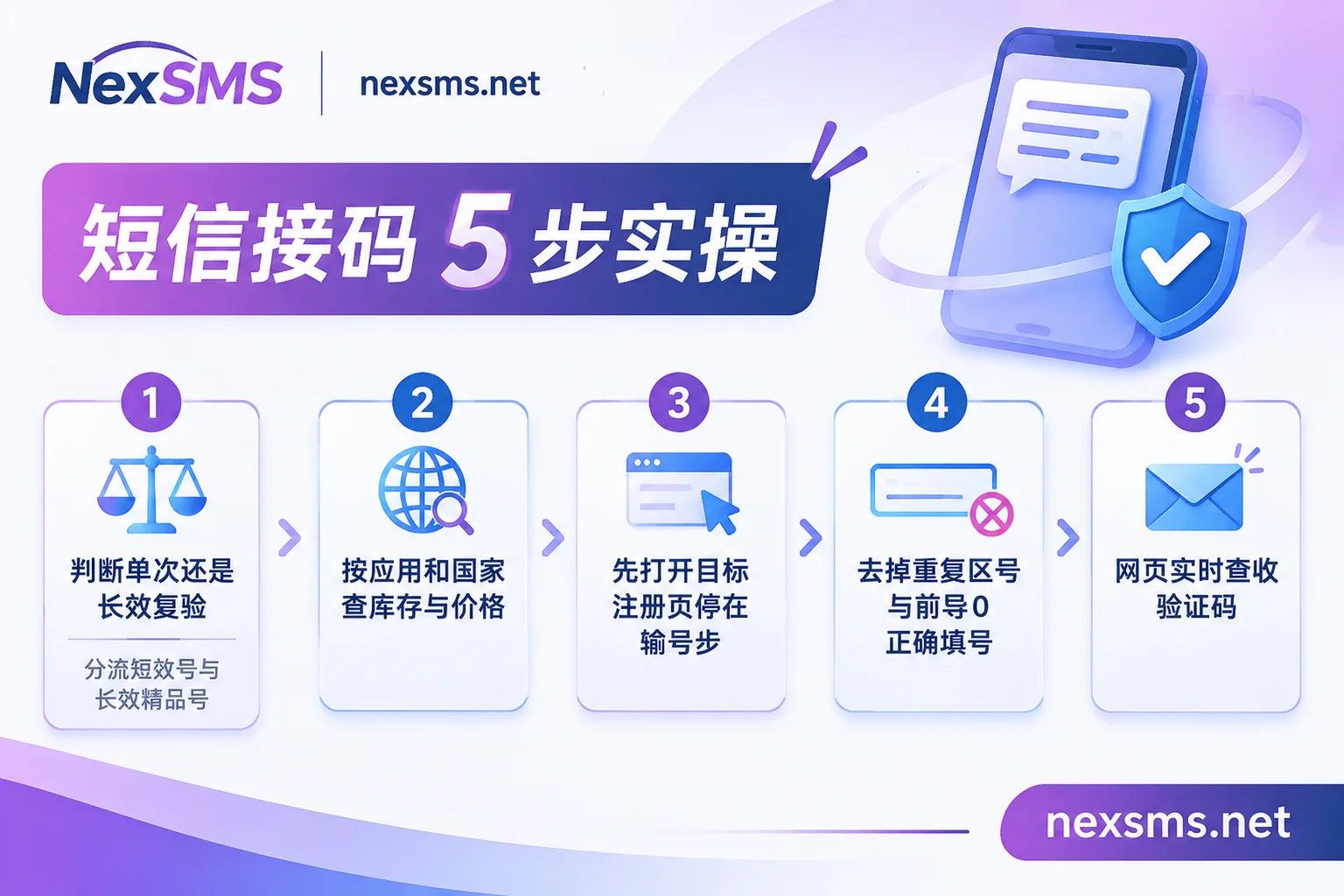
Step 1: First determine whether the account will need to "receive another code" later
This is the most critical decision before ordering and directly determines which type of number you should buy:
- Only used this once (short-term one-time number): if you are only doing API testing, claiming temporary materials, or registering an account you would not mind losing, choose a short-term ordinary number. It is billed per use and low-cost, but one number only receives one code, cannot be renewed, and cannot be used to receive a second verification code later.
- Will need login verification or password recovery later (long-term exclusive number): if you are registering overseas social media, cross-border e-commerce, or primary AI accounts that need long-term maintenance and may trigger two-factor authentication (2FA), be sure to choose a long-term premium number (a real carrier local physical SIM or eSIM, rather than a virtual landing number easily blocked by risk controls). During the validity period, the same number supports unlimited code receiving, and you can continue to hold it by renewing before expiration. For a detailed comparison of the two, see How to choose between short-term numbers and long-term premium numbers.
- Public free numbers are only for temporary testing: some platforms list several free public numbers (for example, the NexSMS official website provides US public numbers, and currently you need to log in to view SMS), but everyone can see the verification codes received. Never use them to bind important accounts. For specific risks, see Why free public numbers are unsafe.
Step 2: Check target app and country inventory first; do not blindly top up a large balance first
Pass rates and real-time prices vary greatly across platforms and country number ranges. Before ordering, first check whether the app and country you want to register currently have numbers available and what the starting price is, then decide how much to top up.
Taking NexSMS, which supports real-time web code receiving, as an example, you can do two checks before ordering:
- On NexSMS's SMS verification code price and inventory page, query the starting price and current available number count by target app, and confirm that the app you need is listed and numbers remain available;
- If you have not yet decided which country's number range to choose, you can go to Choose a number by country to view area codes and common local verification uses, or go to App-specific code receiving instructions (such as dedicated pages for OpenAI, X/Twitter, etc.) to review common verification pitfalls for that platform first.
Step 3: Open the target app's registration page and stop at "enter phone number," then get a number
Many short-term numbers start counting down from the moment you get them. First open the target website or app's registration page and confirm the network environment is stable, then log in to the code receiving platform, top up, and get a number (in the NexSMS console, top-ups support cryptocurrencies such as USDT/BTC, Alipay, and WeChat, and the account balance does not expire and is non-transferable).
Step 4: Enter the correct country code; do not duplicate the country code and leading 0
After getting the number, carefully check the input box design of the target website:
- If the target page has already selected the country via a dropdown menu (for example, showing
+1United States or+44United Kingdom), enter only the local number with the country code removed in the input box; do not paste+1or+44again; - Numbers in some countries such as the UK, Australia, Japan, and Southeast Asia have a leading
0when dialed locally, and when filling in the international format (after+区号), the leading0usually needs to be removed.
Step 5: Receive codes in real time on the web page; developers can use the API for parallel processing
After clicking "Send verification code" on the target page, switch back to the code receiving platform web page and wait. NexSMS will display the received SMS content in real time on the web page. If you are a developer doing automated testing or building R&D tools, NexSMS also supports integrating number acquisition and code receiving into your program via API (in parallel with web code receiving). Since there is no public API documentation page, before integration, directly contact the official website's 24/7 Telegram customer service to obtain the integration method.
3. Will I be charged for nothing if I do not receive the verification code? Understand 3 failure scenarios
The most common dispute for beginners using SMS verification code receiving is "the money was deducted, but the code did not arrive." In fact, although all are "verification failed," the system classifies them into three completely different scenarios:
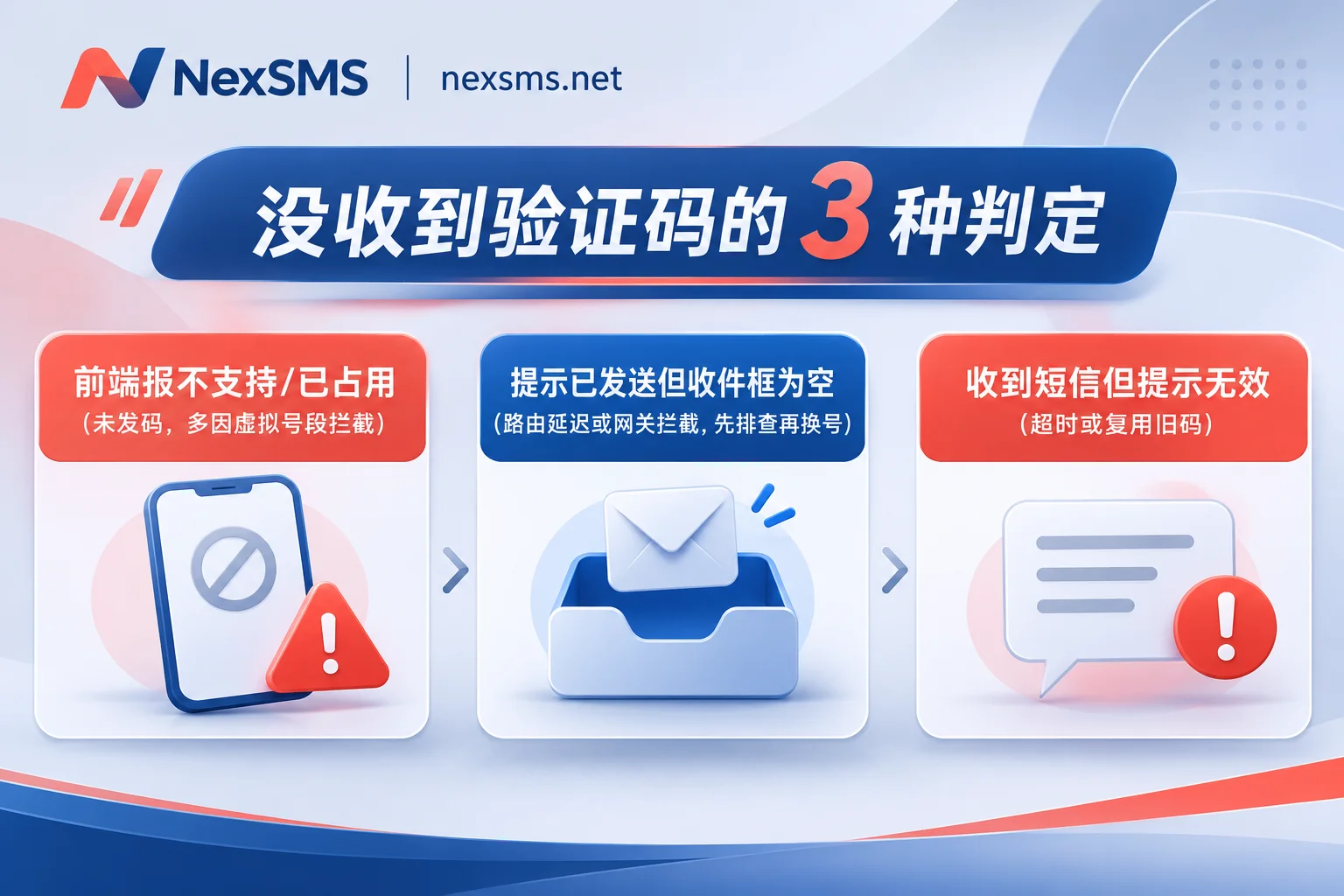
- Scenario A: Right after entering the number, the target platform directly says "number not supported / already in use"
This means the target platform identified the virtual number range or occupancy conflict before sending the code, and the SMS was never sent at all. If you bought an ordinary virtual number, this step is most easily triggered with large companies that have extremely strict risk controls (such as Google, WhatsApp, and OpenAI). At this point, do not retry repeatedly on the same number; switch to a real carrier local number and check whether the current registration environment triggers risk controls. - Scenario B: The target platform says "verification code sent," but the code receiving page remains blank
This means the code sending request has been submitted, but the SMS may be delayed in international routing, blocked by a gateway, or not yet captured. In this case, do not click resend repeatedly first (this easily triggers rate limiting and locks the number). It is recommended to follow the four-layer funnel troubleshooting method to first check the country code, wait a moment, and then decide whether to cancel and change numbers. Most legitimate per-use code receiving platforms have automatic refund or number replacement rules for orders where "no SMS is ever received within the validity period." - Scenario C: The verification code SMS is received, but submitting it shows "invalid or expired"
This is usually because the time from receiving the code to entering it exceeded the target platform's validity window, or because on public/highly reused number ranges you read someone else's earlier old SMS. In this "code received but invalid" situation, most platforms treat the order as completed by default.
Important objective note: no legitimate code receiving platform can promise 100% verification success on any overseas platform—whether a verification code can be sent and whether an account survives ultimately depends on the target platform's risk control rules at that time and whether your device and network environment are clean. Before ordering, always refer to the platform's official real-time instructions for number prices, real-time inventory, validity days, and specific refund rules.
4. Four bottom lines to check before ordering from an SMS verification code platform in 2026
In the past year, the code receiving industry has experienced waves of shutdowns or migrations of many established sites. When choosing a platform as a beginner, do not focus only on "lowest unit price"; check these 4 things before ordering:
- Do not top up too much at once: first top up a small amount based on the budget for the current 1–2 verifications, and add more after it works; at the same time, confirm whether the platform balance will be zeroed out after long-term non-use (for example, NexSMS explicitly states that account balances do not expire, reducing idle losses). For more selection advice to prevent shutdown losses, see the 2026 code receiving platform selection checklist.
- Distinguish between "virtual numbers" and "real carrier local numbers": to pass strict risk controls or keep a number long-term, prioritize checking whether the platform provides clearly labeled real local physical SIM/eSIM number sources. For example, on NexSMS's Features and Number Types page, you can first compare the applicable boundaries of short-term ordinary numbers and long-term premium numbers.
- Check whether there is reachable real-time customer service: when encountering recharge delays, order anomalies, or API integration issues, being able to reach a human directly matters more than anything (NexSMS provides 24/7 Telegram customer service support).
- Stay away from "guaranteed pass" and finished-account black markets: sites claiming "100% pass on any platform" or selling real-name finished accounts on the side are often extremely risky; you may lose both money and numbers and may also bring unnecessary compliance risks.
Summary recommendation: if you are only doing a one-time temporary test, use a short-term number after checking app inventory; if the account will need login re-verification or password recovery later, go directly for a renewable long-term premium number, and test the process with a small budget before ordering—that is the most cost-effective and safest way to use it.