 NexSms官方博客
When Google pops up "This phone number cannot be used for verification" during registration or security verification, many people's first reaction is "try a different number." But for cross-border operators, changing numbers sometimes solves the problem, and sometimes makes it worse. This article does not simply attribute the issue to "virtual numbers being flagged by risk control," but breaks it down into three categories of causes and provides a decision sequence before changing numbers, helping you truly resolve the issue of Google verification codes indicating an invalid number.
It should be noted first: the only part of this article with official basis is that "Google imposes limits on the number of accounts a single number can verify and the frequency, and suggests using another number" (quoted from Google Account Help Center). The rest of the troubleshooting sequence and cause breakdown are compiled from practical experience and do not represent official rules.
Classify the error itself: "This phone number cannot be used for verification" is not a single failure
In Google's official help documentation, this error also appears alongside "This phone number has been used too many times." Either way, the core points to Google's number verification frequency and quantity limits set to prevent spam accounts and system abuse (fact_1).
In other words, this error is not as absolute as "your number is blacklisted," but more like a "traffic control gate." Understanding this, you won't blindly retry or give up, but instead first determine which type of limit you've triggered.
Cause 1: The number has reached the limit of verifiable accounts—why Google sets this gate
In Google's explanation, when a single phone number creates or verifies accounts beyond a certain limit, frequency protection is triggered. Google does not disclose the specific threshold, and the specific numbers circulating online have not been officially confirmed, so it is not recommended to plan based on them (fact_1).
It is particularly important to note: the official documentation does not state whether unbinding or deleting old accounts will reset the number's availability; from actual feedback, it is not uncommon to see the same error after unbinding, so do not treat "unbinding old accounts" as a certain solution.
Causes 2 and 3: Number attribute judged as risky, login environment triggers interception
The following two causes come from general user feedback and common risk control knowledge; Google has not publicly disclosed its determination rules; the conclusions in this section are for reference only and do not represent official statements.
In addition to exceeding the limit, there are two other situations that can cause "failure no matter how many numbers you change":
- Number attribute risk: If the number itself is a virtual number segment, a one-time number, or has been widely used for registration, Google's system may directly determine that the number is "too risky" and refuse verification.
- Abnormal login environment: Even if the number itself is fine, if the current IP address, device, or browser environment is abnormal (e.g., frequently changing nodes, using data center IPs), risk control may be triggered, blocking verification.
These two situations are completely different from "exceeding the limit": the former requires changing numbers, while the latter requires cleaning the environment. If you can't distinguish, it's easy to fall into the loop of "changing numbers and still failing."
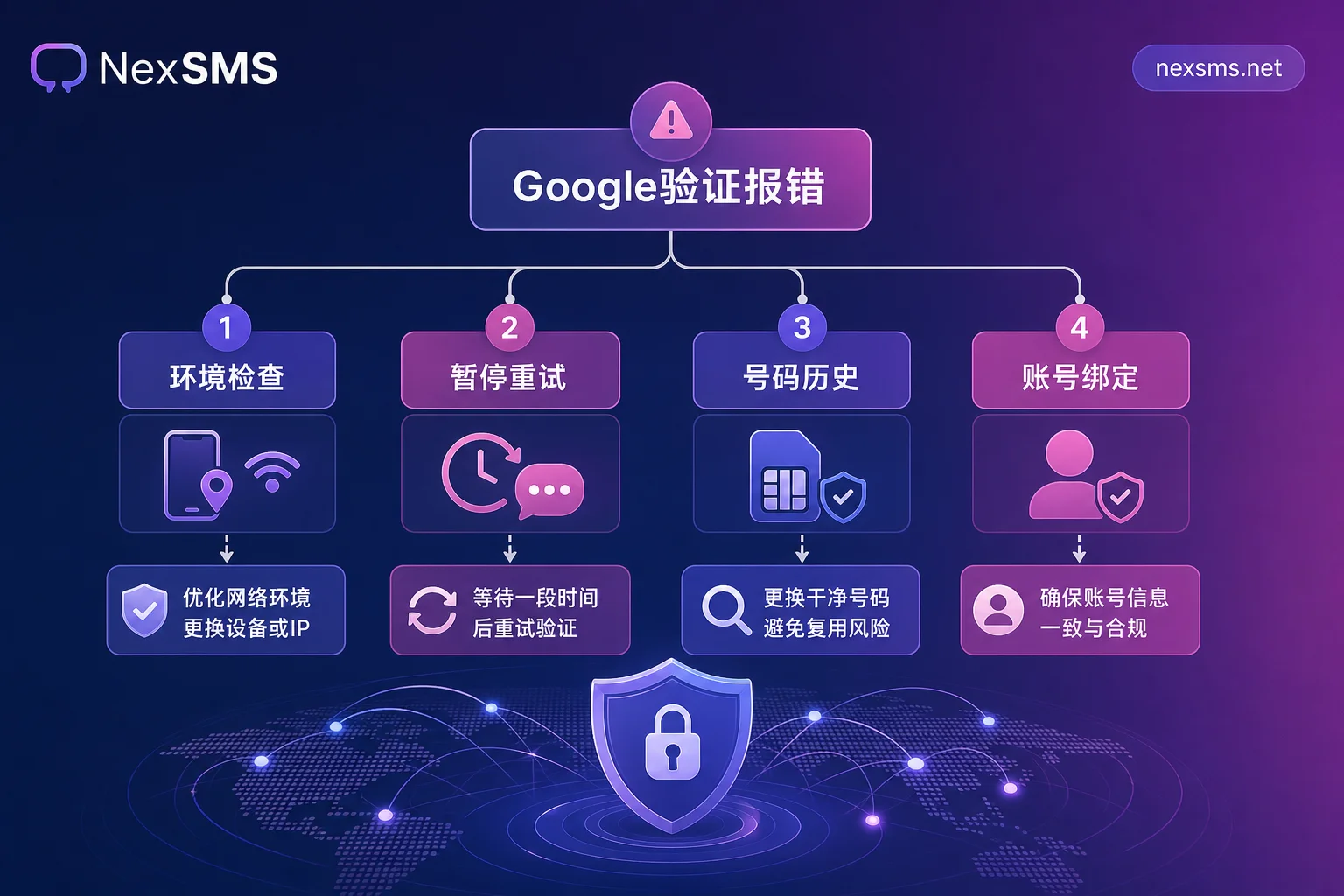
Decision sequence before changing numbers: confirm four things first
When you see "This phone number cannot be used for verification," don't rush to change numbers. Follow this sequence:
- Check the login environment: Are you using a proxy IP or frequently switching networks? Try turning off the proxy, switch to a stable home network, and use a common browser and device.
- Pause continuous retries: Do not retry repeatedly in a short time; wait a while before trying again (the specific cooldown period is not publicly disclosed).
- Verify the number's history: Recall or confirm whether this number has been used to verify other Google accounts; if it's a second-hand/recycled number, its previous usage cannot be queried, which is an unavoidable variable.
- Confirm the target account's binding: If you are trying to recover an existing account, the verification code will be sent to the security number on that account; in that case, changing to a new number may not work.
After completing the above four steps, you can determine whether the problem belongs to the "number limit" category.
Root cause correction: One number carrying multiple accounts will eventually hit this error
Many overseas teams habitually use the same phone number to register multiple Google accounts. In the short term, it's convenient, but in the long run, it almost inevitably triggers the "This phone number has been used too many times" limit.
Instead of waiting until you're blocked and then scrambling for emergency solutions, it's better to plan number differentiation from the start: separate the numbers used for registration verification from those used for long-term login and recovery. For example, use short-lived numbers for one-time registration, and use long-term local numbers as the account's security phone. This is both compliant and avoids the "verification deadlock" caused by a single number exceeding the limit.
Number differentiation and the practical use of NexSMS
In legitimate business verification scenarios, NexSMS offers multi-country number selection, short-lived one-time numbers, and renewable long-term local numbers, supporting web-based SMS reception and developer APIs.
- Short-lived numbers: Suitable for completing one-time registration verification, disposable, without occupying your main number resources.
- Long-term numbers: Suitable for binding as the account's security phone, for long-term login and account recovery.
By separating the purposes of "registration verification" and "long-term protection," you can effectively avoid exceeding verification limits due to one number carrying too many accounts.
It should be clear: changing numbers only works for the "number has reached its limit" cause; no number can bypass Google's verification frequency limits or risk control determinations.
Pre-operation self-check checklist
Finally, here's a checklist you can follow directly:
- If the current environment is abnormal (IP changes, new device), clean the environment first, then try verification.
- If you've failed verification multiple times recently, pause retries and wait a longer period before verifying (the official cooldown length is not disclosed).
- If you confirm the number has been bound to multiple accounts, change to another number that hasn't exceeded the limit.
- If you've changed multiple numbers and still fail, check whether it's device or IP risk control, not the number issue.
- If you plan to use a Google account long-term, separate short-lived verification numbers from long-term security numbers.
Remember: the key to resolving Google verification code indicating an invalid number is not "change more numbers," but to troubleshoot in order and isolate by purpose. Hope this guide helps you avoid detours.




Comments(0)