 NexSms官方博客
While running a Codex task, or using ChatGPT normally, the page suddenly asks for phone verification—at this point you don't need to switch accounts; you need to figure out which layer is blocking you.
Here's the bottom line: Use a real mobile carrier number from a supported country. Don't use VoIP/Google Voice numbers or expect +86 to go through. The remaining question is whether you need the number for one-time use or for receiving future codes.
Why These Two Types of Numbers Don't Work
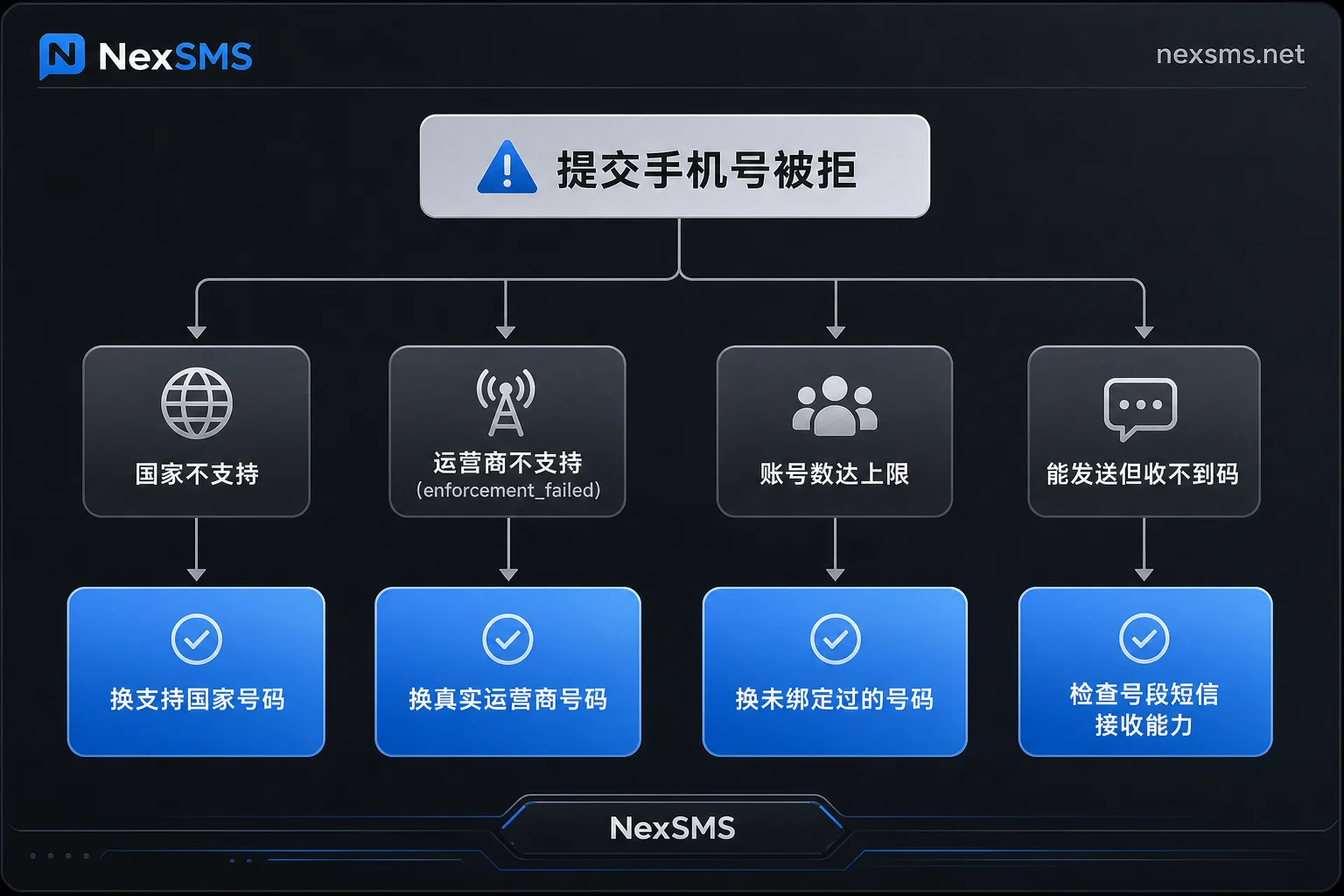
Chinese numbers are a regional issue. OpenAI has a clear list of supported countries and regions, and +86 is not on it. When you select China and enter an 11-digit number, the SMS may not even be sent; you'll likely get a message saying country/region not supported or service unavailable. This layer has nothing to do with number quality—any Chinese SIM will face the same issue.
US virtual numbers are a number-type issue. OpenAI's help center states plainly: VoIP numbers, Google Voice, landlines, and premium-rate numbers are not supported, due to high abuse and fraud risk. Verification only accepts SMS delivered via real mobile carrier networks (with WhatsApp as an alternative in a few countries). So even a +1 number that looks like a US number may fail with The carrier associated with this phone is not supported, or after a spinner, throw error=enforcement_failed—this isn't a network problem; it's that the number's carrier type has been identified.
There's also a subtler case: the SMS isn't blocked, but you simply don't receive it. VoIP providers vary widely in their ability to receive international A2P verification SMS. Some number ranges simply don't accept messages from certain senders; the page may say "Sent," but your inbox is empty. Resending repeatedly won't help.
Diagnose by Error Message—Don't Immediately Switch Numbers
Before switching, take a minute to match the prompt to save repeated costs:
- Country/region not supported → Regional restriction. Switch to a number from a supported country; US is the most common choice.
- Carrier not supported / enforcement_failed → The number type is flagged as VoIP or landline. Switch to a real carrier number.
- Too many signups / maximum accounts → The number has been bound too many times. OpenAI has a cap on accounts per number (commonly reported as up to 3). Shared pool numbers that have been reused heavily often hit this. You'll need a clean number.
- Code sent but not received, no error → First check if it's a timezone delay, then whether the number range supports international A2P SMS. If no code arrives within two minutes, don't spam resend—switch numbers instead.
Short-Term vs. Long-Term Numbers: Consider Whether This Verification Will Recur
This decision determines your cost and whether you'll hit the same wall again in three months.
Choose short-term pay-per-use numbers if: You're creating a throwaway test account, verifying once and never touching it again, and the account has no paid subscription or production use. Short-term numbers are metered and have a very short validity; after receiving the code, its job is done. It's cheap, but you can't rely on it for future verifications.
Choose long-term numbers for scenarios closer to "suddenly asked to verify while in use":
- The account has paid subscriptions like ChatGPT Plus/Pro.
- API keys are in use, or Codex is integrated into real development workflows.
- Your network egress changes (switching proxies, traveling, changing devices), so secondary verification is likely in the future.
- Multiple team members use the account.
In these cases, verification isn't a one-time thing. If risk control triggers again, and the short-term number you originally used is already dead, you'll face being locked out while subscriptions still charge. Long-term numbers solve this: They are renewable, real carrier local numbers that can receive codes unlimited times during validity, effectively anchoring your account's phone slot.
When picking a number, verify two things: (1) The number belongs to a real mobile carrier (physical SIM or eSIM), not a virtual number—this determines whether OpenAI's carrier check will pass; (2) The country is on the supported list. NexSMS numbers can be selected by target platform and country, with the page showing incoming codes in real time. The difference between short-term and long-term, and renewal rules, are clearly explained on the product features page. Decide which type you need before placing an order. Teams needing batch or programmatic access can use the developer API.
A note on boundaries: Whether verification passes depends on OpenAI's risk control rules at that moment. The SMS platform provides the number and real-time SMS reception; it does not guarantee approval.
Correct Sequence After Obtaining the Number
- Prepare your browser and network environment before grabbing the number. The timer starts as soon as you receive the number (especially for short-term ones). If you procrastinate on adjusting proxy or clearing cookies, you may waste a number.
- Ensure the country code matches the page selection. In the phone input, switch to United States first, then enter the number without the +1 prefix. Don't double-enter the country code.
- After submitting, watch the SMS page; don't repeatedly click resend. Too many requests in a short window can be flagged as abnormal. Wait a normal window before retrying.
- Enter the code immediately when received. OTPs usually expire in a few minutes.
- After verification, record the number, validity period, and expiry in your account notes. For long-term numbers, you must renew before expiry to keep holding the number. After expiry, the number may be recycled, and then it's too late to receive codes.
- Also set up a backup verification method. If the account supports TOTP authenticator or backup codes, enable it now. Don't make SMS your only entry.
Still Failing? The Problem Might Not Be the Number
If you've switched to a real carrier number and still get rejected, check these first before deciding whether you need a second number:
- Exit IP. Using a shared datacenter proxy or an IP whose region drastically differs from the number's country increases the chance of additional verification or outright rejection. Even with a clean number, an unclean environment won't pass. For network egress, you can consider NexIP.
- Browser and account history. If you've logged into multiple OpenAI accounts in the same browser or your fingerprint differs significantly from usual, that raises trigger probability. For multi-account isolation, that falls under NexBrowser's scope.
- The number itself has been bound before. Old numbers in shared pools may already exceed the account binding cap. In that case, switching to an unused number works better than repeatedly retrying.
- The account already has a number and you want to change it. OpenAI currently doesn't offer a self-service option to change a bound phone number. In such cases, you must go through support; don't try to overwrite with a new number.
One more thing worth considering in advance: The reason this verification was triggered is likely to recur. OpenAI hasn't disclosed the specific thresholds for forcing secondary verification on old accounts. Based on observed behavior, frequent proxy changes, logins from different locations, and increased concurrent sessions may be correlated, but there's no official single cause. Instead of guessing, replace the phone slot with a number you can hold long-term and see codes for anytime.
Further reading: If you're still comparing number quality across platforms, start with How to Choose an SMS Platform: 6 Number Metrics to Verify Before Ordering; to understand what overseas app verifications actually check, see What Overseas App SMS Verification Is Really Checking; and for how long numbers stay idle before being recycled, check Can Carriers Recycle Virtual Numbers?.
Final reminder: The above paths only apply when you're verifying accounts you legitimately hold. Receiving codes for others or mass-registering accounts is out of scope; such usage also accelerates your number being flagged by platforms.



Comments(0)