 NexSms官方博客
When a social platform repeatedly asks you to re-verify your phone number, most of the time it's not a problem with the number itself—it's that your account has triggered the platform's security checkpoint. The system judges that this login or this sequence of operations doesn't quite look like you, so it sends an SMS verification code to confirm your identity. The help centers of X, Meta (Instagram/Facebook), and Google all classify such situations under protections against "abnormal activity," suspected account theft, or automated behavior.
What's more concerning is something else: every time you re-verify, the code is sent to the number you bound. If that number is no longer in your hands, a routine re-verification could leave you permanently locked out of your account.
Below, we'll first help you identify the trigger, then explain how to reduce re-verification and how to handle it when it pops up, and finally how to choose a number.
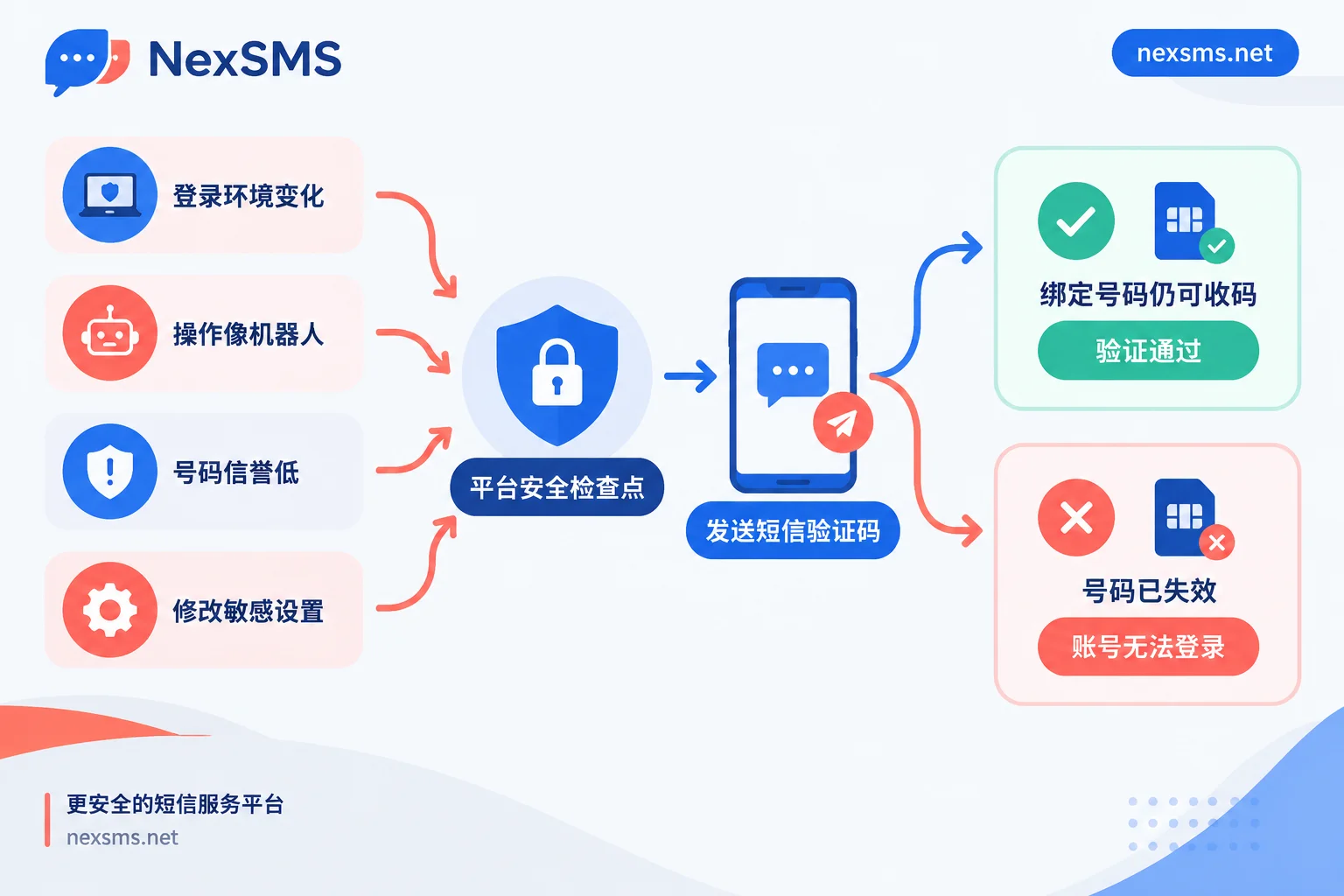
Why Platforms Pop Up Re-Verification: Four Common Triggers
No platform publicly discloses its specific thresholds—for example, how many IP changes count as abnormal, or how many likes per hour count as spam. We can only give direction here, not precise numbers.
1. Too much change in the login environment
Platforms continuously record login IPs, geolocations, and device fingerprints. The following situations make it easy for the platform to judge abnormal activity or suspected account theft:
- Frequently switching proxy nodes;
- Jumping from one country to another in a short time;
- Using data center IPs that are heavily flagged as proxies;
- Logging the same account in turn on multiple unfamiliar devices.
2. Operation rhythm that looks like a bot
Intensive following, liking, mass DMing, or repeatedly posting the same links in a short time can easily be flagged by algorithms as scripting or spam behavior. X's help center states that accounts showing suspected automation or spam behavior may be locked or restricted and need to complete verification to recover. The verification code's role here is to raise the cost of abuse.
3. The bound number itself has low reputation
Platforms can identify number types. Some VoIP virtual numbers and public number ranges have high historical abuse rates, and accounts bound to such numbers are more likely to be spot-checked. When platforms tighten security policies, these accounts are also more likely to be asked to receive verification codes again. To understand why VoIP numbers often cause problems, see What Is a VoIP Phone Number.
4. You just changed a sensitive setting
After changing your password, recovery email, or core personal information, the platform will, out of anti-hijacking considerations, require a code sent to the bound phone number for confirmation. This is a normal protection process and doesn't mean there's a problem with your account.
The self-check method is simple: think back over the few hours before the verification popped up—did you change networks or devices? Did you do a lot of repetitive operations? Did you change settings? In most cases, you'll match one of these categories.
How to Reduce Being Repeatedly Asked to Verify
The practices below can lower the probability of triggering verification, but even if you do them, the platform won't necessarily stop verifying you. Platform rules change, and occasional routine spot checks are normal.
- Stabilize your login environment. Try to log the same account in consistently on your usual device and a fixed network exit. If you need a proxy, choose a stable exit that doesn't rotate frequently, and avoid heavily shared data center IPs. A verification pop-up after a business trip or network change is normal—just verify and continue using it.
- For teams with multiple accounts, keep environments separate and fixed. Each account should correspond to a fixed browser environment and a fixed exit—don't mix or rotate them. Browser environment isolation can be handled by NexBrowser, and network exits can be handled by NexIP.
- Slow down your operation rhythm. New accounts especially should avoid batch-following, mass DMing, or repeatedly posting links right away.
- Do sensitive changes together. Do operations like changing passwords or emails in one go in your usual environment, and don't immediately switch networks or devices afterward.
- Check your bound number. If you've bound a public number, a VoIP number, or an expired number, change it in settings as early as possible while you can still log in normally.
When Verification Pops Up, Handle It in This Order
- First confirm the bound number can still receive SMS. Whose hands is this number in now? Is it still within its validity period? If the answer is uncertain, solve the number problem first, then click "Send verification code."
- Try to operate from your usual device and usual network. Google's account recovery instructions recommend completing verification steps on the device and in the location you normally use, as this increases the success rate.
- Don't click "Resend" repeatedly in a short time. Wait a while between each resend. If requests are too frequent, some platforms will temporarily stop sending codes.
- When the code never arrives, troubleshoot in layers. First determine whether the platform sent it, whether the carrier blocked it, and whether the number itself supports that platform. See What to Do When Cross-Border SMS Verification Codes Don't Arrive.
- If you see signs of account theft, handle security issues first. If the re-verification coincides with unfamiliar logins or content you didn't post, Meta's help center recommends changing your password, checking login activity, and removing unfamiliar devices before doing anything else.
Bind the Wrong Number, and Re-Verification Means Lockout
Re-verification itself isn't scary—what's scary is not being able to receive the code. The type of number determines whether you can still receive codes:
| Number Type | How Many Times It Can Receive | Suitable Scenarios |
|---|---|---|
| Short-term disposable number | One verification and it's done, very short validity period | Only need to verify once, and won't rely on this number for login or account recovery afterward |
| Long-term, renewable real carrier number | Can receive codes repeatedly within the validity period | Accounts that need long-term login and may face re-verification or recovery |
As long as you plan to use a social account long-term, it's hard to avoid re-verification: changing devices, changing settings, and routine platform spot checks will all send another code. If you originally bound a short-term number, you won't be able to receive the code at that point.
If you're selecting numbers on NexSMS, accounts that need long-term maintenance should use long-term premium numbers. These are real carriers' local numbers (physical SIM or eSIM, not virtual landing numbers), and within the validity period you can receive codes unlimited times, with verification codes displayed in real time on the web page. Note two things: first, the number must be renewed before expiration—after expiration it no longer belongs to you, and re-verification also won't receive codes; second, whether it can pass a given platform's verification depends on that platform's rules at the time, and the number itself doesn't guarantee passing. The differences between the two number types and renewal conditions are explained in Short-Term and Long-Term Number Guide; platform-specific code-receiving notes can be found in View Code-Receiving Notes by App.
When a team maintains many accounts at once, you also need to clearly remember which account each number is bound to and when it expires—otherwise, the day the number expires is the day the account goes missing. For specific practices, see How Cross-Border Teams Collaboratively Manage Multiple Business Phone Numbers.
Summary
Frequent re-verification is usually risk control reminding you that at least one of environment, behavior, or number has made the platform suspicious. Fixing your login environment, slowing down your operation rhythm, and handling sensitive changes together can reduce many verification pop-ups. The remaining re-verifications are hard to avoid completely, so the bound number must be able to receive codes whenever needed. If this isn't done well, no matter how good your environment and behavior are, the account may still be lost due to a single re-verification.


Comments(0)