 NexSms官方博客
In daily cross-border communication, community operations, and overseas business expansion, receiving Telegram verification codes is a threshold almost every user and team will encounter. By 2026, the reasons for getting stuck at the login screen are no longer just "SMS delay".
Many users, after entering their phone number, either face an endlessly spinning waiting interface or receive a puzzling prompt: "We've sent the code to the Telegram app on your other device"—even if you don't have any so-called "other device", or even if it's a newly obtained number.
Why is the SMS channel increasingly difficult to get through? What exactly happens when you encounter "sent to another device" during first-time registration? If the old number of an existing account can no longer receive codes, how can you safely rebind and avoid the hidden risk of being "hijacked"? This article starts from Telegram's underlying verification mechanism and provides you with a practical troubleshooting and number selection plan.
I. Why Can't You Always Receive Telegram Verification Codes? Breakdown of Three High-Frequency Sticking Points
Before blindly clicking "Resend", we need to figure out exactly where the verification code is stuck (if you are interested in the underlying transmission link of international SMS, you can first read our 《Frequently Not Receiving Verification Codes: Is It Carrier Blocking? First Identify Which Link Is Stuck》). Regarding Telegram's 2026 risk control and delivery rules, the most common obstacles are mainly the following three types:
1. Delivery Priority Blocking: Prompt "Verification Code Sent to Another Device"
According to Telegram's secure delivery mechanism, when an account (or phone number) initiates a login request, the system's first priority is not to send an SMS, but to go through in-app service notifications (i.e., auth.sentCodeTypeApp).
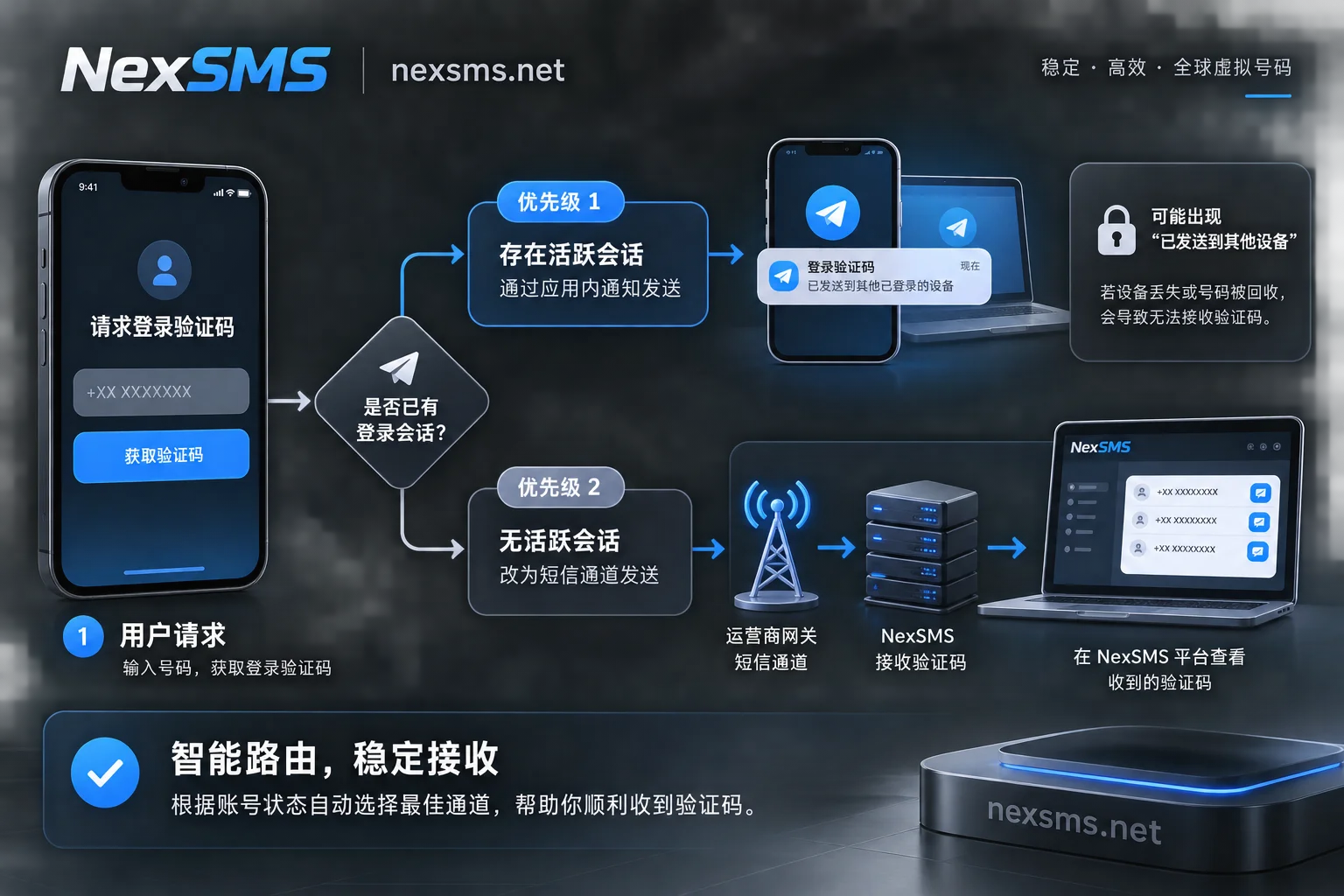
This leads to two common dilemmas:
- Old users losing devices/clearing cache: You have previously logged in on an old phone, tablet, or a desktop computer, but did not click "Log Out" before uninstalling. As long as the cloud still retains an active session, Telegram will persistently send the verification code to that "ghost session" you can no longer access, and may not even provide a "Send via SMS" button on the interface.
- New registration hitting a "second-hand recycled number" or environmental risk control: You are registering for the first time with a number claimed to be "brand new", yet still get "sent to another device". This usually has two reasons: first, the number you obtained is actually a "second-hand number" repeatedly recycled and reissued by the carrier or a low-quality card provider, and the previous owner registered Telegram without logging out the session; second, you are using a non-official third-party client, or your current network and device have triggered anti-abuse risk control, and the system refuses to send international SMS to you, directly blocking you with this default prompt.
2. International SMS Channel Blocking and SMS Fee Threshold
Even if SMS delivery is successfully triggered (the interface indicates SMS sent), domestic +86 number segments and numbers from some high-risk regions still face extremely high interception rates. On the one hand, cross-border carriers strictly silently filter international verification code gateways, and packet loss is especially likely during evening peak hours; on the other hand, Telegram has implemented an SMS Fee mechanism for some regions and stricter filtering of virtual number segments (for a detailed analysis of the SMS fee mechanism, please refer to our previous article 《Telegram Registration Pops Up SMS Fee, Claude Rejects Virtual Numbers: 2026 Overseas Platform SMS Code Pitfall Avoidance Guide》).
3. Hidden Minefields After Receiving the Code: Missing Two-Step Verification and Being "Hijacked"
Many users finally receive the verification code through cheap or public channels, but after using the account for only a few days, they find themselves inexplicably kicked offline with all chat history gone. This is because Telegram uses the phone number as the sole primary identifier. If the number used is resold by the platform to someone else and you have not enabled Two-Step Verification (2FA), the person who later obtains that number only needs to receive one verification code to directly log in or even reset your account.
II. Zero-Cost Self-Rescue: Try These Four Steps First When Reception Fails or "Sent to Another Device"
If your phone number itself is in normal status and is only blocked by client logic or risk control, you can troubleshoot in the following order without rushing to change numbers:
- Must switch back to the official native client (or try Telegram X)
Many third-party clients (such as Nicegram, iMe, etc.) due to interface limitations fundamentally do not support directly requesting SMS verification codes and can only send codes to logged-in devices. Be sure to download the latest version of the Telegram native client from official channels. In addition, Android users can try the official Telegram X client, which has a relatively higher success rate in triggering SMS channels under some network environments. - Use a logged-in device to complete a "smooth rebinding"
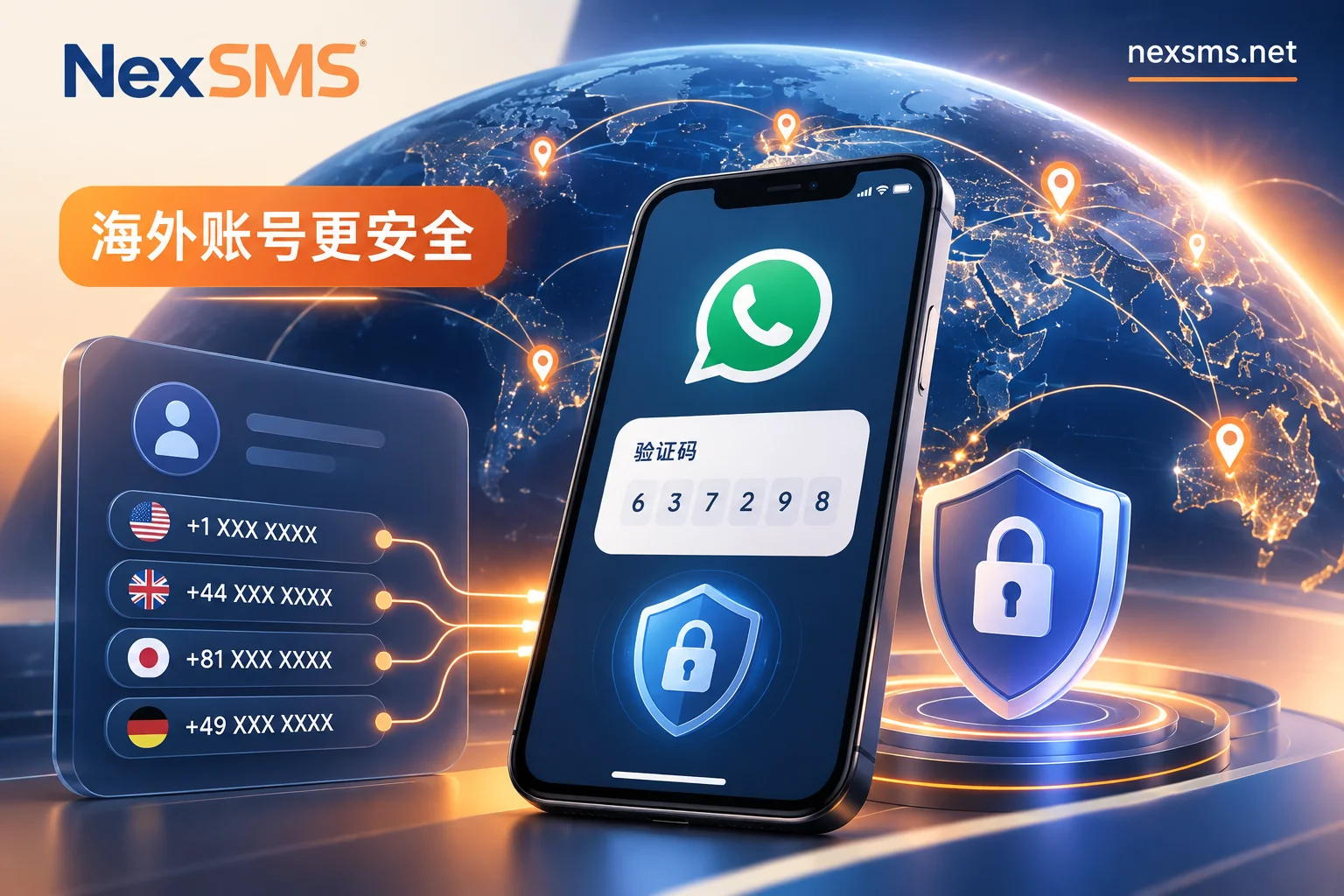
If you are anxious because your old phone number is about to be deactivated or you are afraid you won't receive codes in the future, but the account is still logged in on your computer or old phone, do not log out! Directly go to设置 (Settings)->点击手机号->更改号码 (Change Number)on that device and rebind to an overseas number that can reliably receive codes. During rebinding, the new number only needs to receive one verification code, and the old number requires no verification for a seamless migration. - Bind a secure email as a fallback for daily login
Telegram has opened the "Login Email" binding feature to most accounts. While the account can be accessed normally, go to隐私与安全 (Privacy and Security)to bind a commonly used email and enable Two-Step Verification. After binding, when logging in on a new device in daily use, the verification code will be sent to the email first, greatly reducing dependence on international SMS channels. - Stop immediately to avoid triggering Flood Wait
If you still haven't received the SMS after clicking 2-3 times consecutively, stop immediately. High-frequency requests for verification codes in a short period will directly trigger Telegram's anti-abuse cooling mechanism (usually locking for several hours to 24 hours), during which no SMS can be sent even if you change networks or clients.
III. When the Original Number Is Completely Unusable: How to Choose the Right Overseas Code Solution by Purpose?
If you are a first-time registrant without an overseas card, a domestic number that never receives SMS, or an old account that needs to be rebound to a more hassle-free overseas number, using a professional online code platform is the most efficient way to break through.
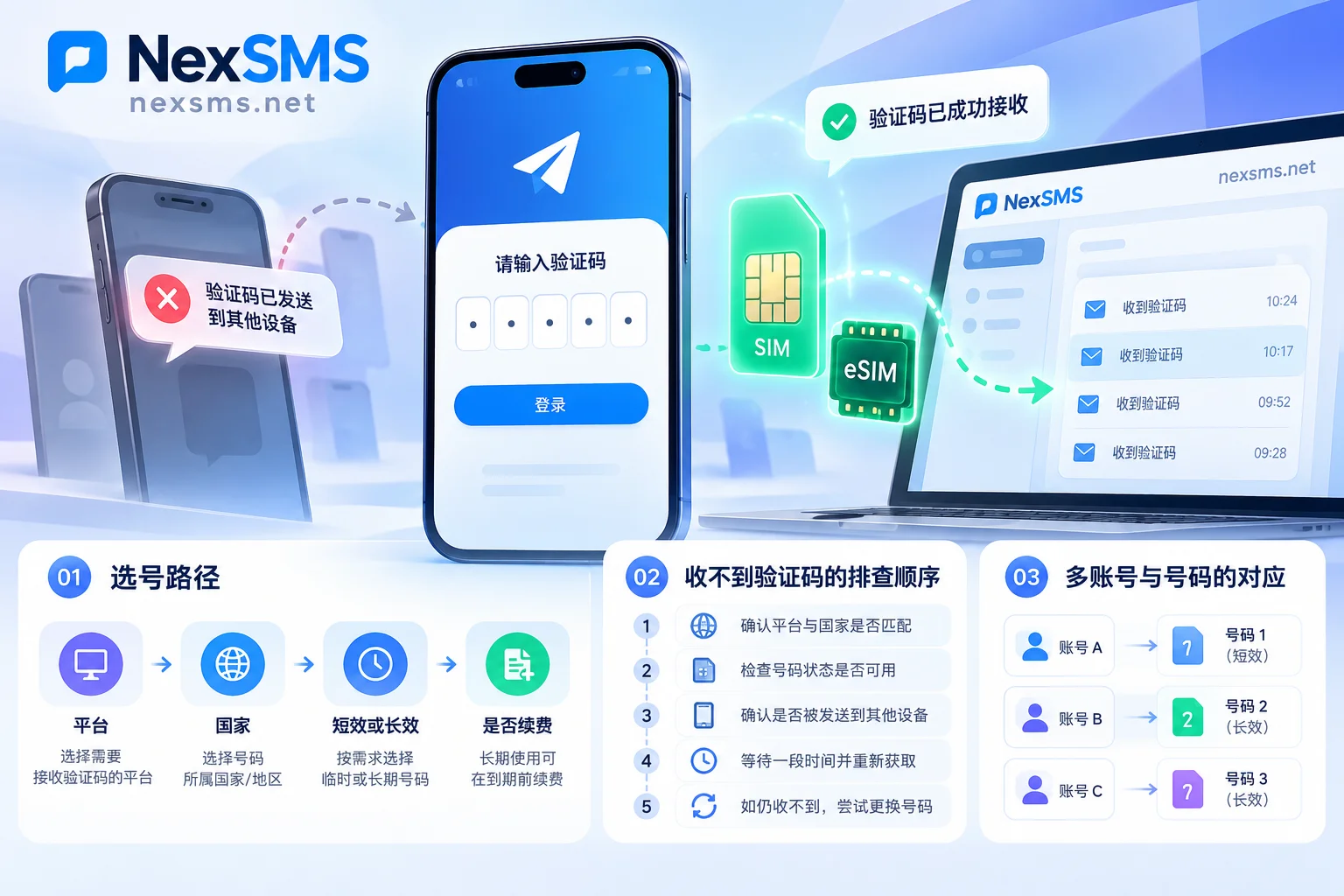
But faced with various number types on the market, "How to choose so as not to buy a registered second-hand number? How to choose so as not to be hijacked?" are the two most core questions. On the NexSMS platform, we recommend users strictly select numbers by the actual lifecycle of the account (for more thoughts on layered management of multiple accounts, please refer to 《Operating Multiple Accounts, How to Allocate Phone Numbers: Layer by Account Value, One Number per Account, and Note Who Renews》):
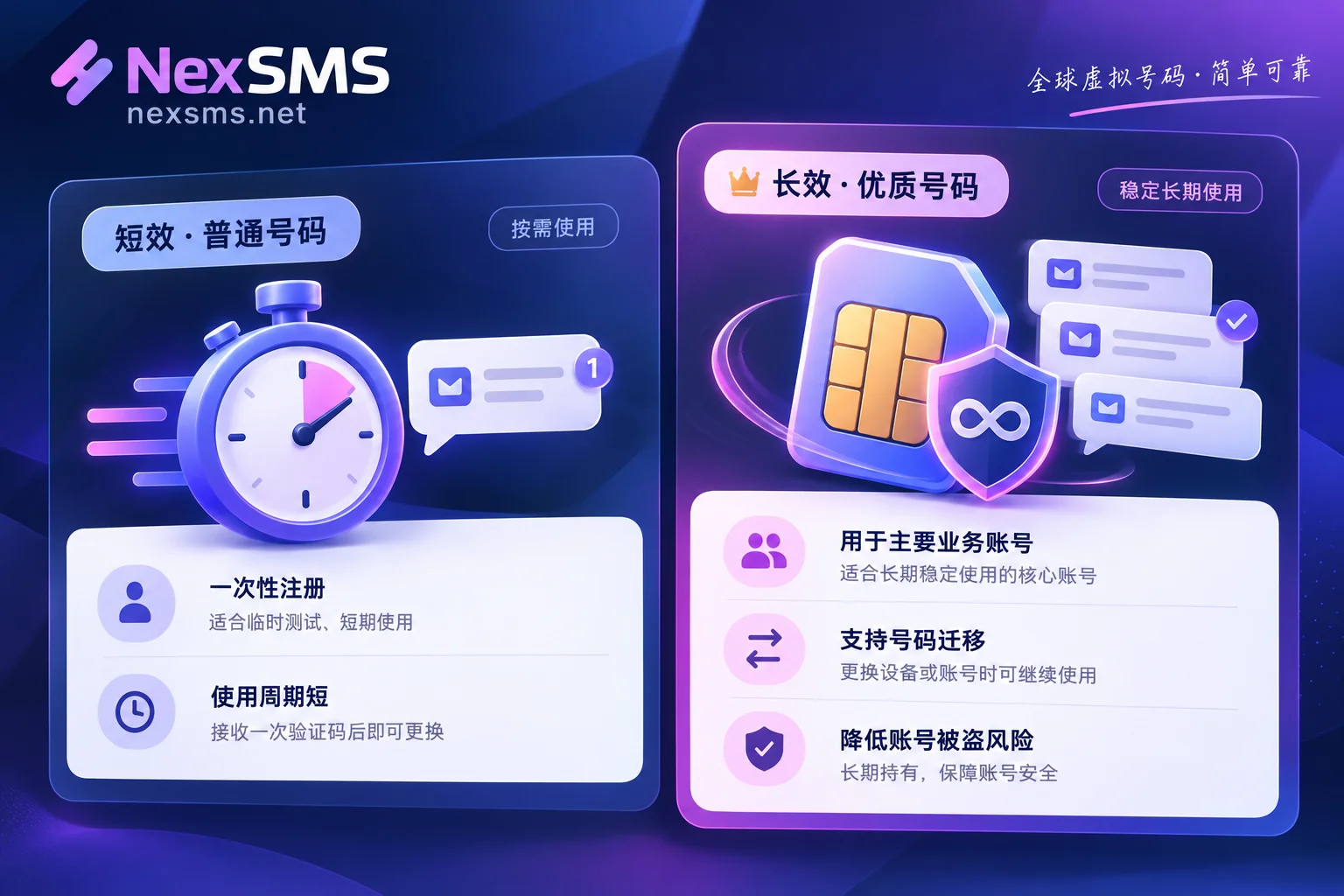
Scenario A: Temporary Testing, Short-Term Community Browsing — Choose "Short-Term Ordinary Number"
If you only need to register a temporary alt account for short-term testing, viewing public channels, or a one-time task, and do not need to maintain the account's asset security long-term, you can choose NexSMS's Short-Term Ordinary Number.
- Billing and Mechanism: Pay-per-use, short validity period, one number is only used to receive one verification code, no renewal supported, and the same number cannot be used to receive codes again.
- Usage Advice: On the order page, first select Telegram by target application, then choose a country or region with sufficient current stock and suitable price from the country code list. The verification code will be displayed in real-time on the web page. After successful registration, please immediately enable Two-Step Verification (set an independent password) and bind a recovery email within Telegram, and keep a constant login on the computer side to prevent loss of access due to inability to receive codes again in the future.
Scenario B: Core Main Account, Business Communication, Old Account Rebinding — Choose "Long-Term Premium Number"
If you are registering a business main account for accumulating customer resources, an important personal social account, or need to rebind an old account to a long-term reliable "security anchor", short-term numbers are absolutely not suitable. Once the phone is lost, all sessions unexpectedly go offline, or platform high-risk control forces phone number secondary verification (re-verification), a one-time number will make you completely lose the account.
For such high-value scenarios, you should directly configure NexSMS's Long-Term Premium Number:
- Real Local Carrier Number Source: Uses local physical SIM cards and eSIM lines (rather than cheap virtual landing numbers that are easily identified and blocked), providing better stability when dealing with number segment screening by overseas platforms like Telegram.
- Unlimited Code Reception and Renewal Retention: Within the validity period, the same number can receive SMS verification codes unlimited times, and supports renewal before expiration to continue long-term retention (this is also why we repeatedly emphasize the irreplaceability of long-term numbers in 《Why Keep a Long-Term Code Number Even with an Authenticator App? The Fallback Role of Real Numbers from the Perspective of Risk Control Re-verification》).
- Once and for All Against "Hijacking": As long as you renew and retain the number on time within the validity period, the right to use the number is firmly in your hands, fundamentally eliminating the risk of the number being recycled and reissued, leading to your Telegram account being reset or replaced by others through appeal.
Scenario C: Bulk Registration and Automated Workflows — Access "Developer API"
For operations teams maintaining multiple overseas accounts, or developers needing to integrate number acquisition and code reception processes into their own programs, manually refreshing and copying on the web is obviously too inefficient. NexSMS supports integrating the Developer API into automated programs, enabling parallel operation with web-based code reception. To obtain API access, you can directly contact 7×24 Telegram Customer Service for integration.
⚠️ Security Pitfall Warning: Never Use Free Public Numbers to Register Telegram!
Many beginners, when searching for code platforms, like to look for free public code pages. Although the NexSMS official website also provides several US free public numbers for user experience (you can view verification codes after login), all verification codes received by public numbers are publicly visible to everyone. If used to register or bind Telegram, anyone can see your login verification code on the web page and instantly take over your account, or even pry into all your privacy. For important accounts, be sure to use private paid numbers.
IV. Practical Process: How to Successfully Receive Telegram Codes on NexSMS?
To maximize the one-time pass rate of receiving Telegram verification codes, it is recommended to follow these standard operating steps before and after placing an order:
- Pre-check: Ensure that the latest official Telegram client is installed on your phone or emulator, and prepare a stable, clean overseas network environment in advance (avoid using free nodes shared by thousands of people).
- Check Price and Select Number: Go to the NexSMS Price and Stock Page or directly enter the Telegram Dedicated Code Solution Page to view currently supported countries, starting prices, and the number of available numbers (for specific prices, available countries, and real-time stock, please refer to the official website).
- Recharge and Get Number: Log in to the NexSMS User Dashboard. The platform supports recharge via Alipay, WeChat, and cryptocurrency (USDT/BTC), and account balance does not expire. Choose "Short-Term Ordinary Number" or "Long-Term Premium Number" based on your purpose and obtain a phone number.
- Enter Correctly: On the Telegram login page, first correctly select the corresponding country calling code (e.g.,
+1for the US,+44for the UK), then enter the phone number without the country code. - Real-Time Code Reception on Web: After submission, no need to refresh the page; wait for the verification code to pop up in real-time on the NexSMS dashboard web page, and enter it in the client to complete registration or rebinding.
- Immediate Hardening: After entering the account, immediately go to the settings page to enable the two-step verification password and bind a secure email to complete the final hardening of the account.
Note: Since risk control rules of overseas platforms are dynamically adjusted over time, no code service can promise 100% verification success. Whether it passes is jointly determined by Telegram's risk control rules at the time and your login environment. If you encounter questions during number selection or code reception, you can always seek assistance from 7×24 online customer service through the official contact page.


Comments(0)