 NexSms官方博客
When you don't receive the 6-digit WhatsApp verification code, the first thing to do is take your hand off the "Resend" button. Most of these issues fall into four areas: incorrect number format, a number type that WhatsApp doesn't accept, temporary restrictions due to frequent resends, or something on your phone blocking the SMS. Follow the order below; most people get the code at steps 2 or 3. If you really must change your number, see the last section on how to choose.
First things first: stop resending and don't guess the code
There is a countdown on the registration screen. If you repeatedly tap resend before the countdown ends, or randomly enter a few digits to try, you'll trigger the system's security protection—resulting in no new verification codes for your number for a period. What was just an SMS delay now becomes a temporary lock.
The only official solution: wait for the timer to finish before acting, sometimes up to 10 minutes. During this time, don't uninstall and reinstall, and don't repeatedly switch airplane mode. Use it to check the format as described below. For "how long is considered a delay, and when should you change your number," I previously wrote about the troubleshooting order for verification code delays; the timing judgment is universal.
Step 1: Re-enter your number in international format
The number must be in full international format: country/region code + local number without extra prefixes. Two most common mistakes:
- Keeping the local leading 0. For example, a UK number written locally as 07911 123456 should be entered into WhatsApp as +44 7911 123456, dropping the 0.
- Including an international dialing prefix like 00, 011, etc. These exit codes cannot appear in the number.
The consequence of entering it wrong isn't an error message—the SMS is sent to a non-existent or wrong target, and you just see "never receiving." So it's worth rechecking during the wait, including whether the country/region is correct.
Step 2: After the countdown, switch to "Call me"
If the countdown ends and the SMS still hasn't arrived, the "Call me" option appears. Selecting it will trigger an automated voice call that reads the 6-digit code to you. This is an official alternative channel, not a workaround.
Two prerequisites:
- The number must be able to receive calls, and international calls at that. A physical SIM in your own phone is usually fine.
- If you're using an online number for verification, whether it can receive voice calls depends on the number itself; not all numbers support it, so check the description before choosing.
Also, personal WhatsApp doesn't support landline registration; only WhatsApp Business allows landlines to verify via voice. If you're trying to register personal WhatsApp with a landline, getting stuck here is normal.
Step 3: Confirm whether WhatsApp accepts this number at all
Officially, several types of numbers are not supported:
- VoIP virtual numbers
- Regular landlines (not supported for personal, as explained)
- Toll-free numbers
- Premium-rate numbers
With these, either the code never comes or the number is rejected immediately. The diagnosis is simple: if the format is confirmed, and both SMS and voice channels have been tried without success, it's almost certainly a number type issue; further retries are pointless.
This isn't unique to WhatsApp; many platforms judge number origin by range. ChatGPT rejecting VoIP numbers is a similar case, and the approach is the same: don't adjust your actions, change the number source.
Step 4: Check your phone and client
If the number is fine, the problem is often on the device:
- Is the client the official version? Third-party mods like GB WhatsApp are blocked by risk control, and the verification request may not even be sent. Install the latest official version from the app store and try again.
- Do you have SMS blocking or spam filter apps? Verification codes often end up in the blocked folder, not the inbox.
- Are Do Not Disturb or silent mode suppressing notifications? The SMS may have arrived, but you didn't see it.
- Using a domestic number abroad: Without international roaming, SMS cannot be received; even with it, delivery in some regions can be delayed.
- The device needs a stable network connection (Wi-Fi or mobile data). The verification request itself uses the internet, not just waiting for SMS.
Some people immediately suspect "is my IP flagged?" WhatsApp doesn't publicly disclose its rules or thresholds, so blaming the network exit can easily skip the real cause. The outbound network environment is a separate matter (if you do need a fixed exit, tools like NexIP handle that), and it's not the same as "can this number receive the code."
Why email verification doesn't help here
People often hear that WhatsApp can send codes via email and go looking for that option. The difference is the use case:
Email verification only works for accounts that have previously linked an email in account settings, used for identity verification when switching phones or re-logging in—i.e., "re-registration." For a new number's first activation, you can only prove ownership via SMS or voice call; there's no email path.
Conversely, this is a reminder: once your account is registered, link an email and enable two-step verification early so you have a backup next time you change phones.
When you must change numbers: WhatsApp number selection differs from other platforms
If troubleshooting reveals an unsupported number type, you'll need a real carrier number. But before choosing, consider one thing:
WhatsApp accounts are permanently tied to a number. In the future, changing phones, reinstalling the app, or being logged out may require receiving another verification code on the same number. This differs from many platforms that verify only once at registration. Short-term numbers that expire after one use might pass verification then, but in those future scenarios you'd have no fallback—without the number, you can't recover the account.
So the selection order is:
- Just trying temporarily, don't care if the account is lost: short-term numbers are pay-per-use with very short validity, one verification and done—lowest cost. For the difference between the two types, see the difference between private temporary numbers and public free numbers.
- Planning to use this WhatsApp long-term: choose a number you can keep, that can receive codes repeatedly during its validity. NexSMS's long-term premium numbers are real carrier local numbers (physical SIM and eSIM, not virtual landlines), with unlimited code reception during the validity period; renew before expiry to keep it. For WhatsApp where re-verification is needed, this matters more than whether a single code can be received.
The specific differences and renewal conditions are on the feature description page; to see how to choose numbers for specific apps, see the app-specific code reception guide. Note that whether verification succeeds ultimately depends on WhatsApp's rules at the time; no number can guarantee it. Use a low-cost method to confirm the path works before committing long-term.
The order to follow
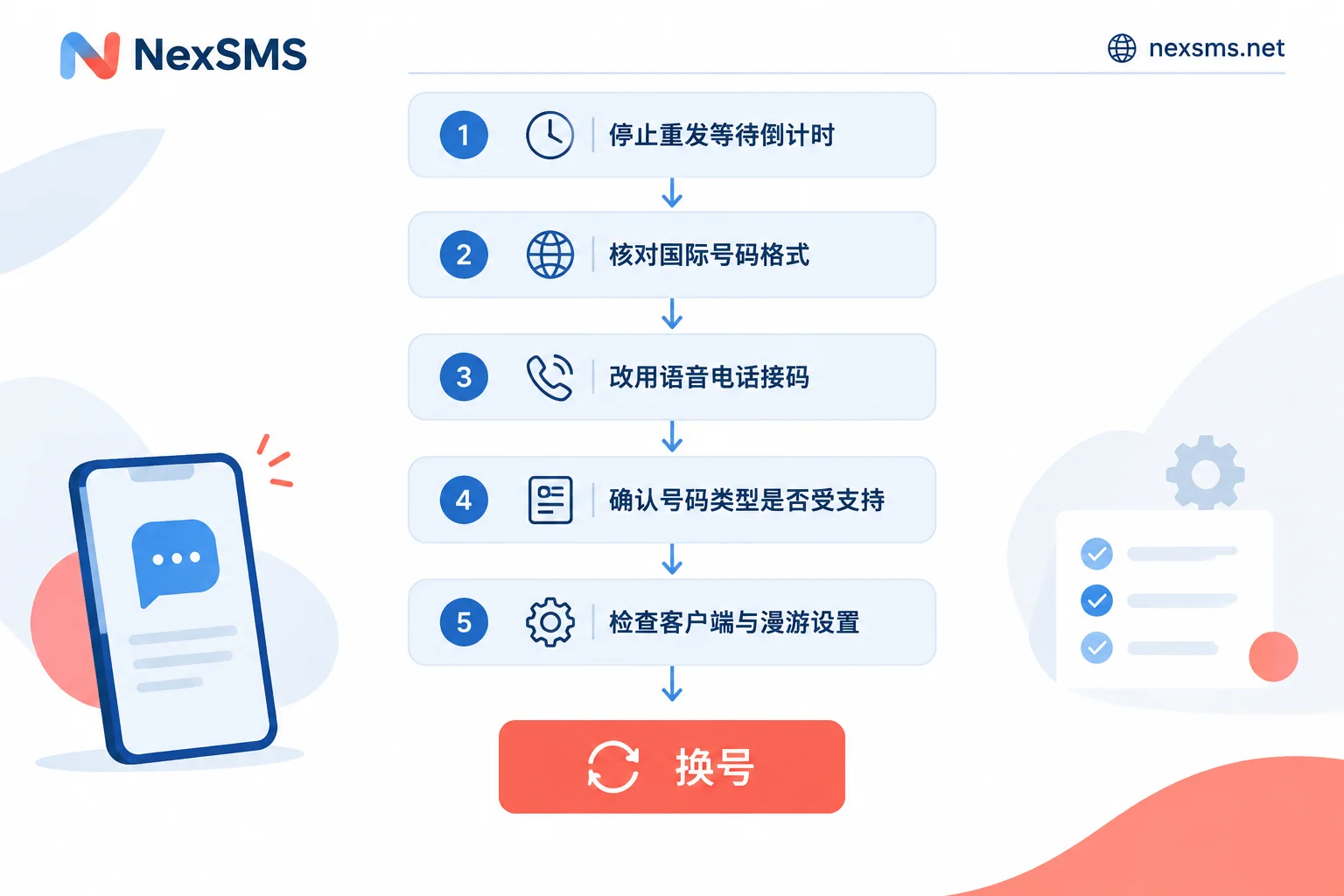
- Stop resending, wait for the countdown (up to about 10 minutes), and don't test codes randomly.
- Re-enter the number in international format: correct country code, remove leading 0 and prefixes like 00/011.
- After the countdown, tap "Call me" to receive the 6-digit code via voice call.
- If both channels fail, check the number type: VoIP, toll-free, premium-rate, and landlines for personal accounts are unsupported.
- Check that the client is the latest official version, disable SMS blocking apps and Do Not Disturb, and confirm roaming and connectivity.
- If all else fails, change the number, and decide between short-term and long-term based on whether you need to keep this WhatsApp long-term.
Most people get stuck at step 1 and step 4: one is rushing to resend and locking themselves out, the other is repeatedly trying a number that will never receive the code. Avoid these two, and the rest are minor issues.


Hi there, ater reading this awesome artile i aam too glad tto sharde my know-how heere wityh mates.
xnxx