 NexSms官方博客
If these accounts are all yours and you plan to use them long term, the safer approach is: bind one number to only one important account, and consider temporary numbers only for one-off or test accounts. Sharing a number does not mean you will definitely get banned. The problem is that on most overseas platforms a phone number simultaneously serves three roles: determining whether accounts belong to the same person, security verification at login, and the recovery entry point when a password is lost. Once several accounts share one number, these three roles become entangled.
Below I first explain the risks by actual consequence, then how to allocate numbers by account purpose, and finally how to split accounts that already share a number.
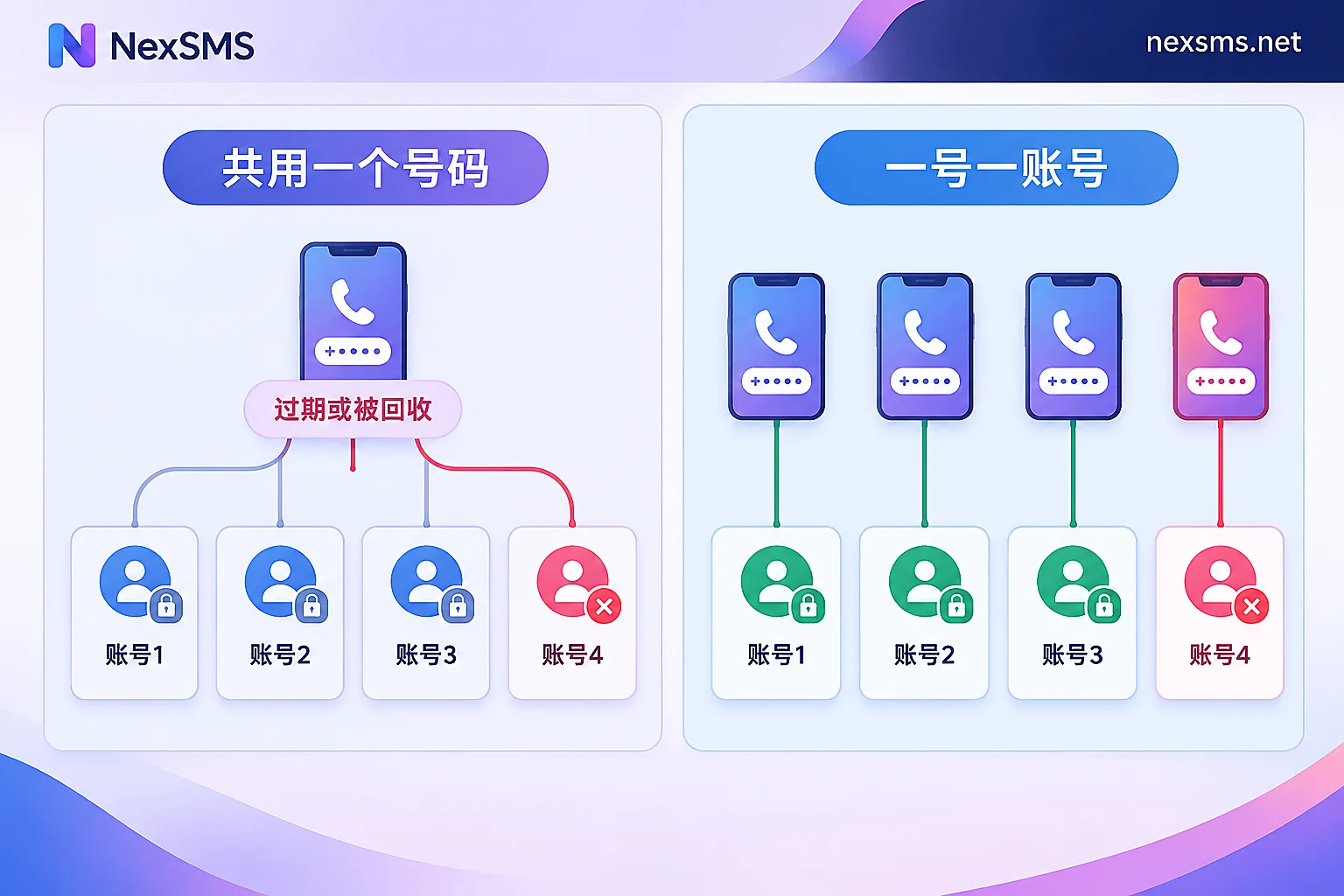
Sharing One Number Mainly Leads to These Five Problems
1. When one account gets in trouble, others may be dealt with together
When platforms judge whether "these accounts are operated by the same person," the phone number is one commonly used signal. Steam's rules are relatively explicit: in its VAC ban support notes, it states that a ban may affect other accounts linked to the same phone number, with the specific scope subject to Steam's current documentation.
Social platforms and ad platforms generally do not disclose their exact criteria, but most have policies against coordinated violations and ban evasion. The same number will be treated as one basis for association, usually considered alongside device, network, and payment information, not as the sole basis.
For you, the practical impact is this: if your accounts carry different levels of risk, for example one used for ad testing and another being a long-term main account, sharing a number means letting the high-risk one drag down the low-risk one.
2. When a number is used too much, future two-factor verification may fail
Services like Google limit how many times the same number can be used for verification. Once the limit is exceeded, you will see messages like "this number has been used too many times" or "this number cannot be used for verification." The exact cap is not public and varies with the registration environment, account activity, and other factors, so there is no number you can safely rely on.
What is worse comes later. If an existing account triggers security verification due to a device change or login from a new location, and the platform no longer accepts that number, the account may get stuck at the verification step. The result is that an otherwise normal account can no longer be logged into. For differences in binding limits across platforms, see how many accounts one phone number can register.
3. Instant messaging apps are inherently one number per account
WhatsApp uses the phone number directly as the account identity. Once the same number completes registration on a new device or new account, the previous one gets kicked offline. Apps like Telegram also use the phone number to identify accounts. So in these apps there is no "sharing" option; to run several independent accounts, you need several numbers.
In addition, some services explicitly do not support using the same number to enable SMS two-factor authentication for multiple accounts separately. Forcing this setup may cause errors in verification or recovery flows.
4. Once a number becomes invalid, all accounts lose their recovery entry point at once
A number can expire, be suspended for non-payment, be recycled and reissued by the carrier, or be targeted by SIM swap attacks. At that point, every account that uses it as a recovery method breaks at the same time: either you cannot receive the code, or someone else receives it. The new owner or attacker can reset passwords via SMS and take over multiple accounts at once.
The more accounts are shared, the greater the loss when something goes wrong. Temporary numbers deserve special caution: a number meant to be discarded after use should never be the recovery method for a long-term account.
5. Contact recommendations may link accounts to your real identity
Platforms such as TikTok, Instagram, and X all have features that recommend contacts based on address book or phone number. If you bind your personal frequently-used number to a work account you want to keep separate from yourself, that account may be recommended to acquaintances in your contacts. You can turn off options like "let others find me by phone number" in privacy settings, but the more fundamental fix is not to bind such accounts to your personal number.
Allocate Numbers by Account Purpose
| Account Type | Recommendation | Requirements for the Number |
|---|---|---|
| Main accounts: long-term operation, with assets or customers, two-factor enabled | Bind one number to only one account | You can hold it long term and repeatedly receive codes later |
| Multiple accounts maintained by a team | Use an independent number for each account, and log the number, account, expiry date, and owner | Same as above, and someone must handle renewal before expiry |
| Instant messaging accounts | Only one number per account | The number must be usable long term, or verification will fail when switching devices |
| One-off registrations and function testing | Temporary numbers are acceptable, discard after use | Do not use it as the only phone number for an account you may need to recover later |
Two points need clarification:
- Cases where sharing is acceptable are relatively few. For example, a small number of accounts belonging to the same person that are already publicly linked and allowed by the platform. Even then, you must accept the linked risks described above.
- A number is only one association signal. If multiple accounts operate on the same device and the same network exit, simply changing numbers will not make them appear unrelated. When a team needs isolated operating environments, you can look at NexBrowser for browser environments and NexIP for network exits.
One more thing to be clear about: if an account has already been banned for violations, reopening an account with a new number is clearly prohibited ban evasion on most platforms, and the advice above does not apply to that situation.
If You Are Already Sharing, How to Split
- Take inventory first. List which accounts this number is bound to, and what it is used for in each account: login verification, two-factor authentication, or password recovery.
- First add a non-SMS verification method to important accounts. If the platform supports it, add an authenticator app, passkey, or backup codes. That way, even if the number has problems, you still have another way into the account.
- Change bindings one by one while the old number can still receive codes. If the platform supports binding multiple numbers, add the new number first, confirm you can receive codes, and then delete the old number. For the specific steps with Apple ID, see two-factor authentication number change steps.
- Test once after changing. Run through the login or recovery flow with the new number to confirm the verification code actually arrives.
- Do not deactivate the old number immediately. Keep it for a while longer to avoid missing any account that was not switched.
What to Look for When Choosing a Number for Main Accounts
The most critical point is: whether you can still receive codes later. Main accounts need this number when changing devices, logging in from new locations, and recovering passwords. If the number has expired or been recycled, the isolation you did earlier becomes meaningless.
NexSMS offers two types of numbers for different scenarios:
- Short-term standard numbers: billed by usage, valid for a very short time, and void after completing one verification. Suitable for one-off registrations and testing.
- Long-term premium numbers: local numbers from real carriers (physical SIM and eSIM), which can receive verification codes unlimited times within the validity period. Suitable for long-term binding and two-factor authentication for main accounts. Note that you must renew before expiry to keep holding it, and for team use it is best to assign a dedicated person to manage renewal.
The difference between the two types and renewal conditions can be found in the NexSMS feature description. Whether a given platform accepts this number is determined by that platform's rules at the time, so after changing the binding it is recommended to actually test once as in step 4 above.


Comments(0)