 NexSms官方博客
Google account SMS verification rejection is not a problem you can solve by simply resending a few times. The sticking points usually fall into three categories: number quota and frequency limits, line attributes deemed unsupported, and historical residue on the number. Below, we'll first help you identify which category you're in, then provide a sequence for replacing your number.
Google's official help center is straightforward about SMS verification for Google accounts: there are hard limits on the number of accounts that can be created and verified per number, and on request frequency within a time window. Exceeding these limits triggers errors. Numbers flagged as suspicious or from unsupported line segments are directly rejected. Knowing exactly where you're blocked determines whether you should retry, change numbers, or take a different path.
Google Registration Shows "This Phone Number Cannot Be Used for Verification": Where Does This Error Block You?
When you see "This phone number cannot be used for verification" during registration or login, it typically happens at the moment you submit the number. This step being stuck indicates the system makes a judgment before sending the code, not that the SMS failed to deliver.
Related common prompts include "This phone number has been used for too many accounts" and pages that show a message sent but you never receive the code. These correspond respectively to: number quota exceeded, number or line flagged by the system, and the SMS sending process being silently blocked. The solutions are completely different, so first match the symptom before taking action.
What Verification Rejection Really Consumes: Number Quota, Account Reputation, and Your Time
A failed verification isn't something you can undo by just clicking resend. Official documentation repeatedly emphasizes that the system cumulatively evaluates the number's usage history and frequency. Every additional attempt on the same number doesn't consume waiting time; it consumes the remaining allowance for that number to pass verification in the future.
More troublesome is that repeated attempts on the same device and network environment can cause the account itself to be temporarily risk-controlled. Many people think "send again" takes them back to square one, but in reality, it's lowering the probability of success for the next attempt. Stop and diagnose the cause first; it's more cost-effective than blind retries.
Number Used Too Many Times: What Can You Do When Quota and Frequency Limits Are Hit?
If you see prompts like "This number has been used for too many accounts" or "used too many times," it means the number has reached the system's upper limit for verifiable accounts or request frequency. The official threshold isn't public, as it's said to be dynamically adjusted based on abuse and risk assessment, meaning there's no public answer to "how many more times can I use this?"
Signals you can check on your own: Has this number been associated with multiple accounts before, even if unbound later? Did you click to resend the code multiple times within minutes? If so, stop retrying immediately. Actions you can take: switch to a fresh, unused independent number, or prioritize non-SMS alternatives like email or backup codes, saving the SMS channel for when it's truly needed.
There's no official method to reset the counter, and claims about "unbinding and rebinding to clear the count" are unfounded—don't waste time on that.
Line Segment Attribute Check: Page Says Sent but You Never Receive the Code
Another typical scenario: the page says the code was sent, but your phone never receives it. Before blaming your network or phone settings, note that in most cases, the number's line segment or line type is deemed unsupported or suspicious, causing the SMS to be filtered or not delivered at all.
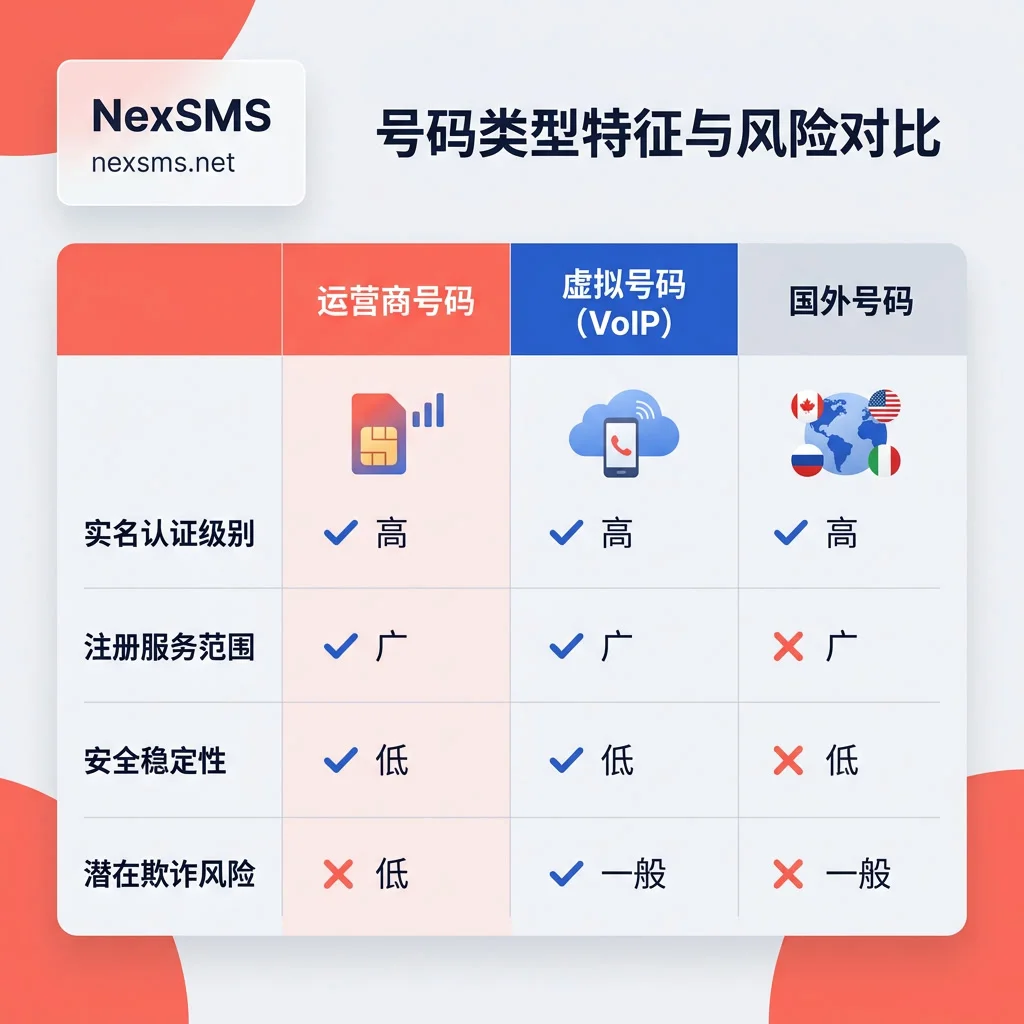
You can run a simple test: on the same device, try a different normal phone number, or use email verification. If you can receive the code that way, the issue lies with the current number's line attributes. Under such conditions, repeatedly resending, toggling Wi-Fi and 4G, or restarting your phone won't change the outcome because the blocking happens on the platform side, not the transmission side. If you're curious about which virtual number segments are more likely to be flagged as VoIP, this article Virtual Numbers vs. Physical SIM Cards: Differences in Number Segments explains the classification and identification logic.
Historical Residue on Recycled or Shared Pool Numbers: The Code Isn't Only Visible to You
The third cause is the most insidious—the number you hold might be a recycled number or from a public shared number pool. A Princeton University study of 259 recycled numbers found that 66% (171) still had active accounts on platforms like Google, Amazon, and PayPal linked to the previous owner. Some newly activated numbers could still receive the previous owner's two-factor authentication and reset SMS within the first week. Google hasn't publicly stated its exact criteria for recycled numbers, but such numbers often cause issues during verification, with one direct reason being: the number's ownership chain isn't clean.
The risk is in the reasoning: numbers from recycled or shared pools might be reassigned to others later, meaning the account recovery entry via SMS isn't necessarily exclusive to you—this is an inference based on number ownership logic, not a research or official conclusion. Even if you manage to pass verification, you might lose exclusive control of the account later if the number gets used by someone else.
Comparison of Three Types of Hosting Numbers: Public Shared Pool, Personal Primary, and Exclusive Long-Term
Viewing number selection from a "role" perspective, temporary code reception and long-term hosting are two completely different tasks. The attribute differences in the table below determine their respective suitable uses:
| Number Type | Exclusivity | Supports Renewal for Extended Holding | Can Receive SMS Again After Registration | Risk of Reassignment to Others | Suitable Role |
|---|---|---|---|---|---|
| Public shared pool | No | No | No | Yes, can be recycled or reassigned at any time | One-time code reception (not recommended for important accounts) |
| Personal primary | Yes | N/A | Yes | No | Long-term two-factor authentication and recovery |
| Exclusive long-term | Yes | Yes | Yes | No (as long as you keep renewing) | Long-term two-factor authentication and recovery |
"Can receive SMS again after registration" refers to the ability to receive SMS again for a period after registration, which is crucial for two-factor authentication and account recovery. Personal primary numbers are the most stable, but if you don't want to expose your personal number to overseas services, an exclusive long-term number is a more reasonable compromise. If you manage multiple Google accounts simultaneously, make sure to allocate distinct numbers to each account to avoid mutual interference.
Complete Migration Path from a Rejected Number to an Independent Number
Once you've decided to change numbers, following these steps in order will help you avoid detours. First, stop resending or retrying on the old number to prevent the account from being flagged with heavier risk controls. Second, log in to your account and review the currently available backup verification methods, such as auxiliary email or backup codes.
Third, determine the country and line attributes of your new number. For this, you can use NexSMS to select a number country based on your target market, using short-term numbers for one-time registration code reception, and renewable long-term local numbers for two-factor authentication and account recovery. Exclusivity and the ability to receive SMS again are prerequisites for a number to support long-term account association. Pay special attention: avoid generic VoIP number segments, since Google checks whether a number is from a supported line before sending codes. Fourth, after completing verification with the new number, immediately migrate both the two-factor authentication and account recovery phone number to the new number.
If your account is already stuck in the recovery process and you're concerned about risks from the old number being recycled, this article Will Virtual Numbers Be Recycled by Operators? explains the recycling and reassignment mechanisms, helping you determine whether the old number might end up in someone else's hands.
For multi-account operations, it's recommended to assign an independent hosting number to each account to avoid frequency limits on one number affecting multiple accounts.
Doing the Math: Cost Difference Between Repeatedly Changing Numbers and Setting Up a Proper Hosting Number Once
Many think configuring a long-term number is an extra expense, but the real cost lies in account lockouts and broken recovery chains. Suppose you repeatedly try normal numbers 5 times. Each attempt—from buying a number, waiting, entering details, to verification failure and buying again—averages 30 minutes, totaling 150 minutes for 5 attempts. At an hourly rate of 100 yuan (assumed value), that's 250 yuan in time costs, not even counting the additional time if your account gets completely locked and requires manual recovery.
In contrast, a one-time setup with a "short-term registration slot + long-term hosting slot" plan, assuming a short-term number costs $0.1 each and a long-term exclusive number costs $2 per month (both assumed values for comparison, not any service pricing), an initial setup cost of about $2.1 (roughly 15 yuan) plus 12 months of renewals totaling about $24 (roughly 170 yuan) gives an annual total cost of approximately $26.1 (about 185 yuan). With the math laid out, it's clear which is more expensive.
FAQ
How to Fix "This Phone Number Cannot Be Used for Verification" on Google Registration
First, two things: immediately stop retrying on that number; check whether the number is a recycled or shared pool number. If you suspect so, switch to a fresh, independent number never used for Google verification. If the error persists after changing numbers, your device or network environment might be flagged; try clearing browser cookies or switching networks.
How Long Do I Have to Wait if Google Account Verification Shows "Number Used Too Many Times"?
Neither the waiting window nor whether it auto-recovers is disclosed officially. It's advised not to wait but to stop requesting codes on that number immediately, use a fresh independent number, or turn to non-SMS backup verification methods like auxiliary email or backup codes.
Is Not Receiving Google SMS Verification Codes a Network Issue?
In most cases, it's not a network issue but rather the number's line segment or type being flagged as unsupported by the system. This judgment is based on official statements about rejecting unsupported line segments, not precise statistics. You can run a comparison test: on the same device, try another normal phone number or opt for email verification. If you can receive codes that way, the problem is with the number itself, not your network or phone settings.
Can Virtual Numbers Verify Google Accounts?
Some can, depending on the number's source and line attributes. Privately owned virtual numbers (like local long-term numbers from legitimate service providers) have a higher chance of passing. Virtual numbers from public free code-receiving platforms are very likely to trigger "cannot be used for verification" due to shared and recycled history, and even if they pass, the account faces a risk of being taken over later.
What If the Phone Number for Google Account Recovery Is No Longer in Use?
If that number can no longer receive SMS, the fastest path is to use the auxiliary email or previously generated backup codes. If no backup methods are available, you'll have to go through the account recovery process. Official handling time and judgment criteria are not public, so you'll need to provide as much registration information and historical activity evidence as possible. There's no shortcut; keeping an email backup is more reliable than post-hoc remedies.
If you plan to keep using your Google account long-term, separate the registration code reception slot from the two-factor authentication/recovery slot, and note the expiration and renewal dates of your long-term number.


Comments(0)