NexSms官方博客
Here’s the short answer: renew a long-term number before its expiration date—don’t wait until the last day, and don’t count on getting the same number back after it expires. There are only two reliable approaches: renew manually 3–5 days early, or enable auto-renewal in the console and make sure your account balance covers the next period. Doing both is the safest.
What Happens If You Don’t Renew
A long-term number is a real carrier resource, exclusively yours during the rental period. Once that period ends, the system releases it according to its process—returning it to the number pool or back to the carrier. In most cases, recovering the same number later is impossible; it may already have been assigned to someone else.
The real loss isn’t the number—it’s the accounts tied to it. If an overseas platform happens to ask for login verification, password change verification, or risk control re-verification during that time, and the code is only sent to a number that no longer belongs to you, your account gets stuck at the verification step. Some platforms have backup email or recovery codes as fallbacks; others don’t. It depends on the platform’s rules.
Four Things to Do Before Expiry
1. First, confirm whether the number is still worth renewing. There’s only one reason to need a long-term number: you’ll need to receive codes again—for two-factor authentication, password recovery, or occasional platform re-verification. If you originally got it just to complete a one-time registration, the platform never sends codes anymore, and you’ve already moved two-factor authentication to an authenticator app or passkey, then letting it expire is reasonable. Conversely, if even one important account’s 2FA still relies on this number, renew on time. For which accounts are suitable for continuing to rely on SMS verification, see Is SMS OTP Secure or Are Passkeys More Reliable; if you’re still wondering whether this number should have been long-term in the first place, see How to Choose Between Short-Term Numbers and Premium Long-Term Numbers.
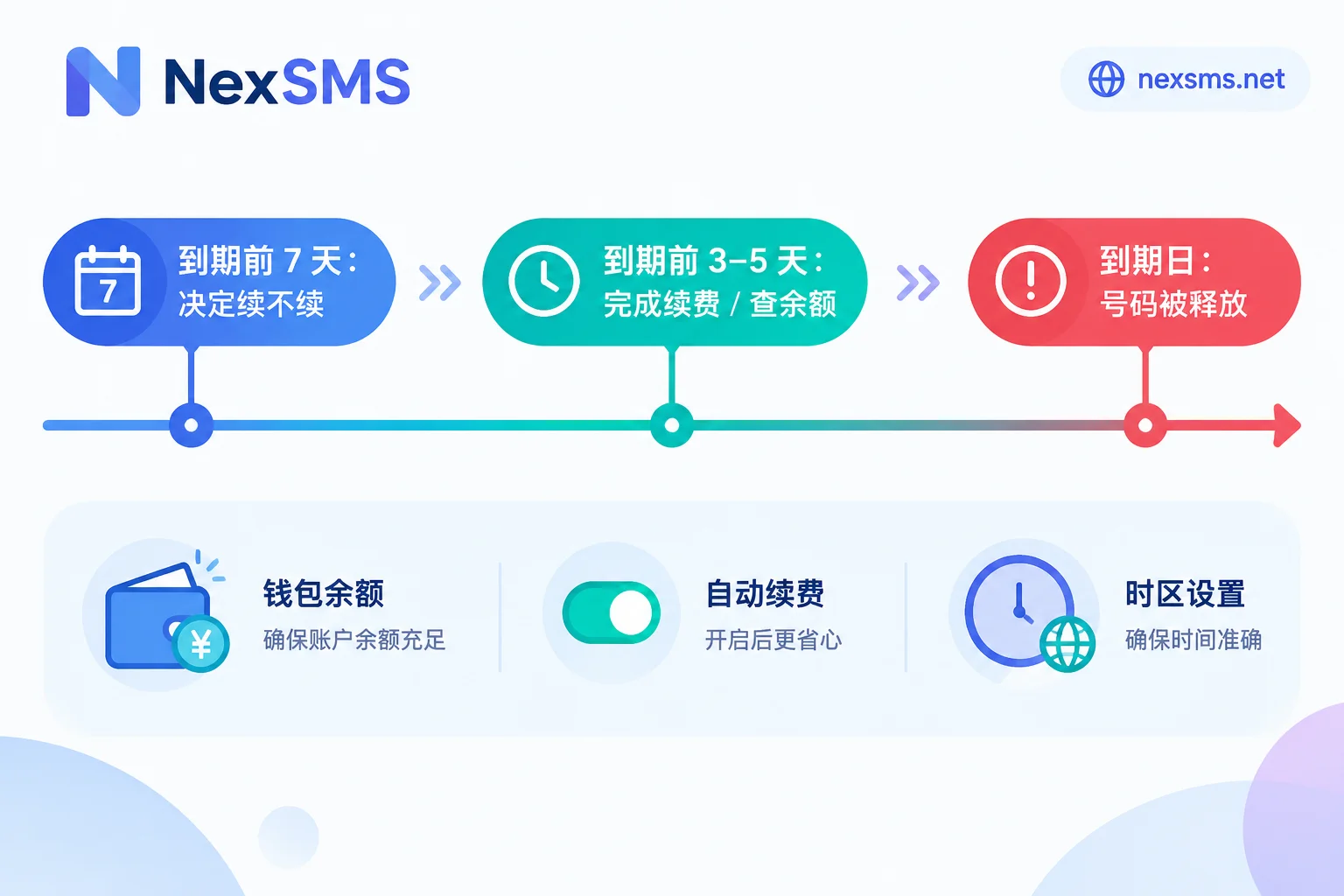
2. Act a few days early, don’t cut it close. The expiration countdown usually follows the platform’s server time, which can easily differ from your local time by a few hours; payment channels also have delays—bank cards or third-party payments may take tens of minutes or even overnight to clear. Renewing 3–5 days ahead absorbs all these discrepancies.
3. Enable auto-renewal, but keep an eye on your balance. The most common reason auto-renewal fails isn’t a broken feature—it’s insufficient account balance at the time of charge, or an expired payment method on file. So even with auto-renewal on, check your wallet before expiry—especially for teams managing multiple long-term numbers, where several numbers expiring in the same week is a recipe for trouble.
4. Keep a separate record of the expiration date. Whether expiration reminders are sent, how far in advance, and whether there’s a grace period after expiry vary by provider. Don’t assume someone will remind you. Set two calendar reminders: 7 days before expiry and 2 days before. The first helps you decide whether to renew; the second is your safety net.
You Renewed the Number, But the Account May Still Require Re-verification
Renewal only secures the “receiving codes” part. Overseas platforms judge whether a login is suspicious based on the overall environment: device fingerprint, browser environment, and whether the network exit matches previous patterns. If the number stays the same but the environment changes, the platform may still trigger stricter re-verification. In scenarios involving long-term multi-account management, the number, browser environment, and network exit must remain stable together to be meaningful—environment isolation is handled by NexBrowser, fixed exits by NexIP, but that’s beyond the scope here.
If It’s Already Expired, Follow This Order
- First, check if the original number can be recovered. Some providers have a brief retention period; others release it immediately. Check your platform’s documentation. If you can renew, do it immediately—don’t hesitate.
- At the same time, use a device that’s still logged in to change the binding. Don’t log out first, don’t clear cache. Go to account security settings, switch the verification method to a new number, or directly switch to an authenticator app and save the recovery codes. The time window for this step is shorter than you think.
- If the original number truly can’t be recovered, then pick a new one. When choosing, pay attention to number attributes—platforms look at line type, not number range. See What’s the Difference Between a Real Carrier Local Number and a Virtual Landline Number. For accounts like Apple ID where rebinding is trickier, refer to How to Change Apple ID Phone Number to an Overseas Number.
How Number Selection Maps to NexSMS
If you’re deciding which type of number to use for this account: NexSMS’s short-term regular numbers are pay-per-use, have very short validity, and are used once for a single verification. Premium long-term numbers are real carrier local numbers (physical SIM and eSIM), allow unlimited code reception during the validity period, and you keep them only if you renew before expiry. The conclusion is straightforward—for any account you plan to bind long-term for two-factor authentication, choose the long-term type from the start, rather than registering with a short-term number and then scrambling to keep it. For specific validity periods and renewal conditions, see Number Types and Features. Prices, available countries, and stock change; check the Pricing Page before ordering.
One final reminder: whether you can pass a given platform’s verification is determined by that platform’s rules at the time—no one can guarantee it on their behalf. What you can control on the number side is simply not letting it expire on the exact day you need it most.