NexSms官方博客
Conclusion first: this question must be split into two completely different scenarios, and the answers differ.
- The same account needs another code later (second login, risk re-verification in a different location, password change, rebinding): whether it works depends on whether you still have receiving access to that number at that time, and has little to do with the platform.
- Using the same number to register or verify a second account: whether it works depends on the target platform's rules at that time, and has nothing to do with whether the number in your hand is still valid.
Mixing these two up leads to typical misjudgments: assuming "my number is still active, so I should be able to receive" but the platform directly says the number has already been used; or assuming "the platform allows multiple accounts, so I can use it freely" but your short-term number has long been released and the code simply cannot reach you.
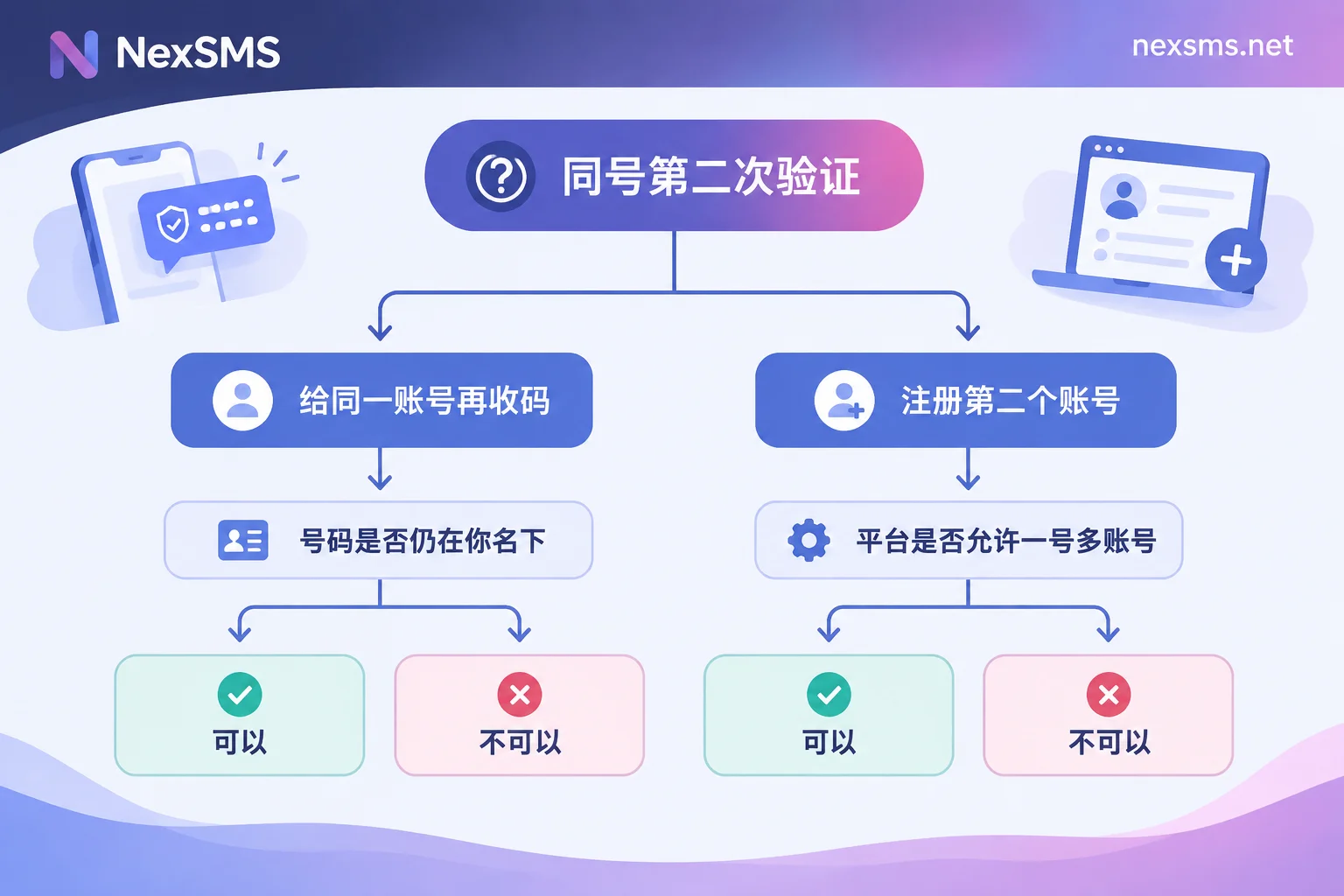
Scenario 1: Receiving another code for the same account
This is what most people actually encounter—registering with a number, then weeks or months later the platform suddenly requires SMS verification.
There is only one step to judge: is this number still under your name and can you see incoming SMS in real time?
- If you originally used a pay-per-use short-term number, you basically cannot receive it. Such numbers are designed for one-time verification and expire quickly; after expiry the number is released back into the pool, and SMS on that number no longer belongs to you. The platform will still send the code as usual, but it goes somewhere you can no longer reach.
- If you used a renewable long-term number and you are still within its validity period, you can receive it. Such numbers are exclusively yours during the rental period and support unlimited code receiving; second verification, password recovery, and login on a new device all go through the same entry point. The caveat is not to miss payment—if it expires without renewal, the number is also released, and the practice of renewing a few days early was covered in this article.
In other words, a short-term number is not "second verification will fail"; rather, that number is no longer yours. This is stated plainly in NexSMS's feature and number type description: short-term regular numbers are pay-per-use, very short-lived, and stop after use; long-term premium numbers are real carrier local numbers, renewable, and support unlimited receiving during the validity period. Choosing which type is essentially answering "will I need another code in the future?"
Already registered with a short-term number? Here's what to do
As long as the account can still log in normally, there is still a time window. Handle it in this order:
- Go to the account's security settings and change the bound phone number to one you can hold long-term. Most platforms require sending a code to the new number, which you complete with a long-term number, and then it's stable. Some platforms also require verifying the old number; if so, this path is blocked—skip to step 2.
- Add a second factor that doesn't rely on SMS: authenticator app (TOTP), passkeys, or download and save the platform's one-time backup codes. Backup codes are the most practical insurance after the SMS channel breaks, and many people skip this during registration. For which second factor suits which account, see Layered choices between SMS OTP and passkeys.
- Add a recovery email and confirm you can still access it. Many platforms allow an email verification alternative when the phone number fails.
If the account can no longer log in and you cannot receive codes, honestly, you no longer hold the initiative. All that remains is the platform's own account appeal/recovery process; approval is up to the platform. Using a new number to "re-verify" usually doesn't help—the platform checks the binding relationship, not what number you currently have.
Don't overlook this detail: released numbers may be taken by someone else
After a short-term number is released back into the pool, it will be used by the next person. That means your account's verification code may end up on a stranger's code-receiving page. This is not a number quality issue; it's inherent to the mechanism of disposable numbers. For any account you still want to log into long-term, never leave the final security entry on a number that will be released.
Scenario 2: Registering a second account with the same number
The rules here are set by the platform and vary widely, so no blanket statement applies.
Instant messaging: essentially one number per account. WhatsApp explicitly states that one phone number can only correspond to one account. If you verify the same number elsewhere, you won't get a new account; instead, the existing account migrates to the new device and the old device's session is kicked out (s1). Telegram also uses the phone number as the unique account identifier; the client's "multiple accounts" feature lets you switch between accounts with multiple different numbers in one app, not open multiple accounts with one number (s2). So on these platforms, the answer to "can the same number pass a second verification to register a second account" is no. To open a second one, you need a second number.
Email/general services: some allowance, but with hidden caps. Take Google: one phone number can verify multiple accounts, but Google has never published a fixed hard number. In practice, community feedback often points to around 4 to 6; beyond that, it shows "This phone number has been used too many times for verification" and refuses to send codes (s3, s4). This threshold is dynamic and depends on frequency, region, and account risk scores—using the same number to verify several new accounts in a short time is more likely to trigger it than spreading them out.
Other platforms: check specifically. Financial, e-commerce, and AI services have different restrictions and cooldown periods on number reuse. Some allow one number to bind multiple accounts but limit simultaneous online sessions; some impose a cooldown window of dozens of days for re-verification with the same number. For platforms you're unsure about, rely on their own help center and announcements; media reports and third-party tutorials are often outdated.
Multi-account teams need one more consideration: linkage risk
Even if a platform allows one number to verify multiple accounts, doing so links those accounts together at the risk-control level. The same phone number is one of the strongest identity signals; once one account triggers a security audit or is judged non-compliant, other accounts bound to the same number often enter review or get restricted together (s4).
So if you maintain multiple overseas accounts, the sensible approach is one number per account, each independent. The number is only one link in the identity chain—browser environment, network egress, and email isolation must also keep up (these belong to NexBrowser, NexIP, and NexMask respectively, outside this article's scope).
The same applies to your main number. Your everyday number has a limited binding quota across platforms; the earlier it's filled up, the harder it is to maneuver later, which is why separating your main number from registration numbers matters.
Choosing a number next time: decide in this order
- First ask: how long do I plan to use this account? Just to get a discount, view content once, or never log in again after registration—a short-term number is enough. If you plan to log in long-term, bind payment, or store data, go straight to a renewable long-term number.
- Then ask: will the platform repeatedly require SMS verification? AI services, cloud platforms, and financial apps have noticeably higher risk re-verification frequency; logging in from a different location, changing devices, or changing passwords can all trigger it. Registering such accounts with a short-term number leaves obvious future problems.
- Finally, check the platform's attitude toward number types. Some platforms reject VoIP and virtual landline numbers and only accept real carrier lines; the difference between the two was covered in this article. Before choosing a number, confirm which country and line type the target platform supports, then pick; the page for choosing numbers by country is organized by country, so switch countries to see stock.
If you're still unsure which type to use this time, the comparison between short-term and long-term lets you decide directly. If you just want to try the code-receiving process once, NexSMS has a free public number page that requires no registration, but public numbers are visible to everyone and only suitable for unimportant one-time verification—don't use them for any account you may want to log into again.
One pragmatic final note: whether you pass a given platform's verification is ultimately determined by that platform's rules at the time; no number can guarantee success. You can only control two things—choosing a number you can hold long-term, and setting up backup verification methods while you can still log in. Do both, and "can it pass a second verification?" stops being a problem.