NexSms官方博客
After clicking "Send verification code" and seeing "Sent," but nothing arrives after a minute or two—do one thing first: stop, don't click resend again. In most cases where "the more you click, the less you receive," it's because continuous resending triggers the platform's frequency control, shutting down the channel that might have otherwise delivered the message.
Here's the conclusion upfront: if the SMS didn't arrive, it's almost certainly stuck at one of the four layers below, and the order is fixed—number format → platform risk control and number attribute determination → routing and international delivery → receiving-end filtering. The further down, the harder it is to solve on your own, so troubleshooting from front to back saves the most time. When you determine a layer is a dead end, the correct action is to switch number types, not to repeatedly retry the same number.
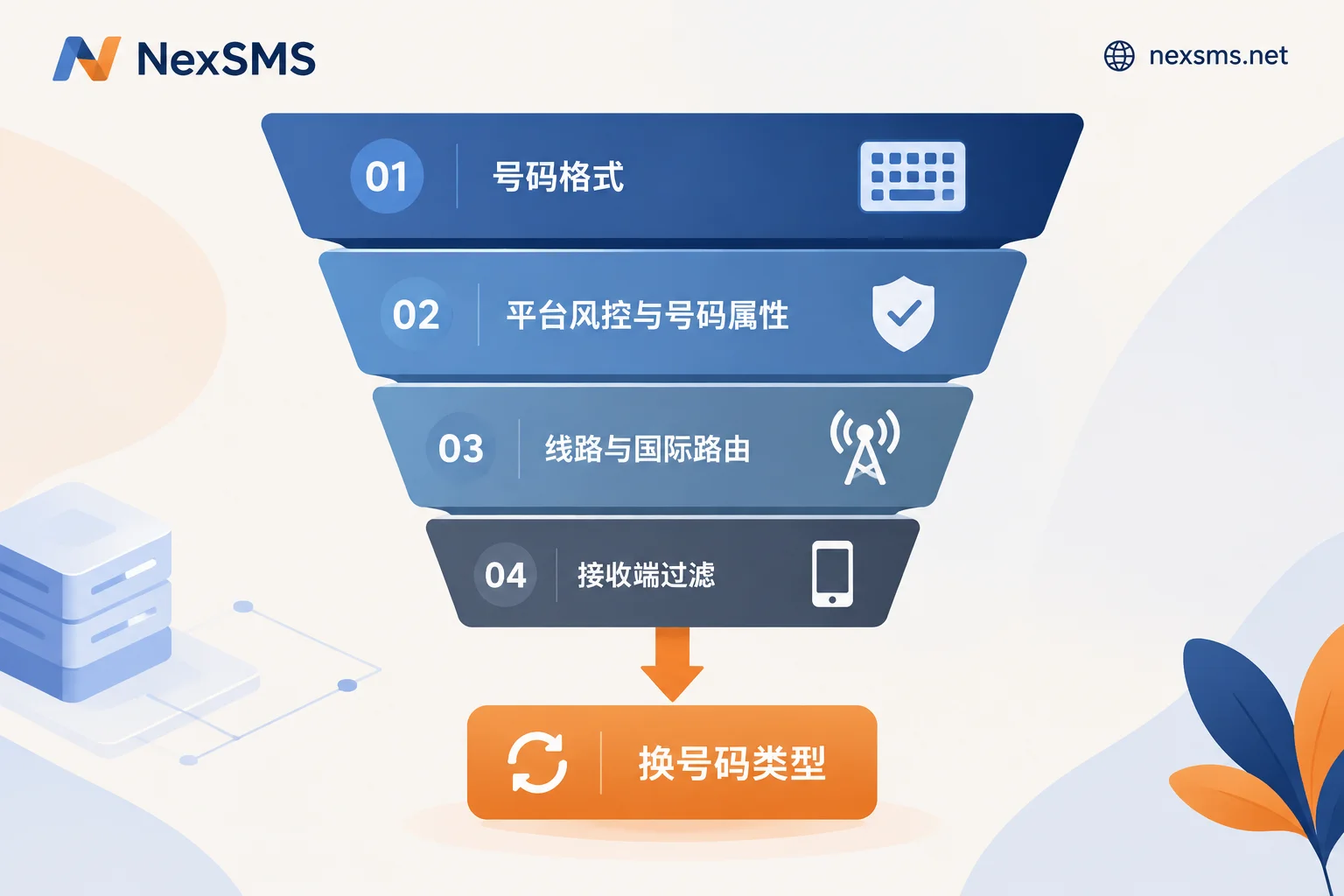
Layer 1: Is the number even written correctly?
This layer is most easily skipped but accounts for a significant proportion of failures. Overseas platforms generally parse numbers in E.164 international format, and there are three common pitfalls:
- Wrong or duplicated country code. The dropdown already selected +44, but you typed 44 again in the input box—the gateway parses it as a non-existent number.
- Not removing the domestic leading zero. Many countries' local formats include a trunk code; for example, UK numbers are written locally as 07xxx, but in international format they should be +44 7xxx—that 0 must be removed. Same for Germany, Australia, etc.
- Extra spaces, hyphens, parentheses. Some platform frontends clean these automatically, others don't; invisible characters from pasting can cause the request to fail outright.
The correct format is: +country code + local number without the leading zero, with no symbols in between. After fixing, refresh the page or restart the process before submitting again—don't keep trying in the same session that already errored.
Layer 2: Has the platform already silently blocked you?
This layer is the most hidden because the frontend often still shows "Sent" with no warning. Two scenarios:
One is frequency control. Clicking resend repeatedly in a short time, or trying several numbers in succession on the same device/IP, will be flagged as verification code abuse. The platform will then refuse to send codes to that number, IP, or device for 15 minutes to 24 hours, but the interface won't tell you. The way to tell is simple: if you didn't receive the first one and then clicked resend three or four times, you're probably already in cooldown, and continuing to click will only extend it. Wait 15–30 minutes and try once—that's the only effective action at this step.
The second is the number being deemed unusable. Major services use carrier number databases and HLR queries to determine the line type. Microsoft's two-step verification for work/school accounts explicitly states that VoIP number ranges are not supported for receiving account security verification codes. Numbers identified as VoIP, low-reputation ranges, or heavily shared numbers are often silently dropped by many platforms' messaging gateways without any error.
This explains a common phenomenon: on the same platform, someone else's number receives instantly, yours never does. It's not luck—it's the different attribute determination of the number on their end. For the difference between number ranges that look the same but have different line types, see What's the difference between a real carrier local number and a virtual landline number.
Layer 3: Can routing and international delivery get through?
You can't change this layer, but knowing about it can save you futile effort.
Overseas services sending OTPs heavily use 5–6 digit enterprise short codes. Short codes can usually only deliver to numbers within the country where they are registered—US short codes cannot reach non-US numbers; this is a limitation at the communication protocol level, not the platform refusing to send. So if a US service only sends codes via short code, and you try to receive with a number from another country, it will never arrive no matter how long you wait. The only solution in this case is to switch to a local number in the country the service primarily covers.
Additionally, international A2P (application-to-person) SMS is a "best-effort" delivery; carrier-side anti-spam gateways may block high-frequency template messages, and cross-border routing congestion can cause delays of a few to a dozen minutes. So give it two or three minutes before judging—don't conclude within 20 seconds. For a more detailed distinction between delay and complete non-delivery, see What to do about verification code delays.
Layer 4: Is the receiving end eating it?
If you're using a physical SIM card in a phone:
- iOS's "Filter Unknown Senders" puts messages from unknown short codes into a separate tab without notification; you need to manually switch to see them.
- Android's Google Messages anti-spam may similarly file it as spam or blocked.
- Check Do Not Disturb, blacklist rules, whether you're roaming, and whether your carrier has enabled international SMS reception for this SIM.
- Swapping SIM slots or toggling airplane mode to re-register on the network can sometimes make backlogged SMS arrive all at once.
If you're using an online SMS receiving service, the checkpoints are different:
- Is the receiving window still valid? Short-lived numbers have very short validity; after expiration, the page no longer fetches new messages, so even if the platform sends, you won't see it.
- Is the page still polling? Switching tabs, or network disconnection and reconnection, can stop live refresh; refresh once and check again.
- Is it a public free number? Free public number pools are heavily used for registrations, easily blacklisted by the target platform, and blocked at the sending stage—so nothing appears on the page. Free numbers are good for testing connectivity, not for accounts you care about; see What is a private temporary number for a comparison.
At what point should you switch numbers, and to what type?
After going through the four layers, if any of the following applies, it means continuing to retry with this number is pointless:
- Format confirmed correct, and after 30 minutes of cooldown, retry still gets no response;
- The platform explicitly says "this number type is not supported" or "this number cannot be used for verification";
- You're using a public free number and the first submission got no response at all;
- The target service only sends codes via its own country's short code, and your number isn't from that country.
When switching numbers, the key decisions are two: which country and whether you'll need to receive again after this use.
Country follows the target service. Choose the local number of the country where the service primarily operates—this also bypasses the cross-border short code delivery limitation.
Number type depends on usage. If it's a one-time registration and you won't need the number again, a short-lived number billed by usage is enough. But if it involves device change login, two-factor authentication, password recovery, or periodic re-receiving, you need a number that can repeatedly receive codes within its validity period; otherwise, the number will be invalid at next login and the account will be stuck. For trade-offs between these two types by scenario, see How to choose between short-lived numbers and long-lasting premium numbers.
In practice, NexSMS lets you pick numbers by target platform and country, with the received verification code displayed in real time on the webpage. Its long-lasting premium numbers are real carrier local numbers (physical SIM and eSIM, not virtual landline numbers), with unlimited code receptions within the validity period and renewable, suitable for accounts needing re-receiving; short-lived regular numbers are for one-time verification. To first confirm connectivity and whether the page receives codes normally, you can use the free public US number page to try once without registration—but remember, public numbers are more likely already blacklisted by the target platform, so they're only for verifying the process, not for accounts you want to use long-term. To pick numbers by country, go directly to the /sms/{country}/ country page.
To be clear: whether you can pass a platform's verification is ultimately determined by that platform's rules at the time; number quality only affects the probability of success—no number guarantees passing.
Correct order of operations after switching numbers
Don't immediately retry after switching; wrong order still won't receive:
- Wait for cooldown to pass first. If you've already clicked resend many times, device/IP restrictions remain, and the new number won't receive either. Wait 15–30 minutes.
- Exit and re-enter the entire verification process; don't just change the number on the original error page.
- Submit one number at a time. Trying multiple numbers in succession is a typical risk-control trigger; try one, wait for the result, then decide.
- After submitting, watch the receiving page for 2–3 minutes; don't declare failure within 20 seconds.
- Complete subsequent steps immediately upon receipt. Some platforms' verification codes are only valid for tens of seconds to a few minutes.
If you're maintaining multiple overseas accounts on the same computer, device fingerprints and network exit also participate in platform risk control—this isn't about the number; it falls under multi-account environment (NexBrowser) and network exit (NexIP). When codes don't arrive, you can rule out these two as well.
One last fallback: if the target platform also offers voice call reading, email verification, or an authenticator app, when SMS repeatedly fails, switching verification methods is often much faster than continuing to fiddle with numbers.