NexSms官方博客
Let's start with the conclusion: in the vast majority of cases, the SMS you're waiting for on a free public number page isn't delayed—it was never sent at all. The moment you click "Send verification code," the platform performs a number check and decides not to send, so you'll never receive it.
So the first thing to do is not refresh the page or repeatedly click resend, but figure out which of the following four scenarios you're in. If you misdiagnose, resending will only make things worse.
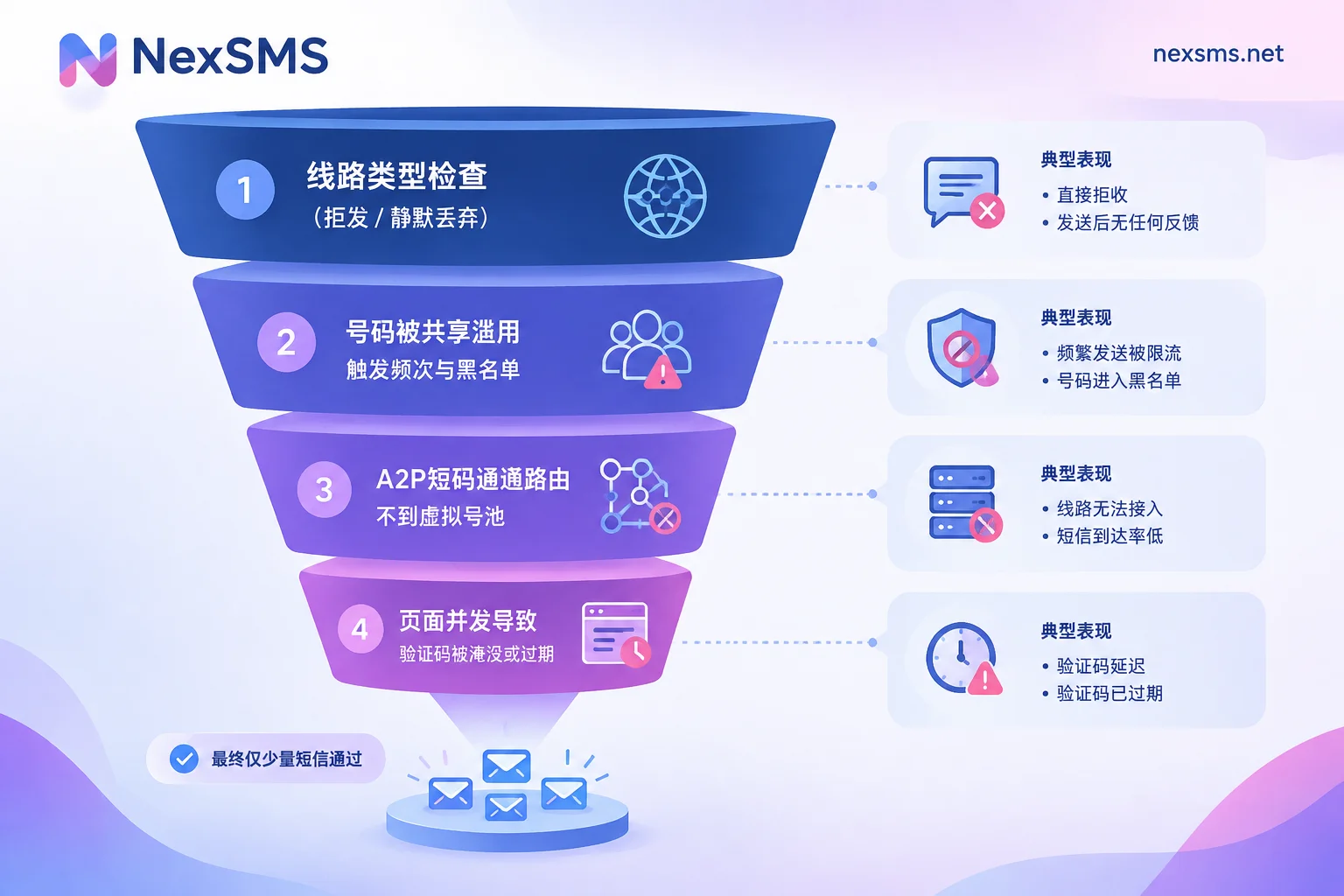
1. The platform checks the line type before sending and rejects it outright
This is the most common layer and the hardest to solve by waiting.
Most mainstream overseas platforms now routinely query carrier metadata (Twilio Lookup's Line Type Intelligence is a typical example) before sending an SMS verification code, to get the line type in real time: whether it's mobile (mobile network), fixedVoip (fixed VoIP), or nonFixedVoip (non-fixed virtual number). To block bot mass registration, many platforms simply refuse to send to numbers classified as VoIP, or—worse—the API returns "sent" but the SMS is silently dropped.
Free public verification numbers almost always fall into virtual cloud communication number ranges. So the problem isn't your actions; it's the number's inherent attributes.
Typical signs of this layer: The page immediately shows an error after you submit the number, such as "This phone number cannot be used for verification," "invalid phone number," or "number not supported." If you see this, stop resending. The same number will yield the same result ten times; switching numbers is the only way out.
It's important to clarify: the platform looks at the line type, not the number prefix. A number range that looks normal in the same country—carrier numbers and virtual numbers appear differently in query results. That's why someone can switch to a "US number" and still get rejected. For more on this distinction, see What's the difference between a real carrier-native number and a virtual number.
2. The number has been used by too many people and is already on the platform's list
A public number is by definition open, unauthenticated, and usable by anyone. As a result, the same number has been repeatedly used to register for popular platforms like Google, WhatsApp, and Telegram.
Platform risk controls limit how many accounts a single number can bind and the recent request frequency. Once exceeded, or if the number has been associated with banned accounts, it gets blacklisted on that platform for the long term—sometimes permanently. The number itself may have a valid line type, but for that specific platform it's already dead.
Typical signs of this layer: No error on submission, the platform says "verification code sent," but your code never appears on the public page.
A useful diagnostic: check the public number's message history to see if someone else recently received a code from the same platform. If yes, the channel works and the platform is willing to send to that number; your failure is more likely due to the number hitting the binding limit or rate limit on that platform. If the platform's SMS never appears on the page, it's more like layer 1 rejection.
Here's a counterintuitive point: the more popular the platform and the more popular the public number, the lower the success rate, because popular numbers get consumed fastest.
3. Enterprise short code channels can't reach virtual number pools
Enterprise verification codes often go through A2P (application-to-person) dedicated channels, sometimes using short codes (e.g., the 5-6 digit numbers in the US).
Many free verification platforms connect to virtual channels that only support regular long-number peer-to-peer SMS and don't support receiving short code routing. Other carrier gateways and SMS firewalls actively filter verification content sent to known temporary number pools. The result: the platform did send, the channel didn't reject, but the message is dropped or can't be routed in between.
This layer is nearly impossible to distinguish from outside; it looks the same as layer 2—platform says sent, page shows nothing. The diagnostic is the same: check if historical codes from the same platform have ever appeared.
4. The code arrived but was buried by others' messages
Finally, it's purely a timing issue. The public page has many people triggering SMS and many scripts polling at once, so the message queue can back up, and your code might be pushed down by a dozen messages that arrive afterward. Verification codes usually expire in 1 to 5 minutes.
Typical signs: The page refreshes rapidly, or after refreshing you see a code from that platform with a timestamp around when you submitted—likely yours, but you didn't see it within the validity window.
In this case it's worth trying once more, but note: don't repeatedly click resend. Triggering too often in a short period will push you into layer 2 rate limiting. Troubleshooting in order is more effective than resending; for detailed steps, see Four-layer funnel troubleshooting when you haven't received an SMS after submitting your number and The order to handle verification code delays.
Stop or keep waiting? A 30-second judgment
Compress the four layers into actionable decisions:
- Page error says number can't be used → Layer 1, switch numbers immediately; resending is pointless.
- Says sent, but this public number has never received SMS from that platform → Layer 1 or 3; switch numbers.
- Says sent, historical codes from the same platform exist but yours didn't arrive → Layer 2 rate limit; switch to a different number, not a neighbor in the same public pool.
- Page is heavily flooded and you can see same-platform codes with close timestamps → Layer 4; you can trigger once more, but space it out.
- Waited 2-3 minutes with no activity and unsure → Treat as Layer 1; switching numbers costs less than continuing to wait.
Public free numbers aren't useless, they're just for specific scenarios
Treating them as a low-cost exploration is reasonable:
- You just want to confirm whether the platform will send codes to this type of number, so spend one free chance to test the waters;
- Registering on a small site with loose risk control that only does one-time verification;
- Want to run through the "enter number → view page → get code" flow before paying.
NexSMS's free public US number page doesn't require registration and is suitable for the above one-time trials.
But if any of the following applies, skip public numbers: the target platform is Google, WhatsApp, Telegram, OpenAI, Claude, or similar with strict risk control; you plan to use the account long-term; or you'll later need the same number for two-factor authentication, password recovery, or rebinding. Public numbers can be blacklisted at any time due to others' behavior, and once your account is tied to it, the risk transfers to your account.
If you're switching numbers, what to switch to
Bypassing line type detection isn't about changing number ranges but about switching to numbers carried by real mobile carrier networks. The query service sees type mobile instead of VoIP, and only then can you pass the first gate.
To choose specifically, answer one question: will you need this number to receive another code later?
- Only for one-time registration verification and never again: a short-term number suffices, pay-per-use, very short validity, use once and done.
- Need it for two-factor authentication, login confirmation, password recovery, or the account will live long-term: go directly for a long-term premium number. NexSMS long-term numbers are real carrier-native numbers (physical SIM and eSIM, not virtual numbers), can receive unlimited codes within the validity period, and can be renewed to keep. The differences and use cases are detailed in How to choose between short-term and long-term premium numbers; number types, validity, and renewal conditions are also in the NexSMS feature description.
Choose the country based on the target platform, not the "cheapest country." Some platforms are stricter with numbers from specific regions. You can start with Choose numbers by country, or check SMS receiving instructions by app to confirm which number type usually works better for the platform you're registering.
Two things are easily overlooked: long-term numbers must be renewed before expiration to remain yours; operating on the expiration date risks disconnection (see How to renew long-term numbers before expiration). Also, "can the same number receive another code" and "can it be used to register a second account" are completely different things—the latter is the main cause of layer 2 rate limiting. For that distinction, see Can the same number be used for a second verification.
Finally: if you've switched to a carrier number and still fail repeatedly on the same platform, the problem may no longer be the number—browser fingerprint and login environment fall under NexBrowser, network exit under NexIP, and registration email and identity under NexMask. The number is just one dimension of risk control; whether you pass a platform's verification ultimately depends on that platform's rules at the time.}