 NexSms官方博客
What is SMS OTP interception attack and how to defend against it? It's not a single attack but four non-overlapping paths: loss of number control, social engineering, channel-side delivery deviations, and account-side entry concentration, each corresponding to four different sets of defensive actions. These four paths respectively address common questions like "If my SIM card is swapped, where does the verification code go?", "Why can someone see my verification code?", and "What should I do if my SMS verification code is intercepted?" – first match the symptom, then decide the action. Carriers are moving toward network-level silent verification to replace plaintext OTP, so self-checking by path is even more necessary.
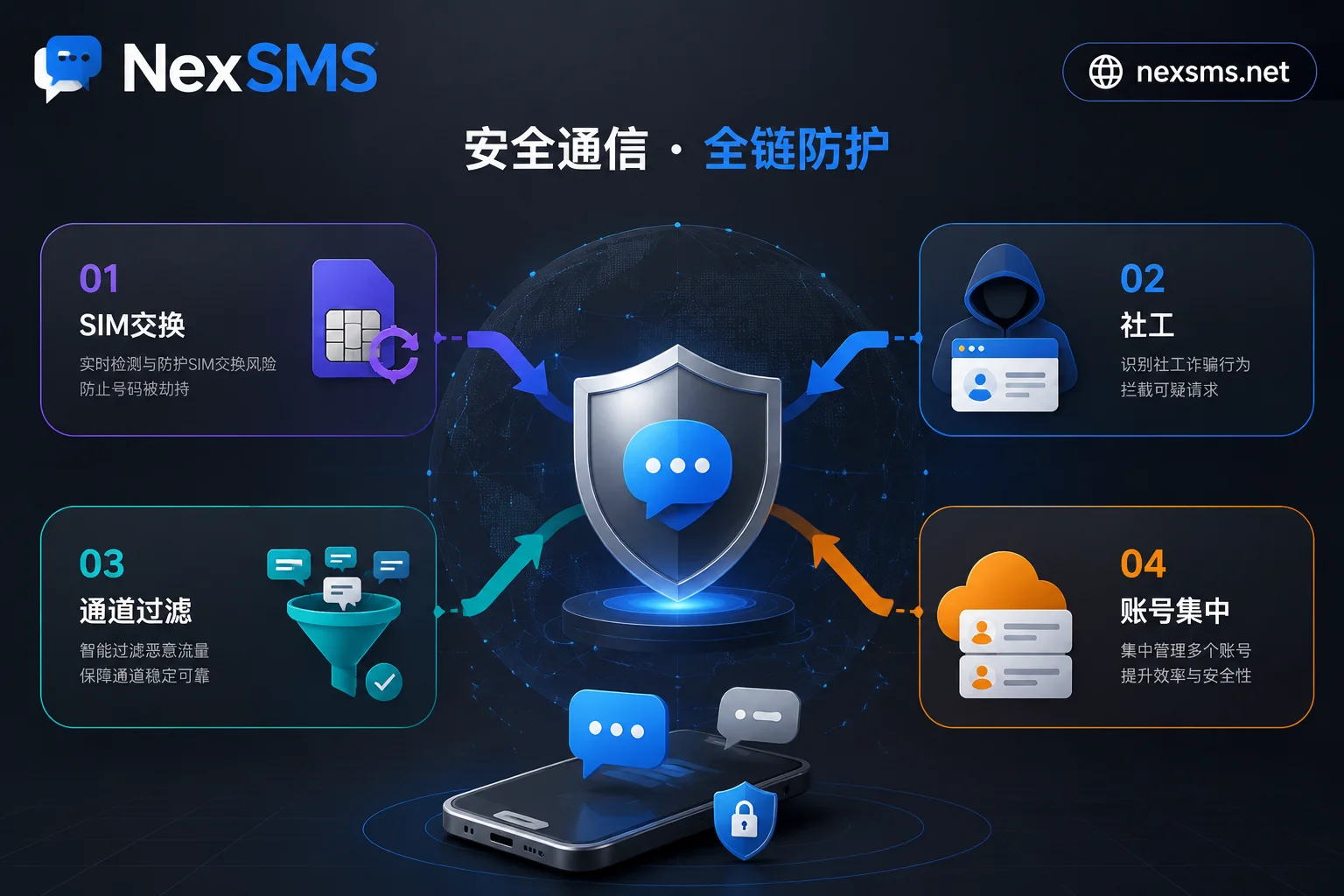
Conclusion First: SMS OTP Interception Is Not One Attack but Four Paths
The first category is loss of number control, such as SIM swapping or number porting fraud. The second is social engineering – often the victim reads out the verification code themselves. The third is channel-side delivery deviation – SMS silently dropped or filtered, creating the illusion that the code never arrived. The fourth is account-side entry concentration – one number tied to all verification entry points, so compromising one breaks all.
Network-level silent verification is replacing plaintext OTP precisely because the first two paths target whether the number itself is trustworthy and whether the person is repeating digits. Understanding these four paths is the first step to answering "Can SMS verification codes be intercepted by others?" – Yes, but the interception methods are far more varied than you think.
Path One: If the SIM Card Is Swapped, Where Does the Verification Code Go? – Manifestations After Number Control Is Transferred
Where does the verification code go if the SIM card is swapped? The answer is direct: it goes to the attacker's new SIM card. Through social engineering or carrier vulnerabilities, the attacker redirects your number to their device, immediately deactivating your SIM card, which manifests as sudden loss of signal, inability to make or receive calls.
A high-priority signal is receiving an unsolicited notification from your carrier about a SIM change or port-out request. In December 2023, in a Report and Order (FCC 23-95A) on preventing SIM swapping and port-out fraud, the FCC required wireless carriers to use secure authentication methods before redirecting a number to a new device or carrier and to immediately alert customers when a change or port request occurs. Note: this rule currently applies only under the U.S. regulatory framework, not globally, but unsolicited change notifications from carriers are always the most reliable signal.
Upon receiving such a notification, the first action is to immediately contact your carrier to freeze the number and check login devices and linked email accounts.
Path Two: Social Engineering – The Verification Code Is Read Out by You Yourself
Why can someone see my verification code? The most direct reason is that you read it out in a phone call or chat. The FTC's consumer alert issued in October 2021 continues to warn about this model: in second-hand marketplaces like Facebook Marketplace or Craigslist, scammers claim to "verify your identity as a seller to prevent fake listings," ask you to provide the six-digit code sent to your phone, then use your real number to register and bind Google Voice or other virtual accounts for further fraud.
Detection signals are clear: verification code texts appear for services you did not initiate, or the other party keeps urging you to repeat the number. The only defense: never relay verification codes under any circumstances, and do not use your primary number as a public contact. This attack relies on no technology, purely on your oversight, so the first reaction to "what to do if a verification code is intercepted" should be: check whether you shared the code with someone at some point.
Path Three: Channel-Side – A2P Filtering and Silent Dropping Causing "Code Never Arrived"
Many cases mistaken for interception are actually channel-side delivery deviations. To combat spam, carriers deploy A2P (application-to-person) filtering rules, and certain number ranges or content patterns may trigger throttling, blocking, or silent dropping, making users see "someone logged in but I never got the code."
How to distinguish from actual hijacking? Focus on two points: try a different channel (e.g., switch to Wi-Fi or a different time on cellular) or a different number range; if SMS arrives normally, it's likely channel filtering. Also check whether there are any logins from unfamiliar locations – if the login log is clean, it's more likely a delivery issue than hijacking. If repeated retries fail and there's unusual account activity, return to Path One or Path Two.
Path Four: Account-Side – One Number Holds All Verification Entries; Breaking One Breaks All
When a primary number is used simultaneously for public exposure, social registration, banking, and e-commerce recovery, any path – whether SIM swap or social engineering – will horizontally compromise all accounts. More insidious is that frequently reused public shared number ranges may trigger platform verification limits, or fail to receive re-verification codes, locking accounts later. So "hiding with a free number" is not a solution; it may actually cause you to lose control of your accounts.
The right approach is to separate purposes: use independent numbers for public exposure, one-off registrations, and long-term logins. This is not just a security strategy but also the basis for sustainable account management.
Detection Signal Comparison for Four Paths: Which Path Does Your Symptom Belong To?
Returning to the question of what SMS OTP interception attack is and how to defend against it, the table below maps typical symptoms directly to the four paths and the first-step actions.
| Symptom You Observe | Belonging Path | First-Step Action |
|---|---|---|
| Sudden loss of service and receipt of SIM change or port notification | Path 1: SIM swap/port | Immediately contact carrier to freeze number, check associated account login devices |
| Receive verification code for unfamiliar service, and someone asks for it | Path 2: Social engineering | Do not relay the code, hang up or end the conversation, check account login records |
| Only you don't receive the code, and account has no abnormal logins | Path 3: Channel-side delivery deviation | Retry with a different channel or number range, confirm login log is clean |
| Multiple accounts have chain anomalies or fail to receive re-verification codes | Path 4: Account-side entry concentration | Separate verification entries account by account, prioritize changing verification method for financial accounts |
This table can be used directly as a self-check checklist.
The Industry Is Changing Tracks: What Network-Level Silent Verification and SIM Status Query Indicate
In the network API standards defined by the GSMA Open Gateway and CAMARA open-source projects, Number Verification allows silent comparison of phone numbers via the telecom network and SIM without user input of a code; SIM Swap API provides near-real-time query of the timestamp of the latest SIM swap for a number, used to prevent account takeover (ATO). This means verification is shifting from "user reads a plaintext string of digits" to "whether the number's bearer layer is trustworthy."
Since trust judgment is moving down to the number bearer layer, reducing exposure of your primary number in public becomes a more proactive action. How to prevent your primary mobile number from leaking online is therefore a more proactive security move.
Defense Actions by Tier: SMS 2FA vs. Authenticator App – Which Is Safer, and Which Accounts Must Stay on SMS
| Account Type | Recommended Verification Method | Explanation |
|---|---|---|
| Financial and identity accounts like banks, payment, email | Authenticator app or hardware key, SMS as backup | SMS 2FA is still significantly better than no 2FA, but lower priority than app authenticators. If an account only supports SMS, refer to virtual number types that can receive bank 2FA codes for the bearer number |
| E-commerce, social platforms that only support SMS | Strengthen the number bearer layer: dedicated number for that purpose, enable carrier-side port lock and SIM change alerts | Keep the number renewed to avoid recycling due to arrears |
| Temporary or unimportant accounts | Short-term numbers or one-time SMS reception | No long-term value, no loss if lost |
Which is safer: SMS 2FA or authenticator app? The answer is clear: the authenticator app is significantly safer because it doesn't rely on the SMS channel and cannot be socially engineered or intercepted at the channel side; however, SMS 2FA is still better than no second-factor verification at all.
Root Cause Fix: Separate the Public Exposure Number from Your Primary Number
Two of the four paths share the same root cause: the primary number serves as both the public exposure point and the account bearer. To completely solve the problem, implement number layering: use short-term numbers for public exposure and one-off registrations; use renewable long-term local numbers for long-term logins and account recovery; keep the primary number only for the most critical few entry points.
Not sharing one number across different purposes is the core of this principle. If you have already exposed your primary number in second-hand transactions, it's advisable to immediately follow the steps in What to do when receiving unsolicited 2FA verification code texts and consider migrating your public contact number to a separate one. For layered implementation in team or multi-account scenarios, refer to multi-account number management.
Implementing Number Layering with NexSMS: Country Selection, Short-Term vs. Long-Term Division, Web SMS Reception and API
NexSMS's officially published capabilities correspond to specific positions in the layering: country and platform number selection to match the landing requirements of target platforms; short-term numbers for public exposure and one-time verification; renewable long-term local numbers for long-term re-verification at login and recovery; web SMS reception for individual ad-hoc scenarios, and API for team batch allocation and expiry review.
In practice, you can distinguish usage when choosing a number: for registering an overseas platform needing only one-time verification, choose a short-term number; for long-term account use, choose a long-term local number and enable renewal reminders. In team scenarios, use the API to allocate numbers and periodically review validity to avoid account lockout due to expired numbers.
Note that any number solution cannot guarantee "absolute security" – NexSMS does not promise that either – but number layering can reduce risk from "lose all at once" to "single point controllable."
FAQ
Can SMS verification codes really be intercepted by others?
Understanding what SMS OTP interception attack is and how to defend requires distinguishing four interception methods: SIM swap makes you not receive the code, social engineering makes you read the code out yourself, channel-side silent dropping creates false interception, and account-side entry concentration leads to a chain collapse. Each path has self-checkable detection signals; first match the symptom, then decide the action.
If my SIM card is swapped, where does the verification code go?
If an attacker uses SIM swapping to transfer your number to a new SIM card, verification codes are sent directly to the attacker's device. Your phone will suddenly lose signal and be unable to make calls. At this point, immediately contact your carrier to freeze the number and check login devices of associated accounts. Under the U.S. regulatory framework, this falls under the FCC December 2023 Report and Order requiring carriers to alert customers immediately; for other countries, you need to check local carrier rules.
How do I know if I've been SIM swapped?
The most direct signal is a sudden loss of service on your phone, or receiving a notification from your carrier about a SIM change or port-out request you did not initiate. Additionally, if you notice logins from unfamiliar locations or password reset texts mysteriously disappearing, it's worth suspecting. You can contact your carrier's customer service to check the timestamp of the last SIM swap for your number.
Which is safer: SMS 2FA or authenticator app?
The authenticator app is significantly safer because it doesn't rely on the SMS channel and cannot be socially engineered or intercepted at the channel side. However, SMS 2FA is still better than no second-factor verification. If possible, prioritize enabling an authenticator app for financial and identity accounts, relegating SMS to a backup.
What should I do first after a verification code is intercepted?
First, check the four-path detection signal table: if you received a SIM change notification, contact your carrier immediately; if a stranger is asking for a verification code, stop the conversation immediately and check account login records; if only you didn't receive the code and there's no abnormal account activity, try a different channel or number range. Avoid resetting passwords before confirming the cause to avoid falling for secondary scams.


Comments(0)