 NexSms官方博客
It might be carrier blocking, but when you frequently don't receive verification codes, most of the time the problem is not with the carrier.
A verification code must go through four stages to reach you: the business platform's risk control decides whether to send it, the SMS service provider's channel delivers it, the carrier gateway allows it through, and finally the phone system decides whether to display it. Any stage can "swallow" it, and most won't give you an error. So don't rush to blame the carrier; first confirm which stage it's stuck at.
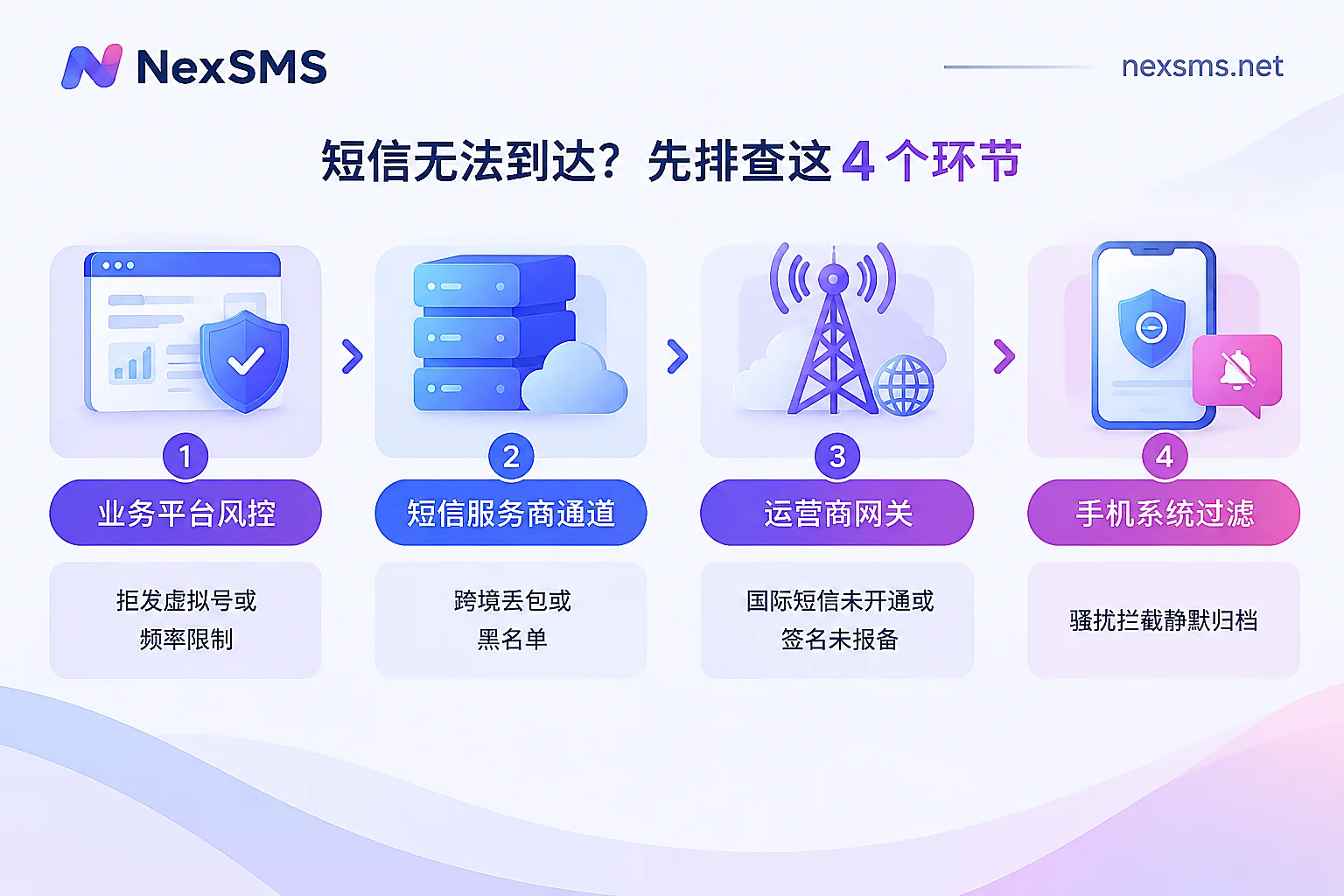
Carriers do block, commonly in these three situations
1. International SMS reception not activated
To prevent telecom fraud, since 2022, many provincial carriers in China have disabled by default or require users to apply to activate "international and Hong Kong/Macau/Taiwan SMS reception." In this state, verification codes sent from overseas gateways by foreign platforms will be directly discarded on the carrier side.
- Typical symptom: You can receive verification codes from domestic platforms, but cannot receive any SMS from overseas.
- Solution: Call the carrier's customer service or visit a business hall to activate it. In some regions, you can send an SMS command to activate (e.g., KTGJDX), but commands vary by region; refer to your local carrier's response.
2. Number is on a blocking blacklist
If you have reported spam messages (e.g., to 12321), your number might be placed on an anti-complaint blacklist by the SMS service provider. After that, verification codes sent through this provider's channel may not reach you. There have been reports of users unable to receive certain verification codes for two years due to this.
- Typical symptom: You consistently cannot receive codes from a few specific platforms, while others work fine; switching to another number immediately works.
- Solution: You cannot find this out yourself; you can only contact the carrier and the respective platform's customer service, ask them to check the delivery records, and request removal from the blacklist.
3. Sender's signature or content is non-compliant
If the sender's SMS signature has not been registered, or the content hits a filter keyword, the carrier gateway will also block the SMS. This is the sender's problem; what you can do is feedback to the platform or use alternative verification methods like email or voice call.
More common situations: the problem is elsewhere
Platform identifies it as a virtual number and doesn't send SMS at all
When registering for overseas platforms with VoIP numbers or online virtual numbers, this is the most common reason. Many overseas platforms check the number's attributes before sending SMS. If it determines it's a VoIP or non-fixed virtual number, the interface may still show "Sent," but the backend risk control has silently canceled the sending.
- Typical symptom: The same number never receives codes on this platform, but works on others.
- Key point: In this case, the SMS was never sent, so contacting the carrier will show no records, and changing carriers won't help. For number types and principles, refer to "What is a VoIP phone number: how it works, why it often can't receive verification codes".
Clicked too frequently, triggering rate limiting
Repeatedly clicking "Get verification code" with the same number, same IP, or same device in a short time will trigger the platform's anti-spam mechanism, such as daily limit or cooldown period. After being limited, the platform stops sending SMS and usually doesn't explicitly tell you.
- Solution: Stop first and wait a while before trying again. Cooldown periods vary by platform; don't keep clicking frantically, or the restriction may last longer.
SMS arrived but was hidden by the phone itself
Security managers on Android systems like HarmonyOS and ColorOS, as well as iOS's "Filter Unknown Senders" feature, often categorize SMS from special service numbers, with special symbols, or not in contacts as "Harassment Interception," "Spam," or "Unknown Senders." These SMS are silently stored, without ringing or notifications.
- Solution: Check the interception records and spam folder. If needed, temporarily disable interception or add the sending number to the whitelist.
Cross-border channel packet loss or delay
If international SMS goes through low-cost aggregation channels, it may pass through multiple transfers and be lost due to congestion, packet loss, or timeout.
- Typical symptom: Intermittent, sometimes received after a long delay.
- Solution: Wait a few minutes and resend once; don't click continuously. If the platform offers voice verification, switch to voice. If this persists, the problem is with the sender's channel; you can feedback to the platform.
Troubleshoot in this order for fastest location
First, compare with the table below to roughly determine which stage the problem is at:
| Symptom | Most likely cause | First action |
|---|---|---|
| Domestic codes work, all overseas SMS not received | Carrier hasn't activated international SMS reception | Contact carrier to activate |
| Consistently cannot receive from a few specific platforms, works after switching number | Number is on service provider's blacklist | Ask platform and carrier customer service to check delivery records |
| Only one overseas platform cannot receive, using virtual number or VoIP | Platform refuses to send to such numbers | Switch to a real carrier number |
| Initially could receive, then stopped after clicking multiple times | Triggered rate limiting | Stop and wait for cooldown |
| Platform says sent, phone shows no notification | Intercepted and archived by phone system | Check interception box and spam SMS |
| Intermittent, often delayed for a long time | Cross-border channel packet loss | Retry after a few minutes, or switch to voice verification |
Then troubleshoot step by step as below. The first two steps are lowest cost, do them first:
- Check phone's interception box. Look through harassment interception, spam SMS, and unknown senders.
- Stop resending. If you've clicked many times consecutively, wait a while to rule out rate limiting.
- Test scope. Use this number to receive verification codes from other platforms, preferably both domestic and overseas. Based on results: if all overseas fail, check international SMS switch; if only a few fail, consider blacklist or platform risk control; if only one overseas platform fails, likely a number type issue.
- Contact carrier. Confirm international SMS reception is activated and ask if the number is blocked.
- Contact platform. Ask if they have a sending record. If there's a record but you didn't receive it, the problem is with the channel or carrier; if no record, it's the platform's risk control.
- Switch number or verification method. If all above confirmed and still failing, switch to email, voice verification, or another number.
For a more complete cross-border troubleshooting process, refer to "What to do if cross-border SMS verification codes are not received: First determine if the code was sent, then troubleshoot layer by layer".
If it's a number type issue, what number to switch to
After confirming the platform refuses to send SMS to VoIP or virtual numbers, retrying or changing network won't help; you need to switch to a real carrier's local number (i.e., non-VoIP number). Which to choose depends mainly on whether you'll need to continue receiving verification codes for this number:
- Only register once, no need for this number to receive codes later: A short-term number is enough. Use once and done, low cost.
- Will need for two-factor authentication, rebinding, or account recovery later: You need a number that can be held long-term, otherwise after the number expires, the account may be unrecoverable.
NexSMS provides both types. Short-term ordinary numbers are billed per use, with a very short validity period, for one-time verification. Long-term premium numbers are real carrier local numbers (physical SIM and eSIM, not virtual landing numbers), can be renewed, with unlimited code receptions during validity, but must be renewed before expiration to continue holding. For differences and renewal conditions, see Feature Description. After deciding the type, you can choose by target platform on the corresponding country page, e.g., US numbers.
It should be noted that whether a number can pass a platform's verification is ultimately determined by the platform's rules at that time; switching numbers doesn't guarantee success. After switching to a new number, don't click continuously if you don't receive it the first time, otherwise it may trigger rate limiting. If you're still undecided between virtual numbers and physical SIMs, you can first read "Choosing virtual numbers or physical SIMs for overseas app registration".


Comments(0)